targeal 60% Mechanical Gaming Keyboard – 61 – Features & Prices in Saudi Arabia :
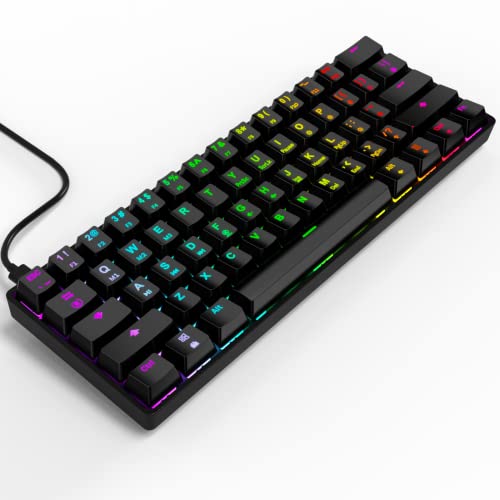
targeal 60% Mechanical Gaming Keyboard – 61 Keys Gateron Red Switch Quiet Office Computer Keyboard – Multi Color RGB Rainbow Led Backlit – Programmable for PC/Windows/Mac Gamer – USB Wired – Black
Product Dimensions
11.8 x 4.3 x 1.8 inches
Item Weight
1.5 pounds
Manufacturer
targeal
ASIN
B0B5KVX42L
Country of Origin
China
Item model number
GK61-B
Date First Available
July 1, 2022
Test video – targeal 60% Mechanical Gaming Keyboard – 61 :
Product highlights :
60% Compact Layout – Targeal gaming keyboard is an ultra-compact layout with 61 keys makes you a neat desktop with your organized gears on, more spaces left for mouse movements. Plug & Play, no drivers needed.
Hot-Swappable Red Switch – Gateron optical red switch with its low trigger pressure, is the most suitable selection for long-time typing and computer working; the hot-swappable design allows you freely replace and diy the switch according your needs, no solder or desolder necessary.
Rgb Amblight – 16.8 million Color combinations, offer 17 modes light effect, 4 levels brightness and breathing speed; easily turn on/off and adjust the lighting, just select your own color to dress your gaming and cheer up.
Ergonomic Designed – Designed in ergonomic arc layout and slightly hollow keycaps, fit your fingers better, help to keep your hand in a most natural state to minimize hand fatigue, reduce the stress while long-time typing.
Full Programmable – Macro recording, advanced lighting effects and customizations through software. Features multimedia keys through multiple layers. Full anti ghosting mode n-key rollover (NKRO) for ideal FPS, MOBA and MMO gaming experiences.
➕ What is the price of targeal 60% Mechanical Gaming Keyboard - 61 in Saudi Arabia ?
The price of targeal 60% Mechanical Gaming Keyboard – 61 in-store is 170 SAR VAT.
➕ When targeal 60% Mechanical Gaming Keyboard - 61 was released ?
The release date was July 1, 2022.
➕ What is the price of targeal 60% Mechanical Gaming Keyboard - 61 cheap used ?
The price of targeal 60% Mechanical Gaming Keyboard – 61 used is 120 SAR VAT.
➕ What are the main characteristics of targeal 60% Mechanical Gaming Keyboard - 61 ?
Special specifications :
60% Compact Layout – Targeal gaming keyboard is an ultra-compact layout with 61 keys makes you a neat desktop with your organized gears on, more spaces left for mouse movements. Plug & Play, no drivers needed.
➕ Is it interesting to buy this product ?
The best people who can answer you are customers who have already bought and tested this product (See Customer Reviews). This product is rated 4.7 / 5 on Amazon.
➕ Where to buy targeal 60% Mechanical Gaming Keyboard - 61 in Saudi Arabia ?
Ergonomic, Split Keyset Design, Backlit, Hotkeys and Media Keys, Customizable Display Keys
Color
BLACK
Number of Keys
61
Keyboard backlighting color support
RGB
Style
Classic
Purchase advice :
Warranty :
Check the duration of the warranty and also the faults and defects it covers. Is it complete or limited? and What is included in the warranty (parts, repairs or both)?
Shipping :
Is delivery offered? And how long does it take to get delivered (Delivery time)
Proof of purchase :
Does the shop give you an invoice ?
After-sales service :
Do they have an after-sales service to have information about the installation or operation (instructions for use). Also in case of problem, it is the seller who takes charge or you must contact the manufacturer or supplier yourself.
_____________________________
12 reviews for targeal 60% Mechanical Gaming Keyboard – 61
Rated 5 out of 5
P. P (verified owner)–
Good for the money – I originally had a corsair k70 that I felt was too big for my desk and wanted to try out a smaller keyboard so my friend let me borrow his Anne pro. I had a good two months using it before I ordered this one. They really feel like the same keyboard and I don’t see much of a difference but I don’t know much about keyboards to begin with this is just based off of my experience with it. This did not cause any stress on my hands while playing. Haven’t tried to mess with any of the rgb functions or any macro setting so I couldn’t tell you anything on that. The lights turn on as soon as its plugged in.
Rated 3 out of 5
K. O (verified owner)–
compact but suffers from its size – Pros – very compact, this is the smallest keyboard I’ve owned.
Rated 5 out of 5
M. T (verified owner)–
Small and compact yet still has backlighting and mechanical switches. – My main keyboard is a Corsair K95, which is wonderful but takes up lots of deskspace. In contrast this keyboard takes up 1/3 as much space, yet has many of its best features; RGB lighting and mechanical switches. It is perfect as a “side keyboard” for my mid-2011 iMac located to the left of my main desktop’s screen. This keyboard replaces a wired Apple keyboard without crowding my desk, and can be more easily seen thanks to the backlit keys. The printing on the keycaps is a bit crowded compared to those of my K95, since many have dual purpose. Even so, there main function is the prominent symbol. I find my main struggle is the lack of dedicated arrow keys; they must be pair with the “fn” key. The Apple keyboard has dedicated brightness keys in the top row (mapping to F14 and F15), which I had hoped mapped to the two keys with a similar symbol to the left of the CR on this keyboard. Unfortunately those are special purpose mappings (for keyboard lighting speed), as are the the ones in the row above. Eventually I figured out that the “ScrLk” and “Pause” keys are what map to F14 and F15. Being non-intuitive, I re-mapped them thru the Mac’s System Prefs ( Keyboard->Shortcuts->Display ) to be F1 and F2, which are the same keys I’m use to using, but since those keys are shared with the numbers, there is now a need to press the “Fn” key too. Certainly a workable solution, and a great keyboard for Windows, but also for macOS. I would probably not want to use it as my primary keyboard, only because so many of the keys I use frequently are shared and that would slow me down, but for gaming where space is tight this would work well.
Rated 5 out of 5
P. P (verified owner)–
Good for the money – I originally had a corsair k70 that I felt was too big for my desk and wanted to try out a smaller keyboard so my friend let me borrow his Anne pro. I had a good two months using it before I ordered this one. They really feel like the same keyboard and I don’t see much of a difference but I don’t know much about keyboards to begin with this is just based off of my experience with it. This did not cause any stress on my hands while playing. Haven’t tried to mess with any of the rgb functions or any macro setting so I couldn’t tell you anything on that. The lights turn on as soon as its plugged in.
Rated 5 out of 5
I. Z (verified owner)–
Great mechanical keyboard, excellent clickiness/loudness balance, full RGB but can’t configure it. – I usually play some video games from a bean in front of the TV, which I use as a monitor for my gaming PC. So, I place the keyboard on my lap and there is not much space. I’ve always used compact keyboards like the Logitech K810. Once it died, I decided to try a mechanical keyboard, old-school style. This keyboard takes up half of the space of a full-sized keyboard and fits perfectly on my lap. It has mechanical switches and full RGB backlighting. I usually prefer to play games at night without turning on any lights, and thanks to the backlit it’s easy to see the keys. The mechanical Gaterron key switches feel sooo good and so much better for my finger that I can’t forgive myself for not switching to it earlier. It’s a “clicky” keyboard though and everyone around would hear you typing (my wife now complains when I play together with her in headset lol) but it provides excellent tactile feedback. I’d say it’s not too “clicky” and has a good balance between annoying other people and giving you keypress feedback. And I especially want to note that it’s fully modular. You can hot swap any of the switches for other types and configure or upgrade as you like. All the keycaps are also replaceable. Pullers for key caps and switches are included with the keyboard.
Rated 4 out of 5
Z. J (verified owner)–
Great for first time modders or folks looking for something heavier. – Excellent, sturdy basis of foundation for a first timer and great out the box for someone just looking for a keyboard!
Rated 4 out of 5
J. K (verified owner)–
Great value – This was a great value. It was easy to connect. Began working immediately. Very stylish as well.
Rated 5 out of 5
M. T (verified owner)–
Small and compact yet still has backlighting and mechanical switches. – My main keyboard is a Corsair K95, which is wonderful but takes up lots of deskspace. In contrast this keyboard takes up 1/3 as much space, yet has many of its best features; RGB lighting and mechanical switches. It is perfect as a “side keyboard” for my mid-2011 iMac located to the left of my main desktop’s screen. This keyboard replaces a wired Apple keyboard without crowding my desk, and can be more easily seen thanks to the backlit keys. The printing on the keycaps is a bit crowded compared to those of my K95, since many have dual purpose. Even so, there main function is the prominent symbol. I find my main struggle is the lack of dedicated arrow keys; they must be pair with the “fn” key. The Apple keyboard has dedicated brightness keys in the top row (mapping to F14 and F15), which I had hoped mapped to the two keys with a similar symbol to the left of the CR on this keyboard. Unfortunately those are special purpose mappings (for keyboard lighting speed), as are the the ones in the row above. Eventually I figured out that the “ScrLk” and “Pause” keys are what map to F14 and F15. Being non-intuitive, I re-mapped them thru the Mac’s System Prefs ( Keyboard->Shortcuts->Display ) to be F1 and F2, which are the same keys I’m use to using, but since those keys are shared with the numbers, there is now a need to press the “Fn” key too. Certainly a workable solution, and a great keyboard for Windows, but also for macOS. I would probably not want to use it as my primary keyboard, only because so many of the keys I use frequently are shared and that would slow me down, but for gaming where space is tight this would work well.
Rated 5 out of 5
I. Z (verified owner)–
Great mechanical keyboard, excellent clickiness/loudness balance, full RGB but can’t configure it. – I usually play some video games from a bean in front of the TV, which I use as a monitor for my gaming PC. So, I place the keyboard on my lap and there is not much space. I’ve always used compact keyboards like the Logitech K810. Once it died, I decided to try a mechanical keyboard, old-school style. This keyboard takes up half of the space of a full-sized keyboard and fits perfectly on my lap. It has mechanical switches and full RGB backlighting. I usually prefer to play games at night without turning on any lights, and thanks to the backlit it’s easy to see the keys. The mechanical Gaterron key switches feel sooo good and so much better for my finger that I can’t forgive myself for not switching to it earlier. It’s a “clicky” keyboard though and everyone around would hear you typing (my wife now complains when I play together with her in headset lol) but it provides excellent tactile feedback. I’d say it’s not too “clicky” and has a good balance between annoying other people and giving you keypress feedback. And I especially want to note that it’s fully modular. You can hot swap any of the switches for other types and configure or upgrade as you like. All the keycaps are also replaceable. Pullers for key caps and switches are included with the keyboard.
Rated 4 out of 5
Z. J (verified owner)–
Great for first time modders or folks looking for something heavier. – Excellent, sturdy basis of foundation for a first timer and great out the box for someone just looking for a keyboard!
Rated 4 out of 5
J. K (verified owner)–
Great value – This was a great value. It was easy to connect. Began working immediately. Very stylish as well.
Rated 3 out of 5
K. O (verified owner)–
compact but suffers from its size – Pros – very compact, this is the smallest keyboard I’ve owned.

P. P (verified owner) –
Good for the money – I originally had a corsair k70 that I felt was too big for my desk and wanted to try out a smaller keyboard so my friend let me borrow his Anne pro. I had a good two months using it before I ordered this one. They really feel like the same keyboard and I don’t see much of a difference but I don’t know much about keyboards to begin with this is just based off of my experience with it. This did not cause any stress on my hands while playing. Haven’t tried to mess with any of the rgb functions or any macro setting so I couldn’t tell you anything on that. The lights turn on as soon as its plugged in.
K. O (verified owner) –
compact but suffers from its size – Pros – very compact, this is the smallest keyboard I’ve owned.
M. T (verified owner) –
Small and compact yet still has backlighting and mechanical switches. – My main keyboard is a Corsair K95, which is wonderful but takes up lots of deskspace. In contrast this keyboard takes up 1/3 as much space, yet has many of its best features; RGB lighting and mechanical switches. It is perfect as a “side keyboard” for my mid-2011 iMac located to the left of my main desktop’s screen. This keyboard replaces a wired Apple keyboard without crowding my desk, and can be more easily seen thanks to the backlit keys. The printing on the keycaps is a bit crowded compared to those of my K95, since many have dual purpose. Even so, there main function is the prominent symbol. I find my main struggle is the lack of dedicated arrow keys; they must be pair with the “fn” key. The Apple keyboard has dedicated brightness keys in the top row (mapping to F14 and F15), which I had hoped mapped to the two keys with a similar symbol to the left of the CR on this keyboard. Unfortunately those are special purpose mappings (for keyboard lighting speed), as are the the ones in the row above. Eventually I figured out that the “ScrLk” and “Pause” keys are what map to F14 and F15. Being non-intuitive, I re-mapped them thru the Mac’s System Prefs ( Keyboard->Shortcuts->Display ) to be F1 and F2, which are the same keys I’m use to using, but since those keys are shared with the numbers, there is now a need to press the “Fn” key too. Certainly a workable solution, and a great keyboard for Windows, but also for macOS. I would probably not want to use it as my primary keyboard, only because so many of the keys I use frequently are shared and that would slow me down, but for gaming where space is tight this would work well.
P. P (verified owner) –
Good for the money – I originally had a corsair k70 that I felt was too big for my desk and wanted to try out a smaller keyboard so my friend let me borrow his Anne pro. I had a good two months using it before I ordered this one. They really feel like the same keyboard and I don’t see much of a difference but I don’t know much about keyboards to begin with this is just based off of my experience with it. This did not cause any stress on my hands while playing. Haven’t tried to mess with any of the rgb functions or any macro setting so I couldn’t tell you anything on that. The lights turn on as soon as its plugged in.
I. Z (verified owner) –
Great mechanical keyboard, excellent clickiness/loudness balance, full RGB but can’t configure it. – I usually play some video games from a bean in front of the TV, which I use as a monitor for my gaming PC. So, I place the keyboard on my lap and there is not much space. I’ve always used compact keyboards like the Logitech K810. Once it died, I decided to try a mechanical keyboard, old-school style. This keyboard takes up half of the space of a full-sized keyboard and fits perfectly on my lap. It has mechanical switches and full RGB backlighting. I usually prefer to play games at night without turning on any lights, and thanks to the backlit it’s easy to see the keys. The mechanical Gaterron key switches feel sooo good and so much better for my finger that I can’t forgive myself for not switching to it earlier. It’s a “clicky” keyboard though and everyone around would hear you typing (my wife now complains when I play together with her in headset lol) but it provides excellent tactile feedback. I’d say it’s not too “clicky” and has a good balance between annoying other people and giving you keypress feedback. And I especially want to note that it’s fully modular. You can hot swap any of the switches for other types and configure or upgrade as you like. All the keycaps are also replaceable. Pullers for key caps and switches are included with the keyboard.
Z. J (verified owner) –
Great for first time modders or folks looking for something heavier. – Excellent, sturdy basis of foundation for a first timer and great out the box for someone just looking for a keyboard!
J. K (verified owner) –
Great value – This was a great value. It was easy to connect. Began working immediately. Very stylish as well.
M. T (verified owner) –
Small and compact yet still has backlighting and mechanical switches. – My main keyboard is a Corsair K95, which is wonderful but takes up lots of deskspace. In contrast this keyboard takes up 1/3 as much space, yet has many of its best features; RGB lighting and mechanical switches. It is perfect as a “side keyboard” for my mid-2011 iMac located to the left of my main desktop’s screen. This keyboard replaces a wired Apple keyboard without crowding my desk, and can be more easily seen thanks to the backlit keys. The printing on the keycaps is a bit crowded compared to those of my K95, since many have dual purpose. Even so, there main function is the prominent symbol. I find my main struggle is the lack of dedicated arrow keys; they must be pair with the “fn” key. The Apple keyboard has dedicated brightness keys in the top row (mapping to F14 and F15), which I had hoped mapped to the two keys with a similar symbol to the left of the CR on this keyboard. Unfortunately those are special purpose mappings (for keyboard lighting speed), as are the the ones in the row above. Eventually I figured out that the “ScrLk” and “Pause” keys are what map to F14 and F15. Being non-intuitive, I re-mapped them thru the Mac’s System Prefs ( Keyboard->Shortcuts->Display ) to be F1 and F2, which are the same keys I’m use to using, but since those keys are shared with the numbers, there is now a need to press the “Fn” key too. Certainly a workable solution, and a great keyboard for Windows, but also for macOS. I would probably not want to use it as my primary keyboard, only because so many of the keys I use frequently are shared and that would slow me down, but for gaming where space is tight this would work well.
I. Z (verified owner) –
Great mechanical keyboard, excellent clickiness/loudness balance, full RGB but can’t configure it. – I usually play some video games from a bean in front of the TV, which I use as a monitor for my gaming PC. So, I place the keyboard on my lap and there is not much space. I’ve always used compact keyboards like the Logitech K810. Once it died, I decided to try a mechanical keyboard, old-school style. This keyboard takes up half of the space of a full-sized keyboard and fits perfectly on my lap. It has mechanical switches and full RGB backlighting. I usually prefer to play games at night without turning on any lights, and thanks to the backlit it’s easy to see the keys. The mechanical Gaterron key switches feel sooo good and so much better for my finger that I can’t forgive myself for not switching to it earlier. It’s a “clicky” keyboard though and everyone around would hear you typing (my wife now complains when I play together with her in headset lol) but it provides excellent tactile feedback. I’d say it’s not too “clicky” and has a good balance between annoying other people and giving you keypress feedback. And I especially want to note that it’s fully modular. You can hot swap any of the switches for other types and configure or upgrade as you like. All the keycaps are also replaceable. Pullers for key caps and switches are included with the keyboard.
Z. J (verified owner) –
Great for first time modders or folks looking for something heavier. – Excellent, sturdy basis of foundation for a first timer and great out the box for someone just looking for a keyboard!
J. K (verified owner) –
Great value – This was a great value. It was easy to connect. Began working immediately. Very stylish as well.
K. O (verified owner) –
compact but suffers from its size – Pros – very compact, this is the smallest keyboard I’ve owned.