
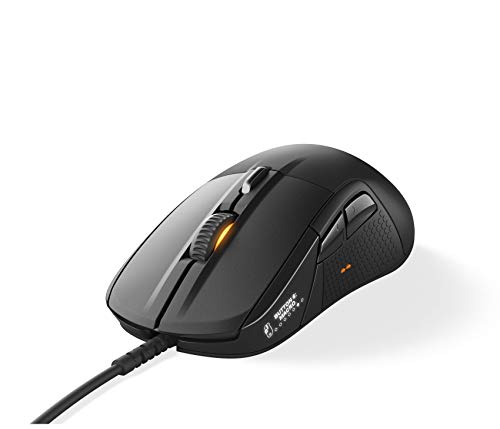
Description
SteelSeries Rival 710 Gaming Mouse – 16,000 – Features & Prices in Saudi Arabia :
SteelSeries Rival 710 Gaming Mouse – 16,000 CPI TrueMove3 Optical Sensor – OLED Display – Tactile Alerts – RGB Lighting, Black
Brand
SteelSeries
Item model number
62334
Hardware Platform
PC
Operating System
Pc
Item Weight
12.2 ounces
Product Dimensions
4.92 x 2.09 x 1.65 inches
Item Dimensions LxWxH
4.92 x 2.09 x 1.65 inches
Color
Black
Power Source
Corded Electric
Manufacturer
SteelSeries APS
ASIN
B07G1WSLYR
Is Discontinued By Manufacturer
No
Date First Available
October 2, 2018
Test video – SteelSeries Rival 710 Gaming Mouse – 16,000 :
Product highlights :
Questions & Answers – SteelSeries Rival 710 Gaming Mouse – 16,000 :
Technical specifications – SteelSeries Rival 710 Gaming Mouse – 16,000 :
Brand
SteelSeries
Color
Black
Movement Detection Technology
Optical
Number of Buttons
7
Hand Orientation
Right
Purchase advice :
-
Warranty :
Check the duration of the warranty and also the faults and defects it covers. Is it complete or limited? and What is included in the warranty (parts, repairs or both)?
-
Shipping :
Is delivery offered? And how long does it take to get delivered (Delivery time)
-
Proof of purchase :
Does the shop give you an invoice ?
-
After-sales service :
Do they have an after-sales service to have information about the installation or operation (instructions for use). Also in case of problem, it is the seller who takes charge or you must contact the manufacturer or supplier yourself.
_____________________________
H. F (verified owner) –
– It’s definitely a lot heavier than most mice so if you use a fairly light one there will be a fair bit of getting used to the feel, and a wrist rest is all but mandatory in my opinion, but once you’re used to it it’s very comfy. The customizable buttons are a nice feature though personally I disabled all but LMB, RMB, and MMB. Custom lighting and images are fun too but really not necessary if you’re budgeting. Do be warned that after about 6 months of relatively heavy (but gentle) almost daily use the right mouse button became faulty and stopped clicking, and it was not a software or driver issue. Fixed it by emptying about half a can of compressed air into it and clicking a bunch until things smoothed out again. Couldn’t see if anything got built up or stuck under the buttons or if something got bumped loose somehow but regardless it’s worth noting.
D. J (verified owner) –
– Precise (and you can always change the optical sensor to a laser if you prefer for whatever reason – or upgrade it to a better one, if a new one ever comes out), looks great (customizable too) lights are on-point and accurate, the tactile feedback is actually truly awesome when playing cs:go (it’s super Unfortunate, that not any other shooters or even other valve games support this) and the screen is quite fun in the beginning and becomes less and less relevant, when also having a screen on your keyboard with the same functionalities. So i decided to put a clock on my mouse and the configuration mode it is set on, whenever required.
Z. T (verified owner) –
Quality mouse with a ton of options – I have used a lot of good mice in my days and i have always noticed that getting the right size for my hand was difficult to narrow down, even during the days that I actually left my home to shop. Some just had the wrong shape; some were just huge. This mouse is about as good as I have seen to fit my hand in the correct shape and size.
H. F (verified owner) –
– It’s definitely a lot heavier than most mice so if you use a fairly light one there will be a fair bit of getting used to the feel, and a wrist rest is all but mandatory in my opinion, but once you’re used to it it’s very comfy. The customizable buttons are a nice feature though personally I disabled all but LMB, RMB, and MMB. Custom lighting and images are fun too but really not necessary if you’re budgeting. Do be warned that after about 6 months of relatively heavy (but gentle) almost daily use the right mouse button became faulty and stopped clicking, and it was not a software or driver issue. Fixed it by emptying about half a can of compressed air into it and clicking a bunch until things smoothed out again. Couldn’t see if anything got built up or stuck under the buttons or if something got bumped loose somehow but regardless it’s worth noting.
G. S (verified owner) –
Great mouse for FPS but the mouse skates always start to rip off. – I’m on my third steelseries mouse, and this is my 2nd of this line. Both this mouse and the previous model of the same line both have had the same issue, the rear mouse skate starts to detach (because it is not firmly seated and too shallow) and leak glue from the pressure of regular use, which in turn picks up dust and creates this sticky residue that gets pressed underneath the skate and start to unseat it as well as completely ruining the glide.
M. H (verified owner) –
Very comfortable for long sessions. – My previous mouse died after a 2.5 year stint (rather disappointing for a higher end mouse) so I decided to switch companies and try out something else. While I’ve used SteelSeries mousepads before, I’ve never purchased any of their peripherals so it was a bit of a leap of faith to put down money on a high end mouse. I don’t really do much gaming anymore, but I tend to find that gaming mice have some of the best ergonomics for long sessions and this certainly holds true here. The build quality feels top notch right out of the box and the aesthetics are a bit on the understated side, which I prefer over some of the in-your-face models that look like some sort of stealth fighter with LED’s everywhere. The software to control the lighting is simple enough to use and the mouse has plenty of buttons for my own use. There is one eyebrow raising feature, which is the LED panel on the side of the mouse which shows the SteelSeries logo by default, but can be customized with pixel art to show something else. I’m not entirely sure how many people are going to be staring at the inside of my mouse, but I suppose it can be a cool place to customize it with your team or sponsor logo if you’re into eSports? Aside from that, it seems like a rather useless feature.
M. H (verified owner) –
Very comfortable for long sessions. – My previous mouse died after a 2.5 year stint (rather disappointing for a higher end mouse) so I decided to switch companies and try out something else. While I’ve used SteelSeries mousepads before, I’ve never purchased any of their peripherals so it was a bit of a leap of faith to put down money on a high end mouse. I don’t really do much gaming anymore, but I tend to find that gaming mice have some of the best ergonomics for long sessions and this certainly holds true here. The build quality feels top notch right out of the box and the aesthetics are a bit on the understated side, which I prefer over some of the in-your-face models that look like some sort of stealth fighter with LED’s everywhere. The software to control the lighting is simple enough to use and the mouse has plenty of buttons for my own use. There is one eyebrow raising feature, which is the LED panel on the side of the mouse which shows the SteelSeries logo by default, but can be customized with pixel art to show something else. I’m not entirely sure how many people are going to be staring at the inside of my mouse, but I suppose it can be a cool place to customize it with your team or sponsor logo if you’re into eSports? Aside from that, it seems like a rather useless feature.
G. S (verified owner) –
Great mouse for FPS but the mouse skates always start to rip off. – I’m on my third steelseries mouse, and this is my 2nd of this line. Both this mouse and the previous model of the same line both have had the same issue, the rear mouse skate starts to detach (because it is not firmly seated and too shallow) and leak glue from the pressure of regular use, which in turn picks up dust and creates this sticky residue that gets pressed underneath the skate and start to unseat it as well as completely ruining the glide.
D. J (verified owner) –
– Precise (and you can always change the optical sensor to a laser if you prefer for whatever reason – or upgrade it to a better one, if a new one ever comes out), looks great (customizable too) lights are on-point and accurate, the tactile feedback is actually truly awesome when playing cs:go (it’s super Unfortunate, that not any other shooters or even other valve games support this) and the screen is quite fun in the beginning and becomes less and less relevant, when also having a screen on your keyboard with the same functionalities. So i decided to put a clock on my mouse and the configuration mode it is set on, whenever required.
Z. T (verified owner) –
Quality mouse with a ton of options – I have used a lot of good mice in my days and i have always noticed that getting the right size for my hand was difficult to narrow down, even during the days that I actually left my home to shop. Some just had the wrong shape; some were just huge. This mouse is about as good as I have seen to fit my hand in the correct shape and size.