
Description
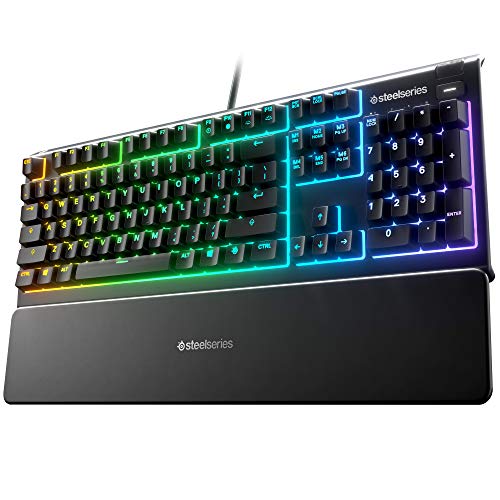
SteelSeries Apex 3 RGB Gaming Keyboard – – Features & Prices in Saudi Arabia :
SteelSeries Apex 3 RGB Gaming Keyboard – 10-Zone RGB Illumination – IP32 Water Resistant – Premium Magnetic Wrist Rest (Whisper Quiet Gaming Switch)
Brand
SteelSeries
Item model number
64812
Hardware Platform
PC
Operating System
Windows, Mac OS X, Xbox, and PS4. USB port required
Item Weight
2.79 pounds
Product Dimensions
5.94 x 17.52 x 1.57 inches
Item Dimensions LxWxH
5.94 x 17.52 x 1.57 inches
Color
Whisper Quiet – Tactile & Silent
Manufacturer
SteelSeries
ASIN
B07ZGDPT4M
Country of Origin
China
Date First Available
January 15, 2020
Test video – SteelSeries Apex 3 RGB Gaming Keyboard – :
Product highlights :
Questions & Answers – SteelSeries Apex 3 RGB Gaming Keyboard – :
Technical specifications – SteelSeries Apex 3 RGB Gaming Keyboard – :
Brand
SteelSeries
Compatible Devices
Gaming Console
Keyboard Description
Gaming
Special Feature
Water Resistant
Color
Whisper Quiet – Tactile & Silent
Operating System
Windows, Mac OS X, Xbox, and PS4. USB port required
Number of Keys
104
Keyboard backlighting color support
RGB
Style
Whisper Quiet – Tactile & Silent
Item Dimensions LxWxH
5.94 x 17.52 x 1.57 inches
Purchase advice :
-
Warranty :
Check the duration of the warranty and also the faults and defects it covers. Is it complete or limited? and What is included in the warranty (parts, repairs or both)?
-
Shipping :
Is delivery offered? And how long does it take to get delivered (Delivery time)
-
Proof of purchase :
Does the shop give you an invoice ?
-
After-sales service :
Do they have an after-sales service to have information about the installation or operation (instructions for use). Also in case of problem, it is the seller who takes charge or you must contact the manufacturer or supplier yourself.
_____________________________
G. G (verified owner) –
Almost perfect -1 star for for forced account requirement – I am not easily impressed and i am not one who would normally spend $50 on a keyboard… This is my first product from Steel Series
C. Z (verified owner) –
– ************ What I liked
K. I (verified owner) –
High quality at your fingertips. – Until now the most expensive keyboard i’d ever purchased cost me about $45 bucks. It set the bar for what I thought I liked. Not withstanding the fact I never even paid for a keyboard before, $45 was huge for me and especially since there was always two or three keyboards laying around in a closet. I was happy with purchase, what I really liked about it was it featured a number pad and a touch pad. It lasted a good while but like the other’s which came before the space bar started throwing craps. Because of my heavy thumbs. So after lots of research looking for the best quality keyboard maker the Steel Series reputation made it stand out from a sea of other cool keyboards. Right out the box the Steel Series 5 felt like the experience of a flagship cell phone or something. It has a modern feel and texture to it and lights up to boot. I didn’t start out looking for the backlit keys but they are such a major upgrade I should’ve done it much sooner. Not only can I now type with the lights off but another weakness of my last keyboard was eliminated. Letters worn off the keys. I was more then willing to sacrifice the touch pad ,which is not offered, for the backlit keys. Now I would be remiss if I failed to speak glowingly about how fast and clicky klacket this keyboard is to use. And others might also gush at how high tech the Steel Series are with their Digital display feature and the app you can download that provides you all kinds of customization options. I also love it for sure. But be warned there is a dark side to the App. I quickly discovered that depending on your operating system {I have the old windows 7) Downloading the app can make your Steel Series keyboard stop working completely and lock you out of it. Crazy Right? And this is not an uncommon problem. I am fairly computer savvy so I got past this however I had to breakout my old keyboard in order to even type for the solution on YouTube and then reset things as needed. Before downloaded the app everything was just plug and play. However one feature you will need to assign to the keyboard is a caps lock indicator. I set mine cap key to go yellow when on. I am pretty certain that If you have a newer operating systerm you will probably not have any issues but if you have an older one then make sure you are careful to download of older version of the app. If you don’t get it right the first time I would even go so far as to say a person less resourceful then myself might’ve just returned the thing. But don’t let me scare you off this is the best keyboard in the world they say.
K. I (verified owner) –
High quality at your fingertips. – Until now the most expensive keyboard i’d ever purchased cost me about $45 bucks. It set the bar for what I thought I liked. Not withstanding the fact I never even paid for a keyboard before, $45 was huge for me and especially since there was always two or three keyboards laying around in a closet. I was happy with purchase, what I really liked about it was it featured a number pad and a touch pad. It lasted a good while but like the other’s which came before the space bar started throwing craps. Because of my heavy thumbs. So after lots of research looking for the best quality keyboard maker the Steel Series reputation made it stand out from a sea of other cool keyboards. Right out the box the Steel Series 5 felt like the experience of a flagship cell phone or something. It has a modern feel and texture to it and lights up to boot. I didn’t start out looking for the backlit keys but they are such a major upgrade I should’ve done it much sooner. Not only can I now type with the lights off but another weakness of my last keyboard was eliminated. Letters worn off the keys. I was more then willing to sacrifice the touch pad ,which is not offered, for the backlit keys. Now I would be remiss if I failed to speak glowingly about how fast and clicky klacket this keyboard is to use. And others might also gush at how high tech the Steel Series are with their Digital display feature and the app you can download that provides you all kinds of customization options. I also love it for sure. But be warned there is a dark side to the App. I quickly discovered that depending on your operating system {I have the old windows 7) Downloading the app can make your Steel Series keyboard stop working completely and lock you out of it. Crazy Right? And this is not an uncommon problem. I am fairly computer savvy so I got past this however I had to breakout my old keyboard in order to even type for the solution on YouTube and then reset things as needed. Before downloaded the app everything was just plug and play. However one feature you will need to assign to the keyboard is a caps lock indicator. I set mine cap key to go yellow when on. I am pretty certain that If you have a newer operating systerm you will probably not have any issues but if you have an older one then make sure you are careful to download of older version of the app. If you don’t get it right the first time I would even go so far as to say a person less resourceful then myself might’ve just returned the thing. But don’t let me scare you off this is the best keyboard in the world they say.
D. C (verified owner) –
– The good:
T. S (verified owner) –
– Bought as present for my son for christmas he hasnt said anything bad about this so i take it its a thumbs up as he does lots of gaming one happy son
C. Z (verified owner) –
– ************ What I liked
G. G (verified owner) –
Almost perfect -1 star for for forced account requirement – I am not easily impressed and i am not one who would normally spend $50 on a keyboard… This is my first product from Steel Series
D. C (verified owner) –
– The good:
T. S (verified owner) –
– Bought as present for my son for christmas he hasnt said anything bad about this so i take it its a thumbs up as he does lots of gaming one happy son