
Description
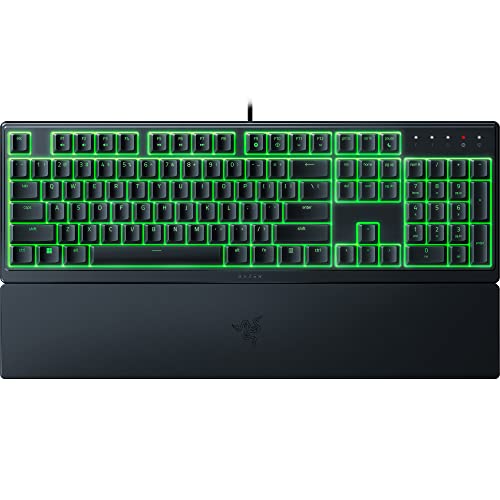
Razer Ornata V3 X Gaming Keyboard: Low-Profile – Features & Prices in Saudi Arabia :
Razer Ornata V3 X Gaming Keyboard: Low-Profile Keys – Silent Membrane Switches – Spill Resistant – Chroma RGB Lighting – Ergonomic Wrist Rest – Classic Black
Brand
Razer
Series
Ornata V3 X
Item model number
RZ03-04470200-R3U1
Hardware Platform
PC
Operating System
Microsoft Windows
Item Weight
2.94 pounds
Product Dimensions
17.46 x 5.68 x 1.23 inches
Item Dimensions LxWxH
17.46 x 5.68 x 1.23 inches
Color
Classic Black
Manufacturer
Razer Inc.
Language
English
ASIN
B09X6GJ691
Country of Origin
China
Date First Available
June 23, 2022
Test video – Razer Ornata V3 X Gaming Keyboard: Low-Profile :
Product highlights :
Questions & Answers – Razer Ornata V3 X Gaming Keyboard: Low-Profile :
Technical specifications – Razer Ornata V3 X Gaming Keyboard: Low-Profile :
Brand
Razer
Compatible Devices
PC
Connectivity Technology
Wired USB
Keyboard Description
Gaming
Special Feature
,
Color
Classic Black
Operating System
Microsoft Windows
Number of Keys
18
Keyboard backlighting color support
RGB
Style
Ornata V3 X
Purchase advice :
-
Warranty :
Check the duration of the warranty and also the faults and defects it covers. Is it complete or limited? and What is included in the warranty (parts, repairs or both)?
-
Shipping :
Is delivery offered? And how long does it take to get delivered (Delivery time)
-
Proof of purchase :
Does the shop give you an invoice ?
-
After-sales service :
Do they have an after-sales service to have information about the installation or operation (instructions for use). Also in case of problem, it is the seller who takes charge or you must contact the manufacturer or supplier yourself.
_____________________________
E. L (verified owner) –
Simple to use – Simplicity and looks
E. L (verified owner) –
Simple to use – Simplicity and looks
A. P (verified owner) –
V2 version is much more comfortable – changed opinion – V3 is better 🙂 – It has a bit lower profile compared to V2. Keys sound is louder a bit. Support bar is plastic and not comfortable. Space bar sounds a bit different. Looks cheaper in general.
T. N (verified owner) –
Great keyboard for home and business use, but not for gaming – For daily home and business use this keyboard gets 5 stars. Great lighting, wrist pad is comfortable, and keys are nice and smooth. For gaming I have to give this only 1 star. I’m not sure if this is a defect or a fixable issue but the keyboard suffers from ghosting (box does not say it has anti-ghosting). In a nutshell you can only have a total of 3 keys actuated at once, no other keys can be activated unless one of those keys are released. If you are doing a lot of high active keyboard gaming, you are going to run into key delay issues.
A. P (verified owner) –
V2 version is much more comfortable – changed opinion – V3 is better 🙂 – It has a bit lower profile compared to V2. Keys sound is louder a bit. Support bar is plastic and not comfortable. Space bar sounds a bit different. Looks cheaper in general.
B. L (verified owner) –
Very close to feeling like a mechanical keyboard – I usually stay away from membrane keyboards, they tend to be mushy and something that is not easy to get used to if you have high standards for your subjective typing experience due to primarily using mechanical keyboards. The “Mecha-Mebrane” feature intrigued me, especially since clicky is my favorite type of mechanical switch, that combined with this being low-profile was enough to get me to order it.
T. F (verified owner) –
Personal preference but better than mk2 red cherry mechanical switches – Perfection. Finally
N. I (verified owner) –
Backlight is too bright vs key lighting – I am disappointed in this as the lighting on the key surfaces is drowned out by the backlighting. I will just stop using this and look for a replacement with illuminated keys but not where the entire area under the keys is lit up. For reference, my favorite keyboard is the Logitech Illuminated Keyboard, which doesnt have this problem.
E. E (verified owner) –
WAY TOO LOUD imo – I’m not going to deduct rating because of my personal preference. The keyboard looks & feels great and its a good price…
B. L (verified owner) –
Very close to feeling like a mechanical keyboard – I usually stay away from membrane keyboards, they tend to be mushy and something that is not easy to get used to if you have high standards for your subjective typing experience due to primarily using mechanical keyboards. The “Mecha-Mebrane” feature intrigued me, especially since clicky is my favorite type of mechanical switch, that combined with this being low-profile was enough to get me to order it.
G. K (verified owner) –
Small height keys and nice bright RGB – I’m not really a keyboard person but I’ve always wanted to try out something ‘more’ and this was a nice start for me. I really like the wrist rest but as I am not used to it, I find myself removing it often. However, it is very easy to take off and put back on which is great. I really like the lighting on the keyboard. You can do multi-colored or solid and it comes with software to customize everything with it, including keybinding / macro, which I love. It’s a bit intimidating though so I haven’t ventured any further that that. The brightness, however, was a little distracting for someone like me who’s never used a light up keyboard and does a lot of computer work and play at night. I can turn it off but it feels a bit like a waste to me as the RGB is a feature. The keys are also much quieter and ‘softer’ than the ones I have. I do have a personal preference for higher keys than this as I got longer nails and shorter keys make it more difficult for me to use since I type a lot. I think it’s a good keyboard in general, but maybe not for someone like me.
T. F (verified owner) –
Personal preference but better than mk2 red cherry mechanical switches – Perfection. Finally
T. N (verified owner) –
Great keyboard for home and business use, but not for gaming – For daily home and business use this keyboard gets 5 stars. Great lighting, wrist pad is comfortable, and keys are nice and smooth. For gaming I have to give this only 1 star. I’m not sure if this is a defect or a fixable issue but the keyboard suffers from ghosting (box does not say it has anti-ghosting). In a nutshell you can only have a total of 3 keys actuated at once, no other keys can be activated unless one of those keys are released. If you are doing a lot of high active keyboard gaming, you are going to run into key delay issues.
E. E (verified owner) –
WAY TOO LOUD imo – I’m not going to deduct rating because of my personal preference. The keyboard looks & feels great and its a good price…
N. I (verified owner) –
Backlight is too bright vs key lighting – I am disappointed in this as the lighting on the key surfaces is drowned out by the backlighting. I will just stop using this and look for a replacement with illuminated keys but not where the entire area under the keys is lit up. For reference, my favorite keyboard is the Logitech Illuminated Keyboard, which doesnt have this problem.
G. K (verified owner) –
Small height keys and nice bright RGB – I’m not really a keyboard person but I’ve always wanted to try out something ‘more’ and this was a nice start for me. I really like the wrist rest but as I am not used to it, I find myself removing it often. However, it is very easy to take off and put back on which is great. I really like the lighting on the keyboard. You can do multi-colored or solid and it comes with software to customize everything with it, including keybinding / macro, which I love. It’s a bit intimidating though so I haven’t ventured any further that that. The brightness, however, was a little distracting for someone like me who’s never used a light up keyboard and does a lot of computer work and play at night. I can turn it off but it feels a bit like a waste to me as the RGB is a feature. The keys are also much quieter and ‘softer’ than the ones I have. I do have a personal preference for higher keys than this as I got longer nails and shorter keys make it more difficult for me to use since I type a lot. I think it’s a good keyboard in general, but maybe not for someone like me.