Razer Basilisk V3 Customizable Ergonomic Gaming Mouse: is available in Saudi Arabia.
Find out all you need to know about Razer Basilisk V3 Customizable Ergonomic Gaming Mouse: before buying : Price, Test video, Datasheet, Similar products.
Test video – Razer Basilisk V3 Customizable Ergonomic Gaming Mouse: :
Product highlights :
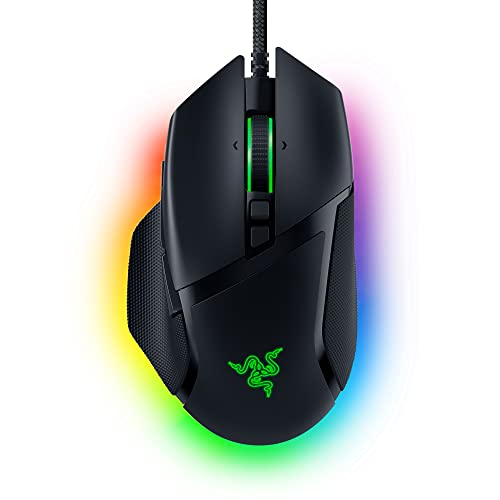
10 plus 1 Programmable Buttons: Assign all your macros and secondary functions across 11 programmable buttons — including its acclaimed multi-function trigger — to execute essential actions like push-to-talk, ping, and more
11 Razer Chroma RGB Lighting Zones: Bask in the Razer Basilisk V3’s glory as you customize each zone from over 16.8 million colors and countless lighting effects, all while it reacts dynamically with over 150 Chroma – integrated games
Razer Optical Mouse Switches Gen – 2: With zero unintended misclicks you can count on these switches to provide crisp, responsive execution at a blistering 0.2m s actuation speed for up to 70 million clicks
Razer Focus 26K DPI Optical Sensor : Our best-in-class sensor with intelligent functions such as asymmetric cut – off, flawlessly tracks your movement with zero smoothing, allowing for crisp response and pixel-precise accuracy
Razer HyperScroll Tilt Wheel : Speed through content with a scroll wheel that free – spins until its stopped, or switch to tactile mode for more precision and satisfying feedback that’s ideal for cycling through weapons or skills
Iconic Ergonomic Design with Thumb Rest: Favored by millions worldwide, the mouse’s signature form factor perfectly supports your hand while its buttons are optimally positioned for quick and easy access
➕ What is the price of Razer Basilisk V3 Customizable Ergonomic Gaming Mouse: in Saudi Arabia ?
The price of Razer Basilisk V3 Customizable Ergonomic Gaming Mouse: in-store is 190 SAR VAT.
➕ When Razer Basilisk V3 Customizable Ergonomic Gaming Mouse: was released ?
The release date was September 8, 2021.
➕ What is the price of Razer Basilisk V3 Customizable Ergonomic Gaming Mouse: cheap used ?
The price of Razer Basilisk V3 Customizable Ergonomic Gaming Mouse: used is 130 SAR VAT.
➕ What are the main characteristics of Razer Basilisk V3 Customizable Ergonomic Gaming Mouse: ?
Special specifications :
10 plus 1 Programmable Buttons: Assign all your macros and secondary functions across 11 programmable buttons — including its acclaimed multi-function trigger — to execute essential actions like push-to-talk, ping, and more
➕ Is it interesting to buy this product ?
The best people who can answer you are customers who have already bought and tested this product (See Customer Reviews). This product is rated 4.7 / 5 on Amazon.
➕ Where to buy Razer Basilisk V3 Customizable Ergonomic Gaming Mouse: in Saudi Arabia ?
Check the duration of the warranty and also the faults and defects it covers. Is it complete or limited? and What is included in the warranty (parts, repairs or both)?
Shipping :
Is delivery offered? And how long does it take to get delivered (Delivery time)
Proof of purchase :
Does the shop give you an invoice ?
After-sales service :
Do they have an after-sales service to have information about the installation or operation (instructions for use). Also in case of problem, it is the seller who takes charge or you must contact the manufacturer or supplier yourself.
_____________________________
12 reviews for Razer Basilisk V3 Customizable Ergonomic Gaming Mouse:
Rated 5 out of 5
A. F (verified owner)–
So far so good – I finally decided to go from the previous generation wireless version to this one. I’m very happy with it so far. It’s got a similar RGB sync as the keyboards or memory sticks. That’s a whole other review on how that thing works. But it’s very comfy and reactive to my level of sensitivity. Cord is super long which is great since my tower is on the ground and I use a standing desk. Lights are bright as well.
Rated 5 out of 5
N. P (verified owner)–
I never knew I needed a good mouse. – I never thought of a need for having a better quality or ergonomic mouse. I just didn’t realize that was important. My son let me try his mouse and I was completely sold. I had to buy my own. It is so much more comfortable and there are so many things they can do with a mouse nowadays. I had no idea. You can get a lot done with all of the different buttons they put on them. I’m very glad I bought it.
Rated 5 out of 5
P. E (verified owner)–
Did not like the shape, ended up loving it. – I’d had watching so many YT videos before decided buying this Razer Basilisk V3 mouse because its very positive review. I did not like the shape at first, but I’d have to give it a try.
Rated 5 out of 5
N. P (verified owner)–
I never knew I needed a good mouse. – I never thought of a need for having a better quality or ergonomic mouse. I just didn’t realize that was important. My son let me try his mouse and I was completely sold. I had to buy my own. It is so much more comfortable and there are so many things they can do with a mouse nowadays. I had no idea. You can get a lot done with all of the different buttons they put on them. I’m very glad I bought it.
Rated 5 out of 5
P. E (verified owner)–
Did not like the shape, ended up loving it. – I’d had watching so many YT videos before decided buying this Razer Basilisk V3 mouse because its very positive review. I did not like the shape at first, but I’d have to give it a try.
Rated 4 out of 5
K. N (verified owner)–
Demoted to 3.5/4 stars Mouse Stakes aren’t the best. – Edit: Use a solid SteelSeries mouse mat, after a month of use the stakes got scratched enough it’d sound like it was dragging around, and not moving smoothly. Never had that issue with this mat before. Some very light sanding with a damp scotch brite pad made it smooth again.
Rated 4 out of 5
F. F (verified owner)–
Nearly perfect. – Really 4-1/2 stars. The Razor Basilisk V3 is nearly perfect hardware. The shortcomings are in the software and firmwear.
Rated 5 out of 5
F. G (verified owner)–
Lightweight, great for big hands and easy to set up – I have been using the Logitech G700s for a long time. After the last one went sideways, I decided to try a Razer mouse to go with the Razer keyboard I am using. I have big hands and the Basilisk, although it is a bit smaller than the G700s, fits nicely. It has a much lighter feel and I much prefer a corded mouse to a cordless (too many hassles over the years with cordless). It glides very smoothly on a desk or mousepad and the extra buttons are almost all in the right spot. My only recommendation is that they move the third thumb button (closest to the back of the mouse) to under the second button instead of behind it. It’s a little difficult to hit back there.
Rated 4 out of 5
F. F (verified owner)–
Nearly perfect. – Really 4-1/2 stars. The Razor Basilisk V3 is nearly perfect hardware. The shortcomings are in the software and firmwear.
Rated 4 out of 5
K. N (verified owner)–
Demoted to 3.5/4 stars Mouse Stakes aren’t the best. – Edit: Use a solid SteelSeries mouse mat, after a month of use the stakes got scratched enough it’d sound like it was dragging around, and not moving smoothly. Never had that issue with this mat before. Some very light sanding with a damp scotch brite pad made it smooth again.
Rated 5 out of 5
A. F (verified owner)–
So far so good – I finally decided to go from the previous generation wireless version to this one. I’m very happy with it so far. It’s got a similar RGB sync as the keyboards or memory sticks. That’s a whole other review on how that thing works. But it’s very comfy and reactive to my level of sensitivity. Cord is super long which is great since my tower is on the ground and I use a standing desk. Lights are bright as well.
Rated 5 out of 5
F. G (verified owner)–
Lightweight, great for big hands and easy to set up – I have been using the Logitech G700s for a long time. After the last one went sideways, I decided to try a Razer mouse to go with the Razer keyboard I am using. I have big hands and the Basilisk, although it is a bit smaller than the G700s, fits nicely. It has a much lighter feel and I much prefer a corded mouse to a cordless (too many hassles over the years with cordless). It glides very smoothly on a desk or mousepad and the extra buttons are almost all in the right spot. My only recommendation is that they move the third thumb button (closest to the back of the mouse) to under the second button instead of behind it. It’s a little difficult to hit back there.


A. F (verified owner) –
So far so good – I finally decided to go from the previous generation wireless version to this one. I’m very happy with it so far. It’s got a similar RGB sync as the keyboards or memory sticks. That’s a whole other review on how that thing works. But it’s very comfy and reactive to my level of sensitivity. Cord is super long which is great since my tower is on the ground and I use a standing desk. Lights are bright as well.
N. P (verified owner) –
I never knew I needed a good mouse. – I never thought of a need for having a better quality or ergonomic mouse. I just didn’t realize that was important. My son let me try his mouse and I was completely sold. I had to buy my own. It is so much more comfortable and there are so many things they can do with a mouse nowadays. I had no idea. You can get a lot done with all of the different buttons they put on them. I’m very glad I bought it.
P. E (verified owner) –
Did not like the shape, ended up loving it. – I’d had watching so many YT videos before decided buying this Razer Basilisk V3 mouse because its very positive review. I did not like the shape at first, but I’d have to give it a try.
N. P (verified owner) –
I never knew I needed a good mouse. – I never thought of a need for having a better quality or ergonomic mouse. I just didn’t realize that was important. My son let me try his mouse and I was completely sold. I had to buy my own. It is so much more comfortable and there are so many things they can do with a mouse nowadays. I had no idea. You can get a lot done with all of the different buttons they put on them. I’m very glad I bought it.
P. E (verified owner) –
Did not like the shape, ended up loving it. – I’d had watching so many YT videos before decided buying this Razer Basilisk V3 mouse because its very positive review. I did not like the shape at first, but I’d have to give it a try.
K. N (verified owner) –
Demoted to 3.5/4 stars Mouse Stakes aren’t the best. – Edit: Use a solid SteelSeries mouse mat, after a month of use the stakes got scratched enough it’d sound like it was dragging around, and not moving smoothly. Never had that issue with this mat before. Some very light sanding with a damp scotch brite pad made it smooth again.
F. F (verified owner) –
Nearly perfect. – Really 4-1/2 stars. The Razor Basilisk V3 is nearly perfect hardware. The shortcomings are in the software and firmwear.
F. G (verified owner) –
Lightweight, great for big hands and easy to set up – I have been using the Logitech G700s for a long time. After the last one went sideways, I decided to try a Razer mouse to go with the Razer keyboard I am using. I have big hands and the Basilisk, although it is a bit smaller than the G700s, fits nicely. It has a much lighter feel and I much prefer a corded mouse to a cordless (too many hassles over the years with cordless). It glides very smoothly on a desk or mousepad and the extra buttons are almost all in the right spot. My only recommendation is that they move the third thumb button (closest to the back of the mouse) to under the second button instead of behind it. It’s a little difficult to hit back there.
F. F (verified owner) –
Nearly perfect. – Really 4-1/2 stars. The Razor Basilisk V3 is nearly perfect hardware. The shortcomings are in the software and firmwear.
K. N (verified owner) –
Demoted to 3.5/4 stars Mouse Stakes aren’t the best. – Edit: Use a solid SteelSeries mouse mat, after a month of use the stakes got scratched enough it’d sound like it was dragging around, and not moving smoothly. Never had that issue with this mat before. Some very light sanding with a damp scotch brite pad made it smooth again.
A. F (verified owner) –
So far so good – I finally decided to go from the previous generation wireless version to this one. I’m very happy with it so far. It’s got a similar RGB sync as the keyboards or memory sticks. That’s a whole other review on how that thing works. But it’s very comfy and reactive to my level of sensitivity. Cord is super long which is great since my tower is on the ground and I use a standing desk. Lights are bright as well.
F. G (verified owner) –
Lightweight, great for big hands and easy to set up – I have been using the Logitech G700s for a long time. After the last one went sideways, I decided to try a Razer mouse to go with the Razer keyboard I am using. I have big hands and the Basilisk, although it is a bit smaller than the G700s, fits nicely. It has a much lighter feel and I much prefer a corded mouse to a cordless (too many hassles over the years with cordless). It glides very smoothly on a desk or mousepad and the extra buttons are almost all in the right spot. My only recommendation is that they move the third thumb button (closest to the back of the mouse) to under the second button instead of behind it. It’s a little difficult to hit back there.