LANGTU Membrane Gaming Keyboard, Rainbow LED Backlit is available in Saudi Arabia.
Find out all you need to know about LANGTU Membrane Gaming Keyboard, Rainbow LED Backlit before buying : Price, Test video, Datasheet, Similar products.
LANGTU Membrane Gaming Keyboard, Rainbow LED Backlit – Features & Prices in Saudi Arabia :
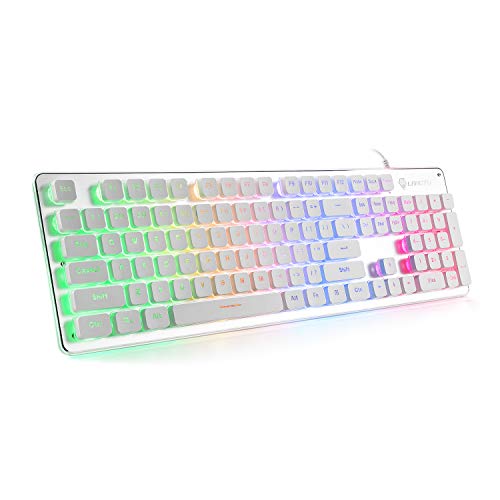
LANGTU Membrane Gaming Keyboard, Rainbow LED Backlit Quiet Keyboard for Office, USB Wired All-Metal Panel 25 Keys Anti-ghosting Computer Keyboard 104 Keys – L1 White/Silver…
Product Dimensions
17.7 x 5 x 1.2 inches
Item Weight
1.54 pounds
Manufacturer
Shine Star Gaming
ASIN
B07QV839G5
Country of Origin
China
Date First Available
April 19, 2019
Test video – LANGTU Membrane Gaming Keyboard, Rainbow LED Backlit :
Product highlights :
Metal Panel Keyboard–Our gaming keyboard is designed with an Aluminum alloy panel. Cool brushed metal panel not only enhances the texture of the keyboard but also extremely improves the durability of the whole keyboard. This light up keyboard has a water-resistant function, you don’t have to worry about spilled liquids damaging it.
Soft & Responsive Keys–All keys are very soft to touch and offer very precise keystrokes, ideal for work or gaming. Our white gaming keyboard has a lifespan of 10,000,000 clicks. The double-colored injection keycaps offer crystal clear uniform backlighting and the letters will never fade away.
Cool Rainbow Backlight Keyboard–The colorful keyboard has a 7-color rainbow LED backlight, and each key is colored brightly, so you can type and play games even in a dark environment without difficulty, and the soft light won’t hurt your eyes. You can adjust the brightness and breathing speed of the backlit according to your preference. Let you immerse the game world in a cool atmosphere (Note: The light is not RGB, the color of light cannot be changed).
Ergonomic Design–The scientific stair-step keycap design makes it easy for the finger to reach all keys, maximizing the comfort of your hand to meet the needs of a long-time game or work. 25 keys Anti-ghosting technology allows you to use more combinations to win a game. 12 combinations of multimedia keys facilitate the operation of your work or game and improve efficiency.
Strong Compatibility & Quality Assurance== LANGTU USB wired keyboard meets the need of gamers, typists, programmers, writers, and combines your office and gaming experience. No driver needed, Plug-and-Play. Support Windows 2000 / 10/8/7 / ME / XP / VISTA, MAC, Linus. If there is any product problem under normal use, please feel free to contact us, we will provide the best solution for you.
➕ What is the price of LANGTU Membrane Gaming Keyboard, Rainbow LED Backlit in Saudi Arabia ?
The price of LANGTU Membrane Gaming Keyboard, Rainbow LED Backlit in-store is 110 SAR VAT.
➕ When LANGTU Membrane Gaming Keyboard, Rainbow LED Backlit was released ?
The release date was April 19, 2019.
➕ What is the price of LANGTU Membrane Gaming Keyboard, Rainbow LED Backlit cheap used ?
The price of LANGTU Membrane Gaming Keyboard, Rainbow LED Backlit used is 70 SAR VAT.
➕ What are the main characteristics of LANGTU Membrane Gaming Keyboard, Rainbow LED Backlit ?
Special specifications :
Metal Panel Keyboard–Our gaming keyboard is designed with an Aluminum alloy panel. Cool brushed metal panel not only enhances the texture of the keyboard but also extremely improves the durability of the whole keyboard. This light up keyboard has a water-resistant function, you don’t have to worry about spilled liquids damaging it.
➕ Is it interesting to buy this product ?
The best people who can answer you are customers who have already bought and tested this product (See Customer Reviews). This product is rated 4.5 / 5 on Amazon.
➕ Where to buy LANGTU Membrane Gaming Keyboard, Rainbow LED Backlit in Saudi Arabia ?
Linux, Windows ME, Windows Vista, Windows XP, Windows 8, Windows 7, Windows 2000, MAC, Windows 10
Number of Keys
104
Keyboard backlighting color support
Single Color
Purchase advice :
Warranty :
Check the duration of the warranty and also the faults and defects it covers. Is it complete or limited? and What is included in the warranty (parts, repairs or both)?
Shipping :
Is delivery offered? And how long does it take to get delivered (Delivery time)
Proof of purchase :
Does the shop give you an invoice ?
After-sales service :
Do they have an after-sales service to have information about the installation or operation (instructions for use). Also in case of problem, it is the seller who takes charge or you must contact the manufacturer or supplier yourself.
_____________________________
10 reviews for LANGTU Membrane Gaming Keyboard, Rainbow LED Backlit
Rated 5 out of 5
P. G (verified owner)–
it’s a keyboard – It’s a keyboard. It lights up with some options that I like, as in it’s nothing crazy like some have so many programming features. I like that you can hear the clacks of the keys. Some reviews saying the keyboard is too loud is kinda funny if you want one that has no sound to it make sure you buy one that says there is no sound! since the board is small I can finally play my games without worry of trying to reach keys that are far away! (I have small hands..)
Rated 5 out of 5
A. S (verified owner)–
This Is a great keyboard for the price! – Bought this keyboard for my wife to use at work as the other kind of sucked and it also broke.
Rated 4 out of 5
M. J (verified owner)–
Command Key for Keyboard Shortcuts only on left-hand side confused me for a bit! – As someone who writes a lot, I used keyboard shortcuts all the time for select all, copy an paste, and I was all set to write a review bemoaning that this keyboard did not allow for keyboard shortcuts. Then I examined my old keyboard (a simple HP got at a garage sale for $5 which lasted for years until my son spilled water on it and the keys started to stick) and a photo of a Mac keyboard and realized this keyboard only has a command key on the left hand side (WIN with a little lock symbol) whereas there is a command key on both sides of a mac and the old HP keyboard I was using with my mac. I always used the command key on the right hand side and could not figure out why keyboard shortcuts were not working on this keyboard! I felt pretty silly once I figured it out, but also thankful I wouldn’t have to return this keyboard as I use shortcuts all the time. I only just got this keyboard last night, so I will update my review if things change, but these are my thoughts so far:
Rated 5 out of 5
P. G (verified owner)–
it’s a keyboard – It’s a keyboard. It lights up with some options that I like, as in it’s nothing crazy like some have so many programming features. I like that you can hear the clacks of the keys. Some reviews saying the keyboard is too loud is kinda funny if you want one that has no sound to it make sure you buy one that says there is no sound! since the board is small I can finally play my games without worry of trying to reach keys that are far away! (I have small hands..)
Rated 4 out of 5
C. T (verified owner)–
Cute but you get what you pay for. – It’s a perfectly fine keyboard. The clicks are satisfying, the lights are nice, it has a nice quality look to it, but once you get up close you can tell the quality is just fine. The caps lock/num lock lights burnt out on mine within days. Sometimes I have to unplug/replug it in to get it to be discovered again. For the price, it gets the job done, but if you want a serious gaming setup, I’d go for a slightly higher price point.
Rated 4 out of 5
M. J (verified owner)–
Command Key for Keyboard Shortcuts only on left-hand side confused me for a bit! – As someone who writes a lot, I used keyboard shortcuts all the time for select all, copy an paste, and I was all set to write a review bemoaning that this keyboard did not allow for keyboard shortcuts. Then I examined my old keyboard (a simple HP got at a garage sale for $5 which lasted for years until my son spilled water on it and the keys started to stick) and a photo of a Mac keyboard and realized this keyboard only has a command key on the left hand side (WIN with a little lock symbol) whereas there is a command key on both sides of a mac and the old HP keyboard I was using with my mac. I always used the command key on the right hand side and could not figure out why keyboard shortcuts were not working on this keyboard! I felt pretty silly once I figured it out, but also thankful I wouldn’t have to return this keyboard as I use shortcuts all the time. I only just got this keyboard last night, so I will update my review if things change, but these are my thoughts so far:
Rated 4 out of 5
C. T (verified owner)–
Cute but you get what you pay for. – It’s a perfectly fine keyboard. The clicks are satisfying, the lights are nice, it has a nice quality look to it, but once you get up close you can tell the quality is just fine. The caps lock/num lock lights burnt out on mine within days. Sometimes I have to unplug/replug it in to get it to be discovered again. For the price, it gets the job done, but if you want a serious gaming setup, I’d go for a slightly higher price point.
Rated 5 out of 5
A. S (verified owner)–
This Is a great keyboard for the price! – Bought this keyboard for my wife to use at work as the other kind of sucked and it also broke.
Rated 4 out of 5
S. F (verified owner)–
Overall solid keyboard – This keyboard is solid overall! I really like the clicking sound it makes and it looks great as a part of my setup. Some other people mentioned the space bar in their review, which I too found to be a little annoying. It has springs under it for some reason so it bounces and makes kind of a funky noise when you hit it. But otherwise, overall, I really like it!
Rated 4 out of 5
S. F (verified owner)–
Overall solid keyboard – This keyboard is solid overall! I really like the clicking sound it makes and it looks great as a part of my setup. Some other people mentioned the space bar in their review, which I too found to be a little annoying. It has springs under it for some reason so it bounces and makes kind of a funky noise when you hit it. But otherwise, overall, I really like it!

P. G (verified owner) –
it’s a keyboard – It’s a keyboard. It lights up with some options that I like, as in it’s nothing crazy like some have so many programming features. I like that you can hear the clacks of the keys. Some reviews saying the keyboard is too loud is kinda funny if you want one that has no sound to it make sure you buy one that says there is no sound! since the board is small I can finally play my games without worry of trying to reach keys that are far away! (I have small hands..)
A. S (verified owner) –
This Is a great keyboard for the price! – Bought this keyboard for my wife to use at work as the other kind of sucked and it also broke.
M. J (verified owner) –
Command Key for Keyboard Shortcuts only on left-hand side confused me for a bit! – As someone who writes a lot, I used keyboard shortcuts all the time for select all, copy an paste, and I was all set to write a review bemoaning that this keyboard did not allow for keyboard shortcuts. Then I examined my old keyboard (a simple HP got at a garage sale for $5 which lasted for years until my son spilled water on it and the keys started to stick) and a photo of a Mac keyboard and realized this keyboard only has a command key on the left hand side (WIN with a little lock symbol) whereas there is a command key on both sides of a mac and the old HP keyboard I was using with my mac. I always used the command key on the right hand side and could not figure out why keyboard shortcuts were not working on this keyboard! I felt pretty silly once I figured it out, but also thankful I wouldn’t have to return this keyboard as I use shortcuts all the time. I only just got this keyboard last night, so I will update my review if things change, but these are my thoughts so far:
P. G (verified owner) –
it’s a keyboard – It’s a keyboard. It lights up with some options that I like, as in it’s nothing crazy like some have so many programming features. I like that you can hear the clacks of the keys. Some reviews saying the keyboard is too loud is kinda funny if you want one that has no sound to it make sure you buy one that says there is no sound! since the board is small I can finally play my games without worry of trying to reach keys that are far away! (I have small hands..)
C. T (verified owner) –
Cute but you get what you pay for. – It’s a perfectly fine keyboard. The clicks are satisfying, the lights are nice, it has a nice quality look to it, but once you get up close you can tell the quality is just fine. The caps lock/num lock lights burnt out on mine within days. Sometimes I have to unplug/replug it in to get it to be discovered again. For the price, it gets the job done, but if you want a serious gaming setup, I’d go for a slightly higher price point.
M. J (verified owner) –
Command Key for Keyboard Shortcuts only on left-hand side confused me for a bit! – As someone who writes a lot, I used keyboard shortcuts all the time for select all, copy an paste, and I was all set to write a review bemoaning that this keyboard did not allow for keyboard shortcuts. Then I examined my old keyboard (a simple HP got at a garage sale for $5 which lasted for years until my son spilled water on it and the keys started to stick) and a photo of a Mac keyboard and realized this keyboard only has a command key on the left hand side (WIN with a little lock symbol) whereas there is a command key on both sides of a mac and the old HP keyboard I was using with my mac. I always used the command key on the right hand side and could not figure out why keyboard shortcuts were not working on this keyboard! I felt pretty silly once I figured it out, but also thankful I wouldn’t have to return this keyboard as I use shortcuts all the time. I only just got this keyboard last night, so I will update my review if things change, but these are my thoughts so far:
C. T (verified owner) –
Cute but you get what you pay for. – It’s a perfectly fine keyboard. The clicks are satisfying, the lights are nice, it has a nice quality look to it, but once you get up close you can tell the quality is just fine. The caps lock/num lock lights burnt out on mine within days. Sometimes I have to unplug/replug it in to get it to be discovered again. For the price, it gets the job done, but if you want a serious gaming setup, I’d go for a slightly higher price point.
A. S (verified owner) –
This Is a great keyboard for the price! – Bought this keyboard for my wife to use at work as the other kind of sucked and it also broke.
S. F (verified owner) –
Overall solid keyboard – This keyboard is solid overall! I really like the clicking sound it makes and it looks great as a part of my setup. Some other people mentioned the space bar in their review, which I too found to be a little annoying. It has springs under it for some reason so it bounces and makes kind of a funky noise when you hit it. But otherwise, overall, I really like it!
S. F (verified owner) –
Overall solid keyboard – This keyboard is solid overall! I really like the clicking sound it makes and it looks great as a part of my setup. Some other people mentioned the space bar in their review, which I too found to be a little annoying. It has springs under it for some reason so it bounces and makes kind of a funky noise when you hit it. But otherwise, overall, I really like it!