
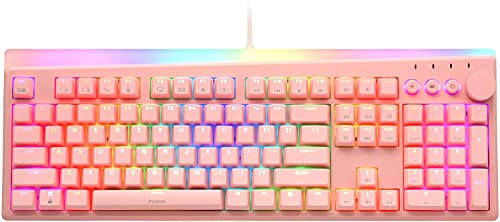
Description
i-rocks K71M Mechanical Gaming Keyboard with Media – Features & Prices in Saudi Arabia :
i-rocks K71M Mechanical Gaming Keyboard with Media Control Knob (Gateron Blue Switches, Pink)
Package Dimensions
18.8 x 8 x 2 inches
Item Weight
3.34 pounds
Manufacturer
i-rocks
ASIN
B00NATU8P0
Country of Origin
China
Date First Available
January 27, 2022
Test video – i-rocks K71M Mechanical Gaming Keyboard with Media :
Product highlights :
Questions & Answers – i-rocks K71M Mechanical Gaming Keyboard with Media :
Technical specifications – i-rocks K71M Mechanical Gaming Keyboard with Media :
Purchase advice :
-
Warranty :
Check the duration of the warranty and also the faults and defects it covers. Is it complete or limited? and What is included in the warranty (parts, repairs or both)?
-
Shipping :
Is delivery offered? And how long does it take to get delivered (Delivery time)
-
Proof of purchase :
Does the shop give you an invoice ?
-
After-sales service :
Do they have an after-sales service to have information about the installation or operation (instructions for use). Also in case of problem, it is the seller who takes charge or you must contact the manufacturer or supplier yourself.
_____________________________
K. B (verified owner) –
Surprised with how much I love this keyboard – Got the white one with brown switches sort of on a whim December 2021 (it’s now October 2022), and I still love it just as much as day one. The lights are really pretty and easy to change, the switches sound super satisfying, and it feels great to type with (even moreso now that they’ve been broken in tbh). My only complaint is that a few keys sound/feel squeaky and springy every here and there – it’s mainly the space bar and wasd, which is almost definitely just due to using these keys so much for gaming haha. Really happy with this product, it’s so underrated and a great value for its price! 🙂
N. C (verified owner) –
Beautiful keyboard and lighting – I was easily able to change out the keycaps for custom ones. However the keycaps I feel do not do the keyboard much justice due to my keycaps not having transparency in the lettering. The RGB interface makes the keyboard seem more expensive then it actually is. I might order another one just so I can use at night and make use of the really pretty lighting effects. (I recommend the Glittering setting – so pretty!).
G. R (verified owner) –
Bright lights – Cool keyboard!
F. Z (verified owner) –
IT IS AMAZING! COLORFUL! LOVE THE SOUND! LOVE THE COLORS – Works well with macOS!!!! To make the ctrl functions work, go to setting preferences > keyboard > modified keys > change the control function to command . The customer service of this company is AMAZING!!
N. C (verified owner) –
Beautiful keyboard and lighting – I was easily able to change out the keycaps for custom ones. However the keycaps I feel do not do the keyboard much justice due to my keycaps not having transparency in the lettering. The RGB interface makes the keyboard seem more expensive then it actually is. I might order another one just so I can use at night and make use of the really pretty lighting effects. (I recommend the Glittering setting – so pretty!).
A. M (verified owner) –
Quality Mechanical Keyboard | Budget Friendly | Desirable Features – Edit:07/21/2021
G. R (verified owner) –
Bright lights – Cool keyboard!
K. B (verified owner) –
Surprised with how much I love this keyboard – Got the white one with brown switches sort of on a whim December 2021 (it’s now October 2022), and I still love it just as much as day one. The lights are really pretty and easy to change, the switches sound super satisfying, and it feels great to type with (even moreso now that they’ve been broken in tbh). My only complaint is that a few keys sound/feel squeaky and springy every here and there – it’s mainly the space bar and wasd, which is almost definitely just due to using these keys so much for gaming haha. Really happy with this product, it’s so underrated and a great value for its price! 🙂
A. M (verified owner) –
Quality Mechanical Keyboard | Budget Friendly | Desirable Features – Edit:07/21/2021
F. Z (verified owner) –
IT IS AMAZING! COLORFUL! LOVE THE SOUND! LOVE THE COLORS – Works well with macOS!!!! To make the ctrl functions work, go to setting preferences > keyboard > modified keys > change the control function to command . The customer service of this company is AMAZING!!