Ecarke 6-Key Gaming Keyboard, USB Mini 6-Key – Features & Prices in Saudi Arabia :
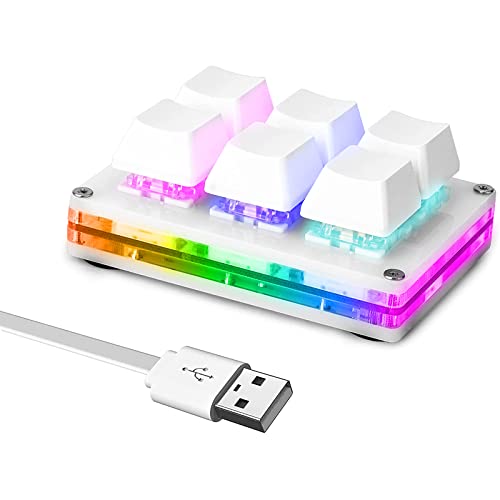
Ecarke 6-Key Gaming Keyboard, USB Mini 6-Key Keypad Mechanical Gaming PC Keyboards Programming Macro with Software OSU HID Standard Keyboard.(Upgrade Cherry Shaft & RGB LED)
Product Dimensions
6 x 5 x 1 inches
Item Weight
3.52 ounces
Manufacturer
Ecarke
ASIN
B093V7TZL8
Date First Available
April 30, 2021
Test video – Ecarke 6-Key Gaming Keyboard, USB Mini 6-Key :
Product highlights :
USB interface, HID standard keyboard, plug and play without driver. The colorful led backlight can be individually adjusted on/off and key press action display mode. Default is irradiation mode: constantly bright and slowly changing color.
The button function can be set by oneself, there is a special setting program, and the setting can be repeated. and Onboard storage, the settings are saved in the keyboard, and there is no need to set again when changing the device.
If you want to use it on MAC, you need to set up win7 and above before you can use it on Mac OS, and use win as command and alt as option
Supports Windows, Linux, Mac OS, Android, Raspberry Pi, etc. The mini keyboard body includes a Hot-swappable shaft, keycaps, non-slip pads, one 1.5m micro-USB cable.
Questions & Answers – Ecarke 6-Key Gaming Keyboard, USB Mini 6-Key :
➕ What is the price of Ecarke 6-Key Gaming Keyboard, USB Mini 6-Key in Saudi Arabia ?
The price of Ecarke 6-Key Gaming Keyboard, USB Mini 6-Key in-store is 110 SAR VAT.
➕ When Ecarke 6-Key Gaming Keyboard, USB Mini 6-Key was released ?
The release date was April 30, 2021.
➕ What is the price of Ecarke 6-Key Gaming Keyboard, USB Mini 6-Key cheap used ?
The price of Ecarke 6-Key Gaming Keyboard, USB Mini 6-Key used is 70 SAR VAT.
➕ What are the main characteristics of Ecarke 6-Key Gaming Keyboard, USB Mini 6-Key ?
Special specifications :
USB interface, HID standard keyboard, plug and play without driver. The colorful led backlight can be individually adjusted on/off and key press action display mode. Default is irradiation mode: constantly bright and slowly changing color.
➕ Is it interesting to buy this product ?
The best people who can answer you are customers who have already bought and tested this product (See Customer Reviews). This product is rated 4.1 / 5 on Amazon.
➕ Where to buy Ecarke 6-Key Gaming Keyboard, USB Mini 6-Key in Saudi Arabia ?
Technical specifications – Ecarke 6-Key Gaming Keyboard, USB Mini 6-Key :
Brand
Ecarke
Compatible Devices
Gaming Console
Connectivity Technology
Micro USB
Keyboard Description
Standalone
Recommended Uses For Product
游戏
Special Feature
Non-slip
Color
White
Operating System
Windows
Number of Keys
6
Keyboard backlighting color support
RGB
Purchase advice :
Warranty :
Check the duration of the warranty and also the faults and defects it covers. Is it complete or limited? and What is included in the warranty (parts, repairs or both)?
Shipping :
Is delivery offered? And how long does it take to get delivered (Delivery time)
Proof of purchase :
Does the shop give you an invoice ?
After-sales service :
Do they have an after-sales service to have information about the installation or operation (instructions for use). Also in case of problem, it is the seller who takes charge or you must contact the manufacturer or supplier yourself.
_____________________________
16 reviews for Ecarke 6-Key Gaming Keyboard, USB Mini 6-Key
Rated 4 out of 5
K. B (verified owner)–
Works BUT Limited documentation – Got this for basic macro keys. I also own XKeys products which are very robust and durable and have English documentation and programing but they are much pricier.
Rated 3 out of 5
C. K (verified owner)–
Difficult setup, works only with 1 program – The instructions were pretty much impossible to follow. My son has taken a couple of programming classes, and was finally able to get this thing going for me, after much trial and error. I wanted it to be able to do the extra vowels from the Norwegian alphabet, as I was teaching Norwegian on an American keyboard. It finally worked, but on Word docs ONLY, not in Google, search bar, or any other writing programs. Bummer.
Rated 5 out of 5
A. C (verified owner)–
Happy with my purchase! – This is exactly what I needed!
Rated 5 out of 5
K. G (verified owner)–
Something I didn’t know I need until I got one – I had bought a 3 button keypad for functions I used most as a Dispatcher. It worked great but quickly realized I needed and extra set of keys and I decided to buy this unit. This model not only has more features but uses an updated USB-C and has a more user friendly programming app. I highly recommend this if you have a set of commonly used macros or something that requires multiple keystrokes like cut and paste. I is a major time saver for my end of day reports and emails.
Rated 4 out of 5
S. N (verified owner)–
Works fine, questionable config software – Product work fine for setting hotkeys. The software to program it is web based, which makes me wonder how long I will be able to use it to configure this device. Accessing the web based software is troublesome. many 1 star reviews of people who couldn’t figure it out. The software itself is pretty well written, I just wonder why its web based (maybe to be able to add features and update without directing people to a new download?) Could be a common Chinese thing, but it seems odd.
Rated 5 out of 5
L. A (verified owner)–
I got one for home and one for work – Having 15 programmable keys is fantastic, there are three layers of six keys, but one key has to be reserved to switch layers, so that leaves 15 for real work. The footprint is small and the functionality once programmed is fantastic.
Rated 4 out of 5
S. N (verified owner)–
Works fine, questionable config software – Product work fine for setting hotkeys. The software to program it is web based, which makes me wonder how long I will be able to use it to configure this device. Accessing the web based software is troublesome. many 1 star reviews of people who couldn’t figure it out. The software itself is pretty well written, I just wonder why its web based (maybe to be able to add features and update without directing people to a new download?) Could be a common Chinese thing, but it seems odd.
Rated 5 out of 5
B. M (verified owner)–
Sweet! Works Well for Zoom and Screen Captures – I read the reviews for the three, four, and six-button versions of this device. A reviewer of the three-button version described where to download the Driver. I will simply quote Carl Cravens’ review, below. I followed his instructions and programmed my six keys as follows: One for Zoom Audio (Alt-A) and one for Video (Alt-V), and four keys to capture screenshots, which were various key combinations with the Print Screen Key.
Rated 5 out of 5
A. C (verified owner)–
Happy with my purchase! – This is exactly what I needed!
Rated 4 out of 5
M. H (verified owner)–
Pretty good but not perfect (for osu) – Got this for osu because I switched to ring index and the simpad wasn’t meant for ring index. Took this pad apart and desoldered all the switches and put in some real lubed and filmed reds. Also the feedback didn’t feel great it felt almost kind of mushy because the whole thing is plastic so I got two custom brass plates cut out for the top and bottom to replace the pre existing plastic and now it feels a lot better. Was a fun project and I like it a lot now. I don’t use this thing at all outside of osu so idk if the software is good or not
Rated 4 out of 5
K. B (verified owner)–
Works BUT Limited documentation – Got this for basic macro keys. I also own XKeys products which are very robust and durable and have English documentation and programing but they are much pricier.
Rated 5 out of 5
K. G (verified owner)–
Something I didn’t know I need until I got one – I had bought a 3 button keypad for functions I used most as a Dispatcher. It worked great but quickly realized I needed and extra set of keys and I decided to buy this unit. This model not only has more features but uses an updated USB-C and has a more user friendly programming app. I highly recommend this if you have a set of commonly used macros or something that requires multiple keystrokes like cut and paste. I is a major time saver for my end of day reports and emails.
Rated 5 out of 5
B. M (verified owner)–
Sweet! Works Well for Zoom and Screen Captures – I read the reviews for the three, four, and six-button versions of this device. A reviewer of the three-button version described where to download the Driver. I will simply quote Carl Cravens’ review, below. I followed his instructions and programmed my six keys as follows: One for Zoom Audio (Alt-A) and one for Video (Alt-V), and four keys to capture screenshots, which were various key combinations with the Print Screen Key.
Rated 4 out of 5
M. H (verified owner)–
Pretty good but not perfect (for osu) – Got this for osu because I switched to ring index and the simpad wasn’t meant for ring index. Took this pad apart and desoldered all the switches and put in some real lubed and filmed reds. Also the feedback didn’t feel great it felt almost kind of mushy because the whole thing is plastic so I got two custom brass plates cut out for the top and bottom to replace the pre existing plastic and now it feels a lot better. Was a fun project and I like it a lot now. I don’t use this thing at all outside of osu so idk if the software is good or not
Rated 5 out of 5
L. A (verified owner)–
I got one for home and one for work – Having 15 programmable keys is fantastic, there are three layers of six keys, but one key has to be reserved to switch layers, so that leaves 15 for real work. The footprint is small and the functionality once programmed is fantastic.
Rated 3 out of 5
C. K (verified owner)–
Difficult setup, works only with 1 program – The instructions were pretty much impossible to follow. My son has taken a couple of programming classes, and was finally able to get this thing going for me, after much trial and error. I wanted it to be able to do the extra vowels from the Norwegian alphabet, as I was teaching Norwegian on an American keyboard. It finally worked, but on Word docs ONLY, not in Google, search bar, or any other writing programs. Bummer.

K. B (verified owner) –
Works BUT Limited documentation – Got this for basic macro keys. I also own XKeys products which are very robust and durable and have English documentation and programing but they are much pricier.
C. K (verified owner) –
Difficult setup, works only with 1 program – The instructions were pretty much impossible to follow. My son has taken a couple of programming classes, and was finally able to get this thing going for me, after much trial and error. I wanted it to be able to do the extra vowels from the Norwegian alphabet, as I was teaching Norwegian on an American keyboard. It finally worked, but on Word docs ONLY, not in Google, search bar, or any other writing programs. Bummer.
A. C (verified owner) –
Happy with my purchase! – This is exactly what I needed!
K. G (verified owner) –
Something I didn’t know I need until I got one – I had bought a 3 button keypad for functions I used most as a Dispatcher. It worked great but quickly realized I needed and extra set of keys and I decided to buy this unit. This model not only has more features but uses an updated USB-C and has a more user friendly programming app. I highly recommend this if you have a set of commonly used macros or something that requires multiple keystrokes like cut and paste. I is a major time saver for my end of day reports and emails.
S. N (verified owner) –
Works fine, questionable config software – Product work fine for setting hotkeys. The software to program it is web based, which makes me wonder how long I will be able to use it to configure this device. Accessing the web based software is troublesome. many 1 star reviews of people who couldn’t figure it out. The software itself is pretty well written, I just wonder why its web based (maybe to be able to add features and update without directing people to a new download?) Could be a common Chinese thing, but it seems odd.
L. A (verified owner) –
I got one for home and one for work – Having 15 programmable keys is fantastic, there are three layers of six keys, but one key has to be reserved to switch layers, so that leaves 15 for real work. The footprint is small and the functionality once programmed is fantastic.
S. N (verified owner) –
Works fine, questionable config software – Product work fine for setting hotkeys. The software to program it is web based, which makes me wonder how long I will be able to use it to configure this device. Accessing the web based software is troublesome. many 1 star reviews of people who couldn’t figure it out. The software itself is pretty well written, I just wonder why its web based (maybe to be able to add features and update without directing people to a new download?) Could be a common Chinese thing, but it seems odd.
B. M (verified owner) –
Sweet! Works Well for Zoom and Screen Captures – I read the reviews for the three, four, and six-button versions of this device. A reviewer of the three-button version described where to download the Driver. I will simply quote Carl Cravens’ review, below. I followed his instructions and programmed my six keys as follows: One for Zoom Audio (Alt-A) and one for Video (Alt-V), and four keys to capture screenshots, which were various key combinations with the Print Screen Key.
A. C (verified owner) –
Happy with my purchase! – This is exactly what I needed!
M. H (verified owner) –
Pretty good but not perfect (for osu) – Got this for osu because I switched to ring index and the simpad wasn’t meant for ring index. Took this pad apart and desoldered all the switches and put in some real lubed and filmed reds. Also the feedback didn’t feel great it felt almost kind of mushy because the whole thing is plastic so I got two custom brass plates cut out for the top and bottom to replace the pre existing plastic and now it feels a lot better. Was a fun project and I like it a lot now. I don’t use this thing at all outside of osu so idk if the software is good or not
K. B (verified owner) –
Works BUT Limited documentation – Got this for basic macro keys. I also own XKeys products which are very robust and durable and have English documentation and programing but they are much pricier.
K. G (verified owner) –
Something I didn’t know I need until I got one – I had bought a 3 button keypad for functions I used most as a Dispatcher. It worked great but quickly realized I needed and extra set of keys and I decided to buy this unit. This model not only has more features but uses an updated USB-C and has a more user friendly programming app. I highly recommend this if you have a set of commonly used macros or something that requires multiple keystrokes like cut and paste. I is a major time saver for my end of day reports and emails.
B. M (verified owner) –
Sweet! Works Well for Zoom and Screen Captures – I read the reviews for the three, four, and six-button versions of this device. A reviewer of the three-button version described where to download the Driver. I will simply quote Carl Cravens’ review, below. I followed his instructions and programmed my six keys as follows: One for Zoom Audio (Alt-A) and one for Video (Alt-V), and four keys to capture screenshots, which were various key combinations with the Print Screen Key.
M. H (verified owner) –
Pretty good but not perfect (for osu) – Got this for osu because I switched to ring index and the simpad wasn’t meant for ring index. Took this pad apart and desoldered all the switches and put in some real lubed and filmed reds. Also the feedback didn’t feel great it felt almost kind of mushy because the whole thing is plastic so I got two custom brass plates cut out for the top and bottom to replace the pre existing plastic and now it feels a lot better. Was a fun project and I like it a lot now. I don’t use this thing at all outside of osu so idk if the software is good or not
L. A (verified owner) –
I got one for home and one for work – Having 15 programmable keys is fantastic, there are three layers of six keys, but one key has to be reserved to switch layers, so that leaves 15 for real work. The footprint is small and the functionality once programmed is fantastic.
C. K (verified owner) –
Difficult setup, works only with 1 program – The instructions were pretty much impossible to follow. My son has taken a couple of programming classes, and was finally able to get this thing going for me, after much trial and error. I wanted it to be able to do the extra vowels from the Norwegian alphabet, as I was teaching Norwegian on an American keyboard. It finally worked, but on Word docs ONLY, not in Google, search bar, or any other writing programs. Bummer.