EasySMX Wireless PC Controller, Dual-Vibration Joystick Gamepad is available in Saudi Arabia.
Find out all you need to know about EasySMX Wireless PC Controller, Dual-Vibration Joystick Gamepad before buying : Price, Test video, Datasheet, Similar products.
EasySMX Wireless PC Controller, Dual-Vibration Joystick Gamepad – Features & Prices in Saudi Arabia :
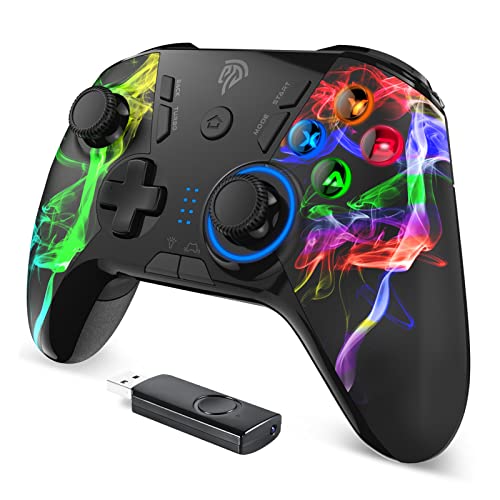
EasySMX Wireless PC Controller, Dual-Vibration Joystick Gamepad Computer Gaming Controller for PC Windows 7/8/10/11/12, Steam, PS3, Switch and Android- Black
Package Dimensions
6.42 x 4.53 x 2.64 inches
Item Weight
11.3 ounces
ASIN
B08CNDJLSW
Item model number
ESM-9110
Batteries
1 Lithium Polymer batteries required.
Date First Available
July 9, 2020
Manufacturer
EasySMX
Test video – EasySMX Wireless PC Controller, Dual-Vibration Joystick Gamepad :
Product highlights :
【Universal Compatibility】EasySMX 9110 Wireless Game Controller supports PS3, PC, Android phones and tablets, and it is compatible with Windows XP/ 7/8/10 and Android 4.0 or above.
【Wireless Connectivity】10m(32.8ft) connectivity range covers the living room and bedroom. No wires, no mess, no hassle. Just wirelessly connect to your device and get to the gaming.
【Dual Vibration Feedback】Asymmetrical linear motor put you in the center of the action, giving you immersive gaming experience with multi magnitude of vibration feedback.
【Ergonomics】The non-slip grips are designed for improved stability. The indentation and textured surface of the joystick fit your fingers snuggly and prevent slips in intense games, giving you full control.
【Battery Operated】The wireless game controller has an embedded lithium battery and it has a smart sleep function, increasing battery efficiency.
➕ What is the price of EasySMX Wireless PC Controller, Dual-Vibration Joystick Gamepad in Saudi Arabia ?
The price of EasySMX Wireless PC Controller, Dual-Vibration Joystick Gamepad in-store is 150 SAR VAT.
➕ When EasySMX Wireless PC Controller, Dual-Vibration Joystick Gamepad was released ?
The release date was July 9, 2020.
➕ What is the price of EasySMX Wireless PC Controller, Dual-Vibration Joystick Gamepad cheap used ?
The price of EasySMX Wireless PC Controller, Dual-Vibration Joystick Gamepad used is 100 SAR VAT.
➕ What are the main characteristics of EasySMX Wireless PC Controller, Dual-Vibration Joystick Gamepad ?
Special specifications :
【Universal Compatibility】EasySMX 9110 Wireless Game Controller supports PS3, PC, Android phones and tablets, and it is compatible with Windows XP/ 7/8/10 and Android 4.0 or above.
➕ Is it interesting to buy this product ?
The best people who can answer you are customers who have already bought and tested this product (See Customer Reviews). This product is rated 4.2 / 5 on Amazon.
➕ Where to buy EasySMX Wireless PC Controller, Dual-Vibration Joystick Gamepad in Saudi Arabia ?
Check the duration of the warranty and also the faults and defects it covers. Is it complete or limited? and What is included in the warranty (parts, repairs or both)?
Shipping :
Is delivery offered? And how long does it take to get delivered (Delivery time)
Proof of purchase :
Does the shop give you an invoice ?
After-sales service :
Do they have an after-sales service to have information about the installation or operation (instructions for use). Also in case of problem, it is the seller who takes charge or you must contact the manufacturer or supplier yourself.
_____________________________
16 reviews for EasySMX Wireless PC Controller, Dual-Vibration Joystick Gamepad
Rated 4 out of 5
D. P (verified owner)–
Let’s play games – Pretty good game pad. Everything works great and I like the feel of the buttons and the good vibration. I hit the buttons on the underside sometimes when I really get into playing (not ideal when you are really in it) but got over it by reassignment the buttons on games I don’t need them on (which is most games). Overall though. I like it. Better in my opinion than an Xbox pad.
Rated 3 out of 5
K. B (verified owner)–
It’s an OK controller but not worth 40 bucks – The controller is good if you’re playing games that don’t require precise aiming. I say this because my only frustration with the device is that I can’t lightly tap/rotate the joy sticks to move it in small increments. It’s not as sensitive as I wish. I have to fully tilt each joy stick in order to see changes. So basically you either fully look left or fully look/turn right same thing for up and down. I like the buttons and options but for the life of me I can’t figure out how to customize the M 1 thru M 4 buttons on the bottom of the controller. I tried reading the user manual but there are a lot of grammatical errors and misprints. The controller feels okay in hand but I can see how after a while of game play, it isn’t the best ergonomic controller to have, that’s just me tho I have wrist sensitivity so maybe people who don’t have wrist issues may not see or feel the problem I’m talking about. Other than that. It’s a pretty simple plug and play, I appreciate that it’s cordless and the battery life seems okay so far. It auto shuts off too after a few minutes going afk so I’m glad it doesn’t stay on the whole time draining the battery. It’s easy to turn on and off. I haven’t tried the turbo feature or messed with the lights at all I don’t have a need to do all thar lol but yeah 3 stars only because of what I previously mentioned. So if your playing first shooter games and it requires precise aim, this may not be for you since the joy sticks aren’t as sensitive as I’d like them to be, and that’s regardless of any game settings as well as computer settings I’ve adjusted. The hardware just isn’t as sensitive as it could be. If they upgrade that one thing it would’ve gotten 5 stars regardless of the lack of ergonomic shape or other buttons working. I care more about having the sensitivity needed to aim during a game. I hope this helps anyone looking into this controller.
Rated 5 out of 5
D. M (verified owner)–
Husband loves it – Got it for my husband for his birthday for his PC and he loves it.
Rated 4 out of 5
D. P (verified owner)–
Let’s play games – Pretty good game pad. Everything works great and I like the feel of the buttons and the good vibration. I hit the buttons on the underside sometimes when I really get into playing (not ideal when you are really in it) but got over it by reassignment the buttons on games I don’t need them on (which is most games). Overall though. I like it. Better in my opinion than an Xbox pad.
Rated 4 out of 5
S. K (verified owner)–
Pretty good – The only thing that bothers me is that the glow for the buttons is only on the right side of the controller and not for the joysticks on the left side. My symmetrical self doesn’t like it and it bothers me a lot lol.
Rated 5 out of 5
F. B (verified owner)–
My son loves this controller. – It’s easy to use and set up. My son loves it.
Rated 5 out of 5
O. C (verified owner)–
An exciting controller. The kids love it. – I like everything about it. Well the kids do lol.
Rated 5 out of 5
O. C (verified owner)–
An exciting controller. The kids love it. – I like everything about it. Well the kids do lol.
Rated 5 out of 5
D. M (verified owner)–
Husband loves it – Got it for my husband for his birthday for his PC and he loves it.
Rated 4 out of 5
C. G (verified owner)–
feeling pretty good on the hands. – I got the colorful side grips. Overall its pretty good.
Rated 3 out of 5
K. B (verified owner)–
It’s an OK controller but not worth 40 bucks – The controller is good if you’re playing games that don’t require precise aiming. I say this because my only frustration with the device is that I can’t lightly tap/rotate the joy sticks to move it in small increments. It’s not as sensitive as I wish. I have to fully tilt each joy stick in order to see changes. So basically you either fully look left or fully look/turn right same thing for up and down. I like the buttons and options but for the life of me I can’t figure out how to customize the M 1 thru M 4 buttons on the bottom of the controller. I tried reading the user manual but there are a lot of grammatical errors and misprints. The controller feels okay in hand but I can see how after a while of game play, it isn’t the best ergonomic controller to have, that’s just me tho I have wrist sensitivity so maybe people who don’t have wrist issues may not see or feel the problem I’m talking about. Other than that. It’s a pretty simple plug and play, I appreciate that it’s cordless and the battery life seems okay so far. It auto shuts off too after a few minutes going afk so I’m glad it doesn’t stay on the whole time draining the battery. It’s easy to turn on and off. I haven’t tried the turbo feature or messed with the lights at all I don’t have a need to do all thar lol but yeah 3 stars only because of what I previously mentioned. So if your playing first shooter games and it requires precise aim, this may not be for you since the joy sticks aren’t as sensitive as I’d like them to be, and that’s regardless of any game settings as well as computer settings I’ve adjusted. The hardware just isn’t as sensitive as it could be. If they upgrade that one thing it would’ve gotten 5 stars regardless of the lack of ergonomic shape or other buttons working. I care more about having the sensitivity needed to aim during a game. I hope this helps anyone looking into this controller.
Rated 5 out of 5
F. B (verified owner)–
My son loves this controller. – It’s easy to use and set up. My son loves it.
Rated 4 out of 5
A. E (verified owner)–
It is so cute – The colors on this console is so vibrant and adorable though it doesn’t work for a tablet which I initially bought it for though this console works well on PC it feels really durable and doesn’t make a lot of noise great buy
Rated 4 out of 5
S. K (verified owner)–
Pretty good – The only thing that bothers me is that the glow for the buttons is only on the right side of the controller and not for the joysticks on the left side. My symmetrical self doesn’t like it and it bothers me a lot lol.
Rated 4 out of 5
A. E (verified owner)–
It is so cute – The colors on this console is so vibrant and adorable though it doesn’t work for a tablet which I initially bought it for though this console works well on PC it feels really durable and doesn’t make a lot of noise great buy
Rated 4 out of 5
C. G (verified owner)–
feeling pretty good on the hands. – I got the colorful side grips. Overall its pretty good.

D. P (verified owner) –
Let’s play games – Pretty good game pad. Everything works great and I like the feel of the buttons and the good vibration. I hit the buttons on the underside sometimes when I really get into playing (not ideal when you are really in it) but got over it by reassignment the buttons on games I don’t need them on (which is most games). Overall though. I like it. Better in my opinion than an Xbox pad.
K. B (verified owner) –
It’s an OK controller but not worth 40 bucks – The controller is good if you’re playing games that don’t require precise aiming. I say this because my only frustration with the device is that I can’t lightly tap/rotate the joy sticks to move it in small increments. It’s not as sensitive as I wish. I have to fully tilt each joy stick in order to see changes. So basically you either fully look left or fully look/turn right same thing for up and down. I like the buttons and options but for the life of me I can’t figure out how to customize the M 1 thru M 4 buttons on the bottom of the controller. I tried reading the user manual but there are a lot of grammatical errors and misprints. The controller feels okay in hand but I can see how after a while of game play, it isn’t the best ergonomic controller to have, that’s just me tho I have wrist sensitivity so maybe people who don’t have wrist issues may not see or feel the problem I’m talking about. Other than that. It’s a pretty simple plug and play, I appreciate that it’s cordless and the battery life seems okay so far. It auto shuts off too after a few minutes going afk so I’m glad it doesn’t stay on the whole time draining the battery. It’s easy to turn on and off. I haven’t tried the turbo feature or messed with the lights at all I don’t have a need to do all thar lol but yeah 3 stars only because of what I previously mentioned. So if your playing first shooter games and it requires precise aim, this may not be for you since the joy sticks aren’t as sensitive as I’d like them to be, and that’s regardless of any game settings as well as computer settings I’ve adjusted. The hardware just isn’t as sensitive as it could be. If they upgrade that one thing it would’ve gotten 5 stars regardless of the lack of ergonomic shape or other buttons working. I care more about having the sensitivity needed to aim during a game. I hope this helps anyone looking into this controller.
D. M (verified owner) –
Husband loves it – Got it for my husband for his birthday for his PC and he loves it.
D. P (verified owner) –
Let’s play games – Pretty good game pad. Everything works great and I like the feel of the buttons and the good vibration. I hit the buttons on the underside sometimes when I really get into playing (not ideal when you are really in it) but got over it by reassignment the buttons on games I don’t need them on (which is most games). Overall though. I like it. Better in my opinion than an Xbox pad.
S. K (verified owner) –
Pretty good – The only thing that bothers me is that the glow for the buttons is only on the right side of the controller and not for the joysticks on the left side. My symmetrical self doesn’t like it and it bothers me a lot lol.
F. B (verified owner) –
My son loves this controller. – It’s easy to use and set up. My son loves it.
O. C (verified owner) –
An exciting controller. The kids love it. – I like everything about it. Well the kids do lol.
O. C (verified owner) –
An exciting controller. The kids love it. – I like everything about it. Well the kids do lol.
D. M (verified owner) –
Husband loves it – Got it for my husband for his birthday for his PC and he loves it.
C. G (verified owner) –
feeling pretty good on the hands. – I got the colorful side grips. Overall its pretty good.
K. B (verified owner) –
It’s an OK controller but not worth 40 bucks – The controller is good if you’re playing games that don’t require precise aiming. I say this because my only frustration with the device is that I can’t lightly tap/rotate the joy sticks to move it in small increments. It’s not as sensitive as I wish. I have to fully tilt each joy stick in order to see changes. So basically you either fully look left or fully look/turn right same thing for up and down. I like the buttons and options but for the life of me I can’t figure out how to customize the M 1 thru M 4 buttons on the bottom of the controller. I tried reading the user manual but there are a lot of grammatical errors and misprints. The controller feels okay in hand but I can see how after a while of game play, it isn’t the best ergonomic controller to have, that’s just me tho I have wrist sensitivity so maybe people who don’t have wrist issues may not see or feel the problem I’m talking about. Other than that. It’s a pretty simple plug and play, I appreciate that it’s cordless and the battery life seems okay so far. It auto shuts off too after a few minutes going afk so I’m glad it doesn’t stay on the whole time draining the battery. It’s easy to turn on and off. I haven’t tried the turbo feature or messed with the lights at all I don’t have a need to do all thar lol but yeah 3 stars only because of what I previously mentioned. So if your playing first shooter games and it requires precise aim, this may not be for you since the joy sticks aren’t as sensitive as I’d like them to be, and that’s regardless of any game settings as well as computer settings I’ve adjusted. The hardware just isn’t as sensitive as it could be. If they upgrade that one thing it would’ve gotten 5 stars regardless of the lack of ergonomic shape or other buttons working. I care more about having the sensitivity needed to aim during a game. I hope this helps anyone looking into this controller.
F. B (verified owner) –
My son loves this controller. – It’s easy to use and set up. My son loves it.
A. E (verified owner) –
It is so cute – The colors on this console is so vibrant and adorable though it doesn’t work for a tablet which I initially bought it for though this console works well on PC it feels really durable and doesn’t make a lot of noise great buy
S. K (verified owner) –
Pretty good – The only thing that bothers me is that the glow for the buttons is only on the right side of the controller and not for the joysticks on the left side. My symmetrical self doesn’t like it and it bothers me a lot lol.
A. E (verified owner) –
It is so cute – The colors on this console is so vibrant and adorable though it doesn’t work for a tablet which I initially bought it for though this console works well on PC it feels really durable and doesn’t make a lot of noise great buy
C. G (verified owner) –
feeling pretty good on the hands. – I got the colorful side grips. Overall its pretty good.