
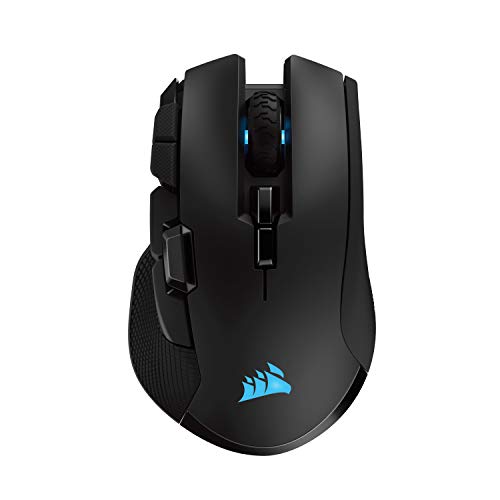
Description
Corsair Ironclaw Wireless RGB – FPS and – Features & Prices in Saudi Arabia :
Corsair Ironclaw Wireless RGB – FPS and MOBA Gaming Mouse – 18,000 DPI Optical Sensor – Sub-1 ms SLIPSTREAM Wireless
Brand
Corsair
Series
IRONCLAW RGB WIRELESS Gaming Mouse
Item model number
CH-9317011-NA
Hardware Platform
PC
Item Weight
4.6 ounces
Product Dimensions
5.12 x 3.15 x 1.77 inches
Item Dimensions LxWxH
5.12 x 3.15 x 1.77 inches
Color
Black
Power Source
Battery Powered
Batteries
1 Lithium Polymer batteries required. (included)
Manufacturer
Corsair
ASIN
B07Q424WFW
Country of Origin
China
Is Discontinued By Manufacturer
No
Date First Available
November 29, 2022
Test video – Corsair Ironclaw Wireless RGB – FPS and :
Product highlights :
Questions & Answers – Corsair Ironclaw Wireless RGB – FPS and :
Technical specifications – Corsair Ironclaw Wireless RGB – FPS and :
Brand
Corsair
Color
Black
Connectivity Technology
Bluetooth
Special Feature
Wireless
Movement Detection Technology
Optical
Purchase advice :
-
Warranty :
Check the duration of the warranty and also the faults and defects it covers. Is it complete or limited? and What is included in the warranty (parts, repairs or both)?
-
Shipping :
Is delivery offered? And how long does it take to get delivered (Delivery time)
-
Proof of purchase :
Does the shop give you an invoice ?
-
After-sales service :
Do they have an after-sales service to have information about the installation or operation (instructions for use). Also in case of problem, it is the seller who takes charge or you must contact the manufacturer or supplier yourself.
_____________________________

A. D (verified owner) –
Good Mouse – This mouse has good weight to it. A fair amount of extra buttons for programming them to macros, extra commands for games, whatever you need. This may be an issue I’m experiencing alone however the mouse does have a tendency to lose its connection with Icue (this causes any custom bindings you’ve set on the mouse to stop working) however it’s fairly easy to fix, I simply turn it off, wait a second then swap back to the 2.4Ghz connection.
J. R (verified owner) –
The biggest mouse failure versus CORSAIR® – Purchased a RAZOR® mouse on September 11th, 2022. Squeaking and plastic failed as a thumb button broke off literally when a five-year-old pressed it while sitting on my lap doing what infants do.
J. R (verified owner) –
The biggest mouse failure versus CORSAIR® – Purchased a RAZOR® mouse on September 11th, 2022. Squeaking and plastic failed as a thumb button broke off literally when a five-year-old pressed it while sitting on my lap doing what infants do.
H. L (verified owner) –
Pretty good, but… – As an avid gamer and professional senior IT technician, I’ve used far more mice than a typical person. Corsair has in the past seldom if ever disappointed me with peripherals. This mouse, which I bought in mid March 2022, has been no different the entire time I’ve owned it, until about 2 weeks ago. In that time I have noticed that the left & right click buttons have begun to squeak when clicking about 90% of the time. With headphones on in a game or watching a show/video it’s not at all noticeable. However, if I’m just using the mouse without headphones it’s impossible to miss. And rather irritating as well. They sound like a faintly squeaky wheel like that of an old light weight wheelbarrow, which in my 20+ years of gaming & heavy PC use I never in my life thought I’d use that as a descriptor of a sound a mouse makes. This alone doesn’t change my opinion of Corsair’s peripherals, but it is something of note. I am monitoring to see if the squeak gets worse, or if other issues develop and will update this review in the event changes occur.
A. D (verified owner) –
Good Mouse – This mouse has good weight to it. A fair amount of extra buttons for programming them to macros, extra commands for games, whatever you need. This may be an issue I’m experiencing alone however the mouse does have a tendency to lose its connection with Icue (this causes any custom bindings you’ve set on the mouse to stop working) however it’s fairly easy to fix, I simply turn it off, wait a second then swap back to the 2.4Ghz connection.
O. A (verified owner) –
Good for DPS, perfect size for large hands, iCUE software a little tricky – So I originally purchased the wired G502 from Logitech back in 2016 and it has been my daily driver ever since. For about 4 years I was happy with it and it performed admirably. However, with the recent release of apex legends and a desk change it has started to bother me due to two issues. Those being the drag of the cable on my new desk and the large size on my hands not sitting properly on the mouse.
O. A (verified owner) –
Good for DPS, perfect size for large hands, iCUE software a little tricky – So I originally purchased the wired G502 from Logitech back in 2016 and it has been my daily driver ever since. For about 4 years I was happy with it and it performed admirably. However, with the recent release of apex legends and a desk change it has started to bother me due to two issues. Those being the drag of the cable on my new desk and the large size on my hands not sitting properly on the mouse.
O. A (verified owner) –
– I decided to try a new brand out because razer has consistently failed me in the last 2 years. So I purchased this along with a k97 mechanical and after 3 months I can rightfully say they are trash. The Q button consistently pops off now all the time when I’m playing games which uses wasd lolol not q and the mouse forward button (I use for push to talk has completely stopped working. Not even a click sound at all.) My case I ordered the front panel isnt even put on properly and there is a chunk of metal on the cases frame blocking it from even going on properly. 3 corsair products and all 3 have failed in 3 months. I really wish I noticed the case prior to last month as I could have returned it. As for the mouse and keyboard well what can I say…..I didnt buy warranty and here I am out 250$
O. A (verified owner) –
– I decided to try a new brand out because razer has consistently failed me in the last 2 years. So I purchased this along with a k97 mechanical and after 3 months I can rightfully say they are trash. The Q button consistently pops off now all the time when I’m playing games which uses wasd lolol not q and the mouse forward button (I use for push to talk has completely stopped working. Not even a click sound at all.) My case I ordered the front panel isnt even put on properly and there is a chunk of metal on the cases frame blocking it from even going on properly. 3 corsair products and all 3 have failed in 3 months. I really wish I noticed the case prior to last month as I could have returned it. As for the mouse and keyboard well what can I say…..I didnt buy warranty and here I am out 250$
H. L (verified owner) –
Pretty good, but… – As an avid gamer and professional senior IT technician, I’ve used far more mice than a typical person. Corsair has in the past seldom if ever disappointed me with peripherals. This mouse, which I bought in mid March 2022, has been no different the entire time I’ve owned it, until about 2 weeks ago. In that time I have noticed that the left & right click buttons have begun to squeak when clicking about 90% of the time. With headphones on in a game or watching a show/video it’s not at all noticeable. However, if I’m just using the mouse without headphones it’s impossible to miss. And rather irritating as well. They sound like a faintly squeaky wheel like that of an old light weight wheelbarrow, which in my 20+ years of gaming & heavy PC use I never in my life thought I’d use that as a descriptor of a sound a mouse makes. This alone doesn’t change my opinion of Corsair’s peripherals, but it is something of note. I am monitoring to see if the squeak gets worse, or if other issues develop and will update this review in the event changes occur.