WolfLawS Wired Gaming Mouse, Computer PC Gaming – Features & Prices in Saudi Arabia :
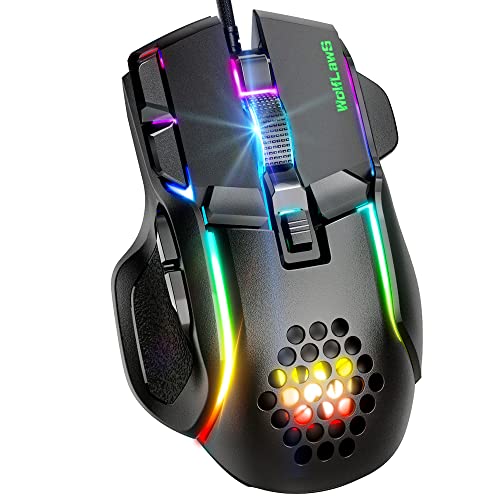
WolfLawS Wired Gaming Mouse, Computer PC Gaming Mice USB Mouse with 12 RGB Backlit Modes, High-Precision Adjustable 12800 DPI, 10 Programmable Buttons, Ergonomic Plug Play Gamer Mouse for Laptop Mac
Package Dimensions
5.83 x 3.39 x 1.93 inches
Item Weight
6.7 ounces
ASIN
B0BD754SLH
Item model number
M5
Date First Available
September 6, 2022
Manufacturer
WolfLawS
Test video – WolfLawS Wired Gaming Mouse, Computer PC Gaming :
Product highlights :
6 Adjustable DPI Up to 12800 — Taking high-precision optical sensor, WolfLawS M5 wired gaming mouse owns 6 adjustable DPI levels(1200/1600/2400/6400/7200/12800), and 4 polling rate is adjustable: 125Hz/250Hz/500Hz/1000Hz, which makes your control more smoothly and freely. The M5 driver software supports users to customize it by yourselves, you could download it from our website(please refer to the instructions or contact the WolfLawS support about the website).
12 Chroma RGB Backlit Modes — M5 gaming mouse owns 12 backlit modes: DPI Breathing Effect/Cycle Breathing Effect/Flowing Water Effect/Mono Water Effect/ Comet Streak/Neon/Glittering Effect/Flicker/Star Trek/Ripple/Enraptured/Button Response. To activate the lights, please remember to turn the light button at the bottom of the mouse on, and then you can change the light effects by clicking the ‘Light Switch’ key at the mouse. Or you can download the driver and use it to customize the lighting modes as you like.
10 Progammable Buttons — Equipped with 10 buttons: Left button, Right button, Forward, Backward, DPI button, Light Switch button, Rapid Fire, Show Desktop, Browser and Scroll Wheel. Supports customizing mouse button by the driver(Please download it from our website) as you like, meets for your demands excellently for different games, enables to switch fast while gaming.
Humanized Design for Comfortable Grip — Taking advanced and unique design offers you better touch and using experience, brings you more comfortable grip, and perfectly fits under your palm, offers gamers the most fantastic gaming experience and makes you feel free from fatigue.
Wide Compatiblity and Reliable Quality – M5 Gaming Mouse can compatible with Windows XP, Vista, Windows 7, Windows 8, Windows 10, Mac OS X 10.4 etc., adaptable for Notebook, PC, laptop, Computer, Macbook and so on. (But please note that the M5 driver software can not operate on Mac OS system). 5 million times keystroke tested, gives you reliable durability.
➕ What is the price of WolfLawS Wired Gaming Mouse, Computer PC Gaming in Saudi Arabia ?
The price of WolfLawS Wired Gaming Mouse, Computer PC Gaming in-store is 90 SAR VAT.
➕ When WolfLawS Wired Gaming Mouse, Computer PC Gaming was released ?
The release date was September 6, 2022.
➕ What is the price of WolfLawS Wired Gaming Mouse, Computer PC Gaming cheap used ?
The price of WolfLawS Wired Gaming Mouse, Computer PC Gaming used is 60 SAR VAT.
➕ What are the main characteristics of WolfLawS Wired Gaming Mouse, Computer PC Gaming ?
Special specifications :
6 Adjustable DPI Up to 12800 — Taking high-precision optical sensor, WolfLawS M5 wired gaming mouse owns 6 adjustable DPI levels(1200/1600/2400/6400/7200/12800), and 4 polling rate is adjustable: 125Hz/250Hz/500Hz/1000Hz, which makes your control more smoothly and freely. The M5 driver software supports users to customize it by yourselves, you could download it from our website(please refer to the instructions or contact the WolfLawS support about the website).
➕ Is it interesting to buy this product ?
The best people who can answer you are customers who have already bought and tested this product (See Customer Reviews). This product is rated 4.3 / 5 on Amazon.
➕ Where to buy WolfLawS Wired Gaming Mouse, Computer PC Gaming in Saudi Arabia ?
Programmable Buttons, Ergonomic Design, LED Lights
Movement Detection Technology
Optical
Purchase advice :
Warranty :
Check the duration of the warranty and also the faults and defects it covers. Is it complete or limited? and What is included in the warranty (parts, repairs or both)?
Shipping :
Is delivery offered? And how long does it take to get delivered (Delivery time)
Proof of purchase :
Does the shop give you an invoice ?
After-sales service :
Do they have an after-sales service to have information about the installation or operation (instructions for use). Also in case of problem, it is the seller who takes charge or you must contact the manufacturer or supplier yourself.
_____________________________
10 reviews for WolfLawS Wired Gaming Mouse, Computer PC Gaming
Rated 4 out of 5
H. T (verified owner)–
Decent gaming mouse – I like how this mouse is wider than my other mouse. It has a lip on the upper right to allow one of my fingers to test on it while it lets me pinky finger still touch the mouse pad. You don’t realize how crucial that is for using a mouse.
Rated 4 out of 5
J. B (verified owner)–
Good mouse for the Price – The package was pretty small, which is great, no excess space. It is just the mouse and a set of instructions.
Rated 5 out of 5
T. P (verified owner)–
Affordable Decent Gaming Mouse – I have had other gaming mice, but they all had their drawbacks. I gave this one a try and I like what it has to offer. It has a wide range of buttons and functions – this is always nice – and they are well-integrated into the unit. Other mice have extra buttons and such, but the buttons are in the way for mousing. This one positions the buttons in convenient places that do not interfere with mousing. It easily moves between sensitivity settings as well. The scroll wheel works good, and (even though it is somewhat unique) I like the shape because it doesn’t contact all of my hand and fingers all of the time. It’s a small thing, but one of the features that I like the most is the little Thumb and Ring-finger rests on either side. They don’t do anything except keep your hand off the mousing surface. I didn’t know I would even want that, but I ended up liking it a lot. In the end, I can recommend this for sure. It is a little unusual in shape and took a little getting used to, but not very much and now I really like it.
Rated 4 out of 5
J. B (verified owner)–
Good mouse for the Price – The package was pretty small, which is great, no excess space. It is just the mouse and a set of instructions.
Rated 4 out of 5
H. T (verified owner)–
Decent gaming mouse – I like how this mouse is wider than my other mouse. It has a lip on the upper right to allow one of my fingers to test on it while it lets me pinky finger still touch the mouse pad. You don’t realize how crucial that is for using a mouse.
Rated 5 out of 5
P. M (verified owner)–
A great mouse even for non-gamers – If you like RGBs and the sharp line aesthetic that is in vogue for gaming peripherals these days, this mouse should be a great fit. It features a ton of extra buttons, and while the configuration software is not super polished, it gets the job done. I didn’t test the DPI settings in any rigorous fashion, but they appear to work, and it felt like it would be responsive enough for any FPS style gaming needs. If you’re a gamer or a lover of mouse macros, this seems like a great mouse for you.
Rated 5 out of 5
P. M (verified owner)–
A great mouse even for non-gamers – If you like RGBs and the sharp line aesthetic that is in vogue for gaming peripherals these days, this mouse should be a great fit. It features a ton of extra buttons, and while the configuration software is not super polished, it gets the job done. I didn’t test the DPI settings in any rigorous fashion, but they appear to work, and it felt like it would be responsive enough for any FPS style gaming needs. If you’re a gamer or a lover of mouse macros, this seems like a great mouse for you.
Rated 5 out of 5
M. B (verified owner)–
More functionality than my Logitech mouse – PROS: It defintely has the “cool” factor in its design and in the LED colors that are constantly oscillating from one color to the next. If you need to sleep, you can turn off the LED lights with a long push of the button next to the wheel. My kids have already claimed it for their desktop games (Apex, Fortnite, Call of Duty, etc). As you can see in my photos, I compared this to my favorite Logitech mouse. It is slightly larger than my Logitech mouse, but this larger size results in a better fit for my hand and is therefore more ergonomic for me. This results in less arm and hand fatigue. Buttons galore… Compared to my Logitech mouse, this one has way more buttons that allow me to do extra things with a single click which makes it much more efficient and again contributes to longer hand and concentration endurance. Can control mouse speed with this mouse – very neat feature that allows you to tailor th mouse speed to whatever your needs might be at any moment and you can do this on the fly. This mouse really stands out with respect to functionality, which saves user time and reduces concentration/hand fatigue.
Rated 5 out of 5
M. B (verified owner)–
More functionality than my Logitech mouse – PROS: It defintely has the “cool” factor in its design and in the LED colors that are constantly oscillating from one color to the next. If you need to sleep, you can turn off the LED lights with a long push of the button next to the wheel. My kids have already claimed it for their desktop games (Apex, Fortnite, Call of Duty, etc). As you can see in my photos, I compared this to my favorite Logitech mouse. It is slightly larger than my Logitech mouse, but this larger size results in a better fit for my hand and is therefore more ergonomic for me. This results in less arm and hand fatigue. Buttons galore… Compared to my Logitech mouse, this one has way more buttons that allow me to do extra things with a single click which makes it much more efficient and again contributes to longer hand and concentration endurance. Can control mouse speed with this mouse – very neat feature that allows you to tailor th mouse speed to whatever your needs might be at any moment and you can do this on the fly. This mouse really stands out with respect to functionality, which saves user time and reduces concentration/hand fatigue.
Rated 5 out of 5
T. P (verified owner)–
Affordable Decent Gaming Mouse – I have had other gaming mice, but they all had their drawbacks. I gave this one a try and I like what it has to offer. It has a wide range of buttons and functions – this is always nice – and they are well-integrated into the unit. Other mice have extra buttons and such, but the buttons are in the way for mousing. This one positions the buttons in convenient places that do not interfere with mousing. It easily moves between sensitivity settings as well. The scroll wheel works good, and (even though it is somewhat unique) I like the shape because it doesn’t contact all of my hand and fingers all of the time. It’s a small thing, but one of the features that I like the most is the little Thumb and Ring-finger rests on either side. They don’t do anything except keep your hand off the mousing surface. I didn’t know I would even want that, but I ended up liking it a lot. In the end, I can recommend this for sure. It is a little unusual in shape and took a little getting used to, but not very much and now I really like it.

H. T (verified owner) –
Decent gaming mouse – I like how this mouse is wider than my other mouse. It has a lip on the upper right to allow one of my fingers to test on it while it lets me pinky finger still touch the mouse pad. You don’t realize how crucial that is for using a mouse.
J. B (verified owner) –
Good mouse for the Price – The package was pretty small, which is great, no excess space. It is just the mouse and a set of instructions.
T. P (verified owner) –
Affordable Decent Gaming Mouse – I have had other gaming mice, but they all had their drawbacks. I gave this one a try and I like what it has to offer. It has a wide range of buttons and functions – this is always nice – and they are well-integrated into the unit. Other mice have extra buttons and such, but the buttons are in the way for mousing. This one positions the buttons in convenient places that do not interfere with mousing. It easily moves between sensitivity settings as well. The scroll wheel works good, and (even though it is somewhat unique) I like the shape because it doesn’t contact all of my hand and fingers all of the time. It’s a small thing, but one of the features that I like the most is the little Thumb and Ring-finger rests on either side. They don’t do anything except keep your hand off the mousing surface. I didn’t know I would even want that, but I ended up liking it a lot. In the end, I can recommend this for sure. It is a little unusual in shape and took a little getting used to, but not very much and now I really like it.
J. B (verified owner) –
Good mouse for the Price – The package was pretty small, which is great, no excess space. It is just the mouse and a set of instructions.
H. T (verified owner) –
Decent gaming mouse – I like how this mouse is wider than my other mouse. It has a lip on the upper right to allow one of my fingers to test on it while it lets me pinky finger still touch the mouse pad. You don’t realize how crucial that is for using a mouse.
P. M (verified owner) –
A great mouse even for non-gamers – If you like RGBs and the sharp line aesthetic that is in vogue for gaming peripherals these days, this mouse should be a great fit. It features a ton of extra buttons, and while the configuration software is not super polished, it gets the job done. I didn’t test the DPI settings in any rigorous fashion, but they appear to work, and it felt like it would be responsive enough for any FPS style gaming needs. If you’re a gamer or a lover of mouse macros, this seems like a great mouse for you.
P. M (verified owner) –
A great mouse even for non-gamers – If you like RGBs and the sharp line aesthetic that is in vogue for gaming peripherals these days, this mouse should be a great fit. It features a ton of extra buttons, and while the configuration software is not super polished, it gets the job done. I didn’t test the DPI settings in any rigorous fashion, but they appear to work, and it felt like it would be responsive enough for any FPS style gaming needs. If you’re a gamer or a lover of mouse macros, this seems like a great mouse for you.
M. B (verified owner) –
More functionality than my Logitech mouse – PROS: It defintely has the “cool” factor in its design and in the LED colors that are constantly oscillating from one color to the next. If you need to sleep, you can turn off the LED lights with a long push of the button next to the wheel. My kids have already claimed it for their desktop games (Apex, Fortnite, Call of Duty, etc). As you can see in my photos, I compared this to my favorite Logitech mouse. It is slightly larger than my Logitech mouse, but this larger size results in a better fit for my hand and is therefore more ergonomic for me. This results in less arm and hand fatigue. Buttons galore… Compared to my Logitech mouse, this one has way more buttons that allow me to do extra things with a single click which makes it much more efficient and again contributes to longer hand and concentration endurance. Can control mouse speed with this mouse – very neat feature that allows you to tailor th mouse speed to whatever your needs might be at any moment and you can do this on the fly. This mouse really stands out with respect to functionality, which saves user time and reduces concentration/hand fatigue.
M. B (verified owner) –
More functionality than my Logitech mouse – PROS: It defintely has the “cool” factor in its design and in the LED colors that are constantly oscillating from one color to the next. If you need to sleep, you can turn off the LED lights with a long push of the button next to the wheel. My kids have already claimed it for their desktop games (Apex, Fortnite, Call of Duty, etc). As you can see in my photos, I compared this to my favorite Logitech mouse. It is slightly larger than my Logitech mouse, but this larger size results in a better fit for my hand and is therefore more ergonomic for me. This results in less arm and hand fatigue. Buttons galore… Compared to my Logitech mouse, this one has way more buttons that allow me to do extra things with a single click which makes it much more efficient and again contributes to longer hand and concentration endurance. Can control mouse speed with this mouse – very neat feature that allows you to tailor th mouse speed to whatever your needs might be at any moment and you can do this on the fly. This mouse really stands out with respect to functionality, which saves user time and reduces concentration/hand fatigue.
T. P (verified owner) –
Affordable Decent Gaming Mouse – I have had other gaming mice, but they all had their drawbacks. I gave this one a try and I like what it has to offer. It has a wide range of buttons and functions – this is always nice – and they are well-integrated into the unit. Other mice have extra buttons and such, but the buttons are in the way for mousing. This one positions the buttons in convenient places that do not interfere with mousing. It easily moves between sensitivity settings as well. The scroll wheel works good, and (even though it is somewhat unique) I like the shape because it doesn’t contact all of my hand and fingers all of the time. It’s a small thing, but one of the features that I like the most is the little Thumb and Ring-finger rests on either side. They don’t do anything except keep your hand off the mousing surface. I didn’t know I would even want that, but I ended up liking it a lot. In the end, I can recommend this for sure. It is a little unusual in shape and took a little getting used to, but not very much and now I really like it.