
Description
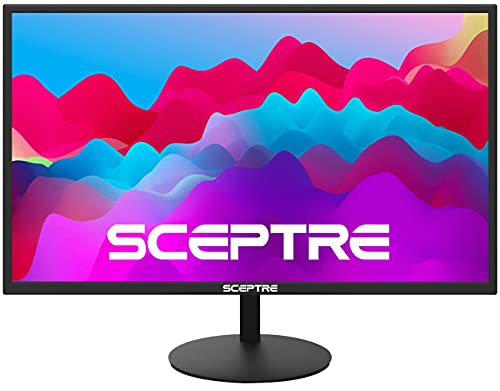
Sceptre 27-Inch FHD LED Gaming Monitor 75Hz – Features & Prices in Saudi Arabia :
Sceptre 27-Inch FHD LED Gaming Monitor 75Hz 2X HDMI VGA Build-in Speakers, Ultra Slim Metal Black
Standing screen display size
27 Inches
Screen Resolution
1920 x 1080p
Max Screen Resolution
1920 x 1080 Pixels
Product Dimensions
18 x 24.56 x 8.27 inches
Item Dimensions LxWxH
18 x 24.56 x 8.27 inches
Color
Black
Voltage
240 Volts
Manufacturer
e-Sceptre
ASIN
B078HSKBG3
Is Discontinued By Manufacturer
No
Date First Available
December 1, 2017
Test video – Sceptre 27-Inch FHD LED Gaming Monitor 75Hz :
Product highlights :
Questions & Answers – Sceptre 27-Inch FHD LED Gaming Monitor 75Hz :
Technical specifications – Sceptre 27-Inch FHD LED Gaming Monitor 75Hz :
Screen Size
27 Inches
Display Resolution Maximum
1920 x 1080 Pixels
Brand
Sceptre
Special Feature
Anti Glare Screen, Adaptive Sync, Flicker-Free, Built-In Speakers
Refresh Rate
75 Hz
Purchase advice :
-
Warranty :
Check the duration of the warranty and also the faults and defects it covers. Is it complete or limited? and What is included in the warranty (parts, repairs or both)?
-
Shipping :
Is delivery offered? And how long does it take to get delivered (Delivery time)
-
Proof of purchase :
Does the shop give you an invoice ?
-
After-sales service :
Do they have an after-sales service to have information about the installation or operation (instructions for use). Also in case of problem, it is the seller who takes charge or you must contact the manufacturer or supplier yourself.
_____________________________

O. K (verified owner) –
Decent for the price – I’ve only had the monitor for a day but I’m happy with the purchase. I initially tried to cancel the order but the seller had already shipped. I figured I would give it a try and send it back if it wasn’t up to spec. I’m coming from a 12 year old Samsung T260HD monitor that is 25.5 inches, 1920×1200 @60hz. This was top of the line at the time and paid $329 while this was one was only $109. The old monitor had screen tearing in games (no g-sync or freesync) and FPS play wasn’t ideal, especially in COD Warzone. If you’ve never played on a higher refresh rate monitor before, it makes a difference. I tried overclocking the monitor to 85hz and then 80hz but neither took so I tried out the rated spec of 75hz with freesync and let me say.. I could notice the difference right away and even picked up my first Warzone Solo victory. Aiming was much more smooth and I could keep my reticle glued on other players. If you’re using this for light gaming and you’re coming from a 60hz panel, you’ll be pleasantly surprised. This appears to be a TN panel because the viewing angles are poor. They’re completely fine when viewed straight ahead – since this is being used as a computer monitor, it’s not a problem for me but buyer beware. No dead pixels or edge bleeding to speak of. Blacks aren’t super dark but decent and the factory setting was ok as far as brightness and contrast was concerned. I configured to my liking and I’m satisfied. The stand is wobbly as others have stated and I didn’t even bother with speakers, nor should you. I’m not expecting this thing to last but I’m hoping to get 2-3 years out of it. I was looking to get a higher refresh rate monitor (144-165hz) but after doing research, you can’t take advantage of the higher refresh rate unless your frames per second average is just as high (144+fps). With a Ryzen 5 2600 and an aging Rx 570, I’m getting an average of 75fps in COD Warzone with the settings at high. In this case, the monitor is a perfect pairing for the 75hz refresh rate.
L. D (verified owner) –
Great monitor for a reasonable price. – I bought one of these for the ‘home’ PC in the kitchen which I share with my wife. She plays some games, but I use it as a monitor-only.
C. T (verified owner) –
It’s a little clunky because the buttons aren’t marked, but this is so worth it – I’m currently got my Chromebook hooked up to it and you do have to learn how to doggle through the unmarked buttons. Right to left I believe they go one through six or one through five we have to toggle or toggle between HDMI and vga. Once you figure that out, if you play audio on the TV by itself, it doesn’t sound so good. If you play the audio from a computer or Chromebook hooked up to the tv, I can’t explain how but it sounds incredible. It’s like I added a 27-inch screen to my chromebook. It’s not completely plug and play cuz you still have to press buttons on the Chromebook and that’s alternate plus one of the top buttons usually the fifth button over from the left on top you got to press those two together. As far as the TV the button on the far right in is the power button. That only needs to be pressed once because once it receives a signal it turns itself on. And that is a plus in the long run. Hooking up a Playstation 2 you got to jump through a few more hoops but it can be done as well if you use the VGA serial connector. But, to use that, you must first hook up something with HDMI so you can rotate the screen over to vga. you better have the PlayStation on when you do this because it will revert to HDMI within 5 seconds if it does not receive a signal from the VGA. You got to have that PlayStation 2 up and running/ updatede PS2 fix! Get the PS2 HDMI converter with the power for USB… works better than the RCA cables 🙂
D. K (verified owner) –
Perfect for computer work – I was in a bit of a rush Black Friday shopping and judged a book by its cover: I did not check to see if these monitors were IPS rated, and they are not. The cover image showed color-grading software being used, so I added these to the cart and moved on. The color depth / representation isn’t BAD at all — but I did buy these to edit videos on, so I’m going to give one to our church secretary and buy an IPS monitor for my actual color grading.
L. D (verified owner) –
Great monitor for a reasonable price. – I bought one of these for the ‘home’ PC in the kitchen which I share with my wife. She plays some games, but I use it as a monitor-only.
B. K (verified owner) –
I Purchased Three! Amazing Quality! – Sceptre Flat screen monitor
O. F (verified owner) –
Did not come damaged; in great condition, very user friendly budget monitor – I just got into the realm of building a PC and a friend recommended this to me as a starter monitor. I read a lot of reviews saying it came damaged, or that it was broken, or had a faulty base.
C. T (verified owner) –
It’s a little clunky because the buttons aren’t marked, but this is so worth it – I’m currently got my Chromebook hooked up to it and you do have to learn how to doggle through the unmarked buttons. Right to left I believe they go one through six or one through five we have to toggle or toggle between HDMI and vga. Once you figure that out, if you play audio on the TV by itself, it doesn’t sound so good. If you play the audio from a computer or Chromebook hooked up to the tv, I can’t explain how but it sounds incredible. It’s like I added a 27-inch screen to my chromebook. It’s not completely plug and play cuz you still have to press buttons on the Chromebook and that’s alternate plus one of the top buttons usually the fifth button over from the left on top you got to press those two together. As far as the TV the button on the far right in is the power button. That only needs to be pressed once because once it receives a signal it turns itself on. And that is a plus in the long run. Hooking up a Playstation 2 you got to jump through a few more hoops but it can be done as well if you use the VGA serial connector. But, to use that, you must first hook up something with HDMI so you can rotate the screen over to vga. you better have the PlayStation on when you do this because it will revert to HDMI within 5 seconds if it does not receive a signal from the VGA. You got to have that PlayStation 2 up and running/ updatede PS2 fix! Get the PS2 HDMI converter with the power for USB… works better than the RCA cables 🙂
L. K (verified owner) –
Great bang for the buck – Best bang for the buck at this size. Played COD: MW2 on this and could barely tell a difference compared to my BENQ Gaming monitors. Speaker sound isn’t the greatest, but most people use external speakers or headsets these days.
S. K (verified owner) –
Replacement screen.. Worth it – Great Price,Quality great, picture awesome quality, recommended this product if you need a new screen update for compter.
L. K (verified owner) –
Great bang for the buck – Best bang for the buck at this size. Played COD: MW2 on this and could barely tell a difference compared to my BENQ Gaming monitors. Speaker sound isn’t the greatest, but most people use external speakers or headsets these days.
B. K (verified owner) –
I Purchased Three! Amazing Quality! – Sceptre Flat screen monitor
O. K (verified owner) –
Decent for the price – I’ve only had the monitor for a day but I’m happy with the purchase. I initially tried to cancel the order but the seller had already shipped. I figured I would give it a try and send it back if it wasn’t up to spec. I’m coming from a 12 year old Samsung T260HD monitor that is 25.5 inches, 1920×1200 @60hz. This was top of the line at the time and paid $329 while this was one was only $109. The old monitor had screen tearing in games (no g-sync or freesync) and FPS play wasn’t ideal, especially in COD Warzone. If you’ve never played on a higher refresh rate monitor before, it makes a difference. I tried overclocking the monitor to 85hz and then 80hz but neither took so I tried out the rated spec of 75hz with freesync and let me say.. I could notice the difference right away and even picked up my first Warzone Solo victory. Aiming was much more smooth and I could keep my reticle glued on other players. If you’re using this for light gaming and you’re coming from a 60hz panel, you’ll be pleasantly surprised. This appears to be a TN panel because the viewing angles are poor. They’re completely fine when viewed straight ahead – since this is being used as a computer monitor, it’s not a problem for me but buyer beware. No dead pixels or edge bleeding to speak of. Blacks aren’t super dark but decent and the factory setting was ok as far as brightness and contrast was concerned. I configured to my liking and I’m satisfied. The stand is wobbly as others have stated and I didn’t even bother with speakers, nor should you. I’m not expecting this thing to last but I’m hoping to get 2-3 years out of it. I was looking to get a higher refresh rate monitor (144-165hz) but after doing research, you can’t take advantage of the higher refresh rate unless your frames per second average is just as high (144+fps). With a Ryzen 5 2600 and an aging Rx 570, I’m getting an average of 75fps in COD Warzone with the settings at high. In this case, the monitor is a perfect pairing for the 75hz refresh rate.
O. F (verified owner) –
Did not come damaged; in great condition, very user friendly budget monitor – I just got into the realm of building a PC and a friend recommended this to me as a starter monitor. I read a lot of reviews saying it came damaged, or that it was broken, or had a faulty base.
S. K (verified owner) –
Replacement screen.. Worth it – Great Price,Quality great, picture awesome quality, recommended this product if you need a new screen update for compter.
D. K (verified owner) –
Perfect for computer work – I was in a bit of a rush Black Friday shopping and judged a book by its cover: I did not check to see if these monitors were IPS rated, and they are not. The cover image showed color-grading software being used, so I added these to the cart and moved on. The color depth / representation isn’t BAD at all — but I did buy these to edit videos on, so I’m going to give one to our church secretary and buy an IPS monitor for my actual color grading.