RisoPhy Wireless Gaming Mouse,Tri-Mode 2.4G/USB-C/Bluetooth Mouse Up is available in Saudi Arabia.
Find out all you need to know about RisoPhy Wireless Gaming Mouse,Tri-Mode 2.4G/USB-C/Bluetooth Mouse Up before buying : Price, Test video, Datasheet, Similar products.
RisoPhy Wireless Gaming Mouse,Tri-Mode 2.4G/USB-C/Bluetooth Mouse Up – Features & Prices in Saudi Arabia :
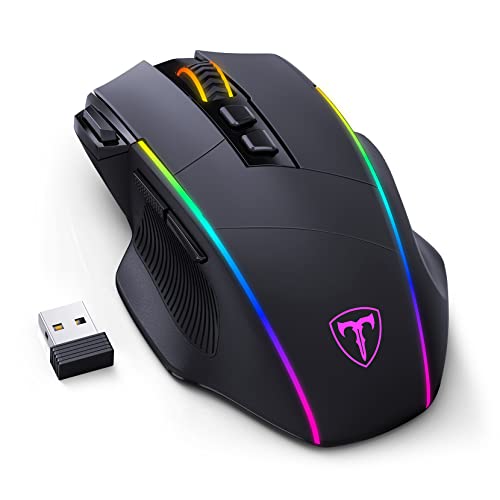
RisoPhy Wireless Gaming Mouse,Tri-Mode 2.4G/USB-C/Bluetooth Mouse Up to 10000DPI,Chroma RGB Backlit,Ergonomic Mouse with 8 Programmable Buttons,On-Board Memory,Wireless Mouse for Laptop,PC,Mac Gamer
Package Dimensions
5.28 x 3.7 x 1.85 inches
Item Weight
6.7 ounces
ASIN
B0BCJC3GCY
Batteries
1 Lithium Ion batteries required. (included)
Date First Available
August 31, 2022
Manufacturer
RisoPhy
Country of Origin
China
Test video – RisoPhy Wireless Gaming Mouse,Tri-Mode 2.4G/USB-C/Bluetooth Mouse Up :
Product highlights :
【Latest Three Modes Connectivity】This wireless gaming mouse supports 3 modes of connection to meet a variety of user scenarios. Switch to 2.4G mode and Bluetooth mode when playing games,saving you the hassle of cable,and getting longer battery life.If it is not enough, you can also switch to traditional wired mode with the included rechargeable USB-C cable.Up to 3 devices can be connected simultaneously,it is also suitable for multi-device office.
【Immersive RGB Backlight】True RGB effect,16.8 million colors for choice.There are 7 kinds of RGB lighting effects such as streamer, horse racing, neon, solid color, etc to match your game style and desktop layout.All the light effect parameters can be customized with the attached software,giving you the best lighting experience.Light can be also turned off if you don’t want it with the convenient switch under the mouse.
【Pixel-Level Tracking Accuracy】The gaming mouse has a 6-level DPI (1200-2400-3500-5000-7000-10000DPI) and 20G acceleration. When you are gaming,increase the DPI to easily play high-intensity games.When you are in your daily office,just lower the DPI,and it instantly becomes your best office assistant.There are also 4 polling rates (125-250-500-1000HZ) to reduce lag and ensure smooth motion.
【8 Programmable Buttons & Quick Fire Button】RisoPhy wireless mouse support macro editing, and all the buttons can be programmed with the easy-to-use software.The advantage is that the fire button(✈one click = three clicks) is on the left side of your index finger which is very easy to click, giving you the edge you need during those intense FPS battles.It is also great for MOBA/RTS games. NOTE:Programming software is only available on Windows and only supports wired mode.
【Extreme Ergonomics & 100% Money Back Guarantee】This bluetooth gaming mouse is designed for medium-large hands, and if you have larger hands, you’ll be amazed at how well-supported this gaming mouse is. Ring finger, pinky and thumb rest provide you with maximum comfort, matte texture is sweat-proof and non-slip, the first choice for computer gamers.3-Year Warranty,RisoPhy will spare no effort to provide every customer with the best service. If you have any problems, please feel free to contact us.
➕ What is the price of RisoPhy Wireless Gaming Mouse,Tri-Mode 2.4G/USB-C/Bluetooth Mouse Up in Saudi Arabia ?
The price of RisoPhy Wireless Gaming Mouse,Tri-Mode 2.4G/USB-C/Bluetooth Mouse Up in-store is 110 SAR VAT.
➕ When RisoPhy Wireless Gaming Mouse,Tri-Mode 2.4G/USB-C/Bluetooth Mouse Up was released ?
The release date was August 31, 2022.
➕ What is the price of RisoPhy Wireless Gaming Mouse,Tri-Mode 2.4G/USB-C/Bluetooth Mouse Up cheap used ?
The price of RisoPhy Wireless Gaming Mouse,Tri-Mode 2.4G/USB-C/Bluetooth Mouse Up used is 70 SAR VAT.
➕ What are the main characteristics of RisoPhy Wireless Gaming Mouse,Tri-Mode 2.4G/USB-C/Bluetooth Mouse Up ?
Special specifications :
【Latest Three Modes Connectivity】This wireless gaming mouse supports 3 modes of connection to meet a variety of user scenarios. Switch to 2.4G mode and Bluetooth mode when playing games,saving you the hassle of cable,and getting longer battery life.If it is not enough, you can also switch to traditional wired mode with the included rechargeable USB-C cable.Up to 3 devices can be connected simultaneously,it is also suitable for multi-device office.
➕ Is it interesting to buy this product ?
The best people who can answer you are customers who have already bought and tested this product (See Customer Reviews). This product is rated 4.3 / 5 on Amazon.
➕ Where to buy RisoPhy Wireless Gaming Mouse,Tri-Mode 2.4G/USB-C/Bluetooth Mouse Up in Saudi Arabia ?
Check the duration of the warranty and also the faults and defects it covers. Is it complete or limited? and What is included in the warranty (parts, repairs or both)?
Shipping :
Is delivery offered? And how long does it take to get delivered (Delivery time)
Proof of purchase :
Does the shop give you an invoice ?
After-sales service :
Do they have an after-sales service to have information about the installation or operation (instructions for use). Also in case of problem, it is the seller who takes charge or you must contact the manufacturer or supplier yourself.
_____________________________
16 reviews for RisoPhy Wireless Gaming Mouse,Tri-Mode 2.4G/USB-C/Bluetooth Mouse Up
Rated 3 out of 5
K. K (verified owner)–
Poor Latency – This is a good value, comfortable and pretty mouse, but it does have a latency. Do not use this if you’re a competitive gamer or require a mouse for daily work. This is best suited for a spare during travel.
Rated 2 out of 5
C. C (verified owner)–
Not Mac compatible… for gaming – This product is labelled as a Mac compatible gaming mouse, and while it connects to my Mac as a Bluetooth mouse, it doesn’t work for gaming. None of the extra buttons function or are recognized at all, and the programming software is PC-only. This makes it useless to me. It does function as a basic bluetooth mouse, but that isn’t why I bought it.
Rated 5 out of 5
F. Z (verified owner)–
So far so good – Was looking for a bluetooth mouse for my Dell laptop, and picked up this one. Pairing was super quick; go to settings, make sure the mouse is in pairing mode. I charged it completely the first time out of the box, and it honestly did not last very long before the red wheel LED turned on. After charging it again, I turned off all the LEDs and so far it seems to be lasting longer. I use it for work, so it is running 8 hours a day. If you’re in the same boat, or if you don’t want to charge it often or run it off the cord, I’d advise turning off the LEDs.
Rated 4 out of 5
G. L (verified owner)–
feels kinda aqward but i’m use to a different mouse so it may grow on me – so first can we talk about how sharp and clean this mouse looks with the led’s they spent some great time on making this thing looks amazing with the rgb lighting so now to my reason for a 4 and not the 5 i’m use to logitech products gpro g305 g502 even so this mouse shape isn’t unfamiliar to me with the 502 as a previous mouse i’ve used and a g602 i had before that over all the mouse is nice has multiple dpi settings and connects flawlessly with the pc just plug play and hook it up to the 2.4ghz and your off and running dial in your dpi with the buttons by the wheel and your gaming. the front left button i don’t know what it does i tried figuring it out but i haven’t gamed with it yet so i may figure it out yet. will update when i do but for the cost this is a great mouse to start with and looks amazing
Rated 5 out of 5
D. S (verified owner)–
great – thanks
Rated 5 out of 5
P. O (verified owner)–
Comfortable generic mouse – Ergonomic grip, and buttons and wheel aren’t clacky.
Rated 2 out of 5
C. C (verified owner)–
Not Mac compatible… for gaming – This product is labelled as a Mac compatible gaming mouse, and while it connects to my Mac as a Bluetooth mouse, it doesn’t work for gaming. None of the extra buttons function or are recognized at all, and the programming software is PC-only. This makes it useless to me. It does function as a basic bluetooth mouse, but that isn’t why I bought it.
Rated 5 out of 5
F. Z (verified owner)–
So far so good – Was looking for a bluetooth mouse for my Dell laptop, and picked up this one. Pairing was super quick; go to settings, make sure the mouse is in pairing mode. I charged it completely the first time out of the box, and it honestly did not last very long before the red wheel LED turned on. After charging it again, I turned off all the LEDs and so far it seems to be lasting longer. I use it for work, so it is running 8 hours a day. If you’re in the same boat, or if you don’t want to charge it often or run it off the cord, I’d advise turning off the LEDs.
Rated 5 out of 5
P. O (verified owner)–
Comfortable generic mouse – Ergonomic grip, and buttons and wheel aren’t clacky.
Rated 4 out of 5
K. G (verified owner)–
Great for larger hands and very compatible with different devices – First thing I noticed when I held this was the size and ergonomics. I’m an adult with a medium/large hand according to glove size and this was about the right size for my hand. There are grooves for your fingers opposite your thumb that help the mouse feel secure in my hand. The thumb side and scroll wheel are textured rubber while the rest is plastic.
Rated 4 out of 5
G. L (verified owner)–
feels kinda aqward but i’m use to a different mouse so it may grow on me – so first can we talk about how sharp and clean this mouse looks with the led’s they spent some great time on making this thing looks amazing with the rgb lighting so now to my reason for a 4 and not the 5 i’m use to logitech products gpro g305 g502 even so this mouse shape isn’t unfamiliar to me with the 502 as a previous mouse i’ve used and a g602 i had before that over all the mouse is nice has multiple dpi settings and connects flawlessly with the pc just plug play and hook it up to the 2.4ghz and your off and running dial in your dpi with the buttons by the wheel and your gaming. the front left button i don’t know what it does i tried figuring it out but i haven’t gamed with it yet so i may figure it out yet. will update when i do but for the cost this is a great mouse to start with and looks amazing
Rated 4 out of 5
K. G (verified owner)–
Great for larger hands and very compatible with different devices – First thing I noticed when I held this was the size and ergonomics. I’m an adult with a medium/large hand according to glove size and this was about the right size for my hand. There are grooves for your fingers opposite your thumb that help the mouse feel secure in my hand. The thumb side and scroll wheel are textured rubber while the rest is plastic.
Rated 3 out of 5
K. K (verified owner)–
Poor Latency – This is a good value, comfortable and pretty mouse, but it does have a latency. Do not use this if you’re a competitive gamer or require a mouse for daily work. This is best suited for a spare during travel.
Rated 4 out of 5
S. P (verified owner)–
good little cheap mouse – works fine, got everything you need. bit light but other than that totally fine.
Rated 5 out of 5
D. S (verified owner)–
great – thanks
Rated 4 out of 5
S. P (verified owner)–
good little cheap mouse – works fine, got everything you need. bit light but other than that totally fine.



K. K (verified owner) –
Poor Latency – This is a good value, comfortable and pretty mouse, but it does have a latency. Do not use this if you’re a competitive gamer or require a mouse for daily work. This is best suited for a spare during travel.
C. C (verified owner) –
Not Mac compatible… for gaming – This product is labelled as a Mac compatible gaming mouse, and while it connects to my Mac as a Bluetooth mouse, it doesn’t work for gaming. None of the extra buttons function or are recognized at all, and the programming software is PC-only. This makes it useless to me. It does function as a basic bluetooth mouse, but that isn’t why I bought it.
F. Z (verified owner) –
So far so good – Was looking for a bluetooth mouse for my Dell laptop, and picked up this one. Pairing was super quick; go to settings, make sure the mouse is in pairing mode. I charged it completely the first time out of the box, and it honestly did not last very long before the red wheel LED turned on. After charging it again, I turned off all the LEDs and so far it seems to be lasting longer. I use it for work, so it is running 8 hours a day. If you’re in the same boat, or if you don’t want to charge it often or run it off the cord, I’d advise turning off the LEDs.
G. L (verified owner) –
feels kinda aqward but i’m use to a different mouse so it may grow on me – so first can we talk about how sharp and clean this mouse looks with the led’s they spent some great time on making this thing looks amazing with the rgb lighting so now to my reason for a 4 and not the 5 i’m use to logitech products gpro g305 g502 even so this mouse shape isn’t unfamiliar to me with the 502 as a previous mouse i’ve used and a g602 i had before that over all the mouse is nice has multiple dpi settings and connects flawlessly with the pc just plug play and hook it up to the 2.4ghz and your off and running dial in your dpi with the buttons by the wheel and your gaming. the front left button i don’t know what it does i tried figuring it out but i haven’t gamed with it yet so i may figure it out yet. will update when i do but for the cost this is a great mouse to start with and looks amazing
D. S (verified owner) –
great – thanks
P. O (verified owner) –
Comfortable generic mouse – Ergonomic grip, and buttons and wheel aren’t clacky.
C. C (verified owner) –
Not Mac compatible… for gaming – This product is labelled as a Mac compatible gaming mouse, and while it connects to my Mac as a Bluetooth mouse, it doesn’t work for gaming. None of the extra buttons function or are recognized at all, and the programming software is PC-only. This makes it useless to me. It does function as a basic bluetooth mouse, but that isn’t why I bought it.
F. Z (verified owner) –
So far so good – Was looking for a bluetooth mouse for my Dell laptop, and picked up this one. Pairing was super quick; go to settings, make sure the mouse is in pairing mode. I charged it completely the first time out of the box, and it honestly did not last very long before the red wheel LED turned on. After charging it again, I turned off all the LEDs and so far it seems to be lasting longer. I use it for work, so it is running 8 hours a day. If you’re in the same boat, or if you don’t want to charge it often or run it off the cord, I’d advise turning off the LEDs.
P. O (verified owner) –
Comfortable generic mouse – Ergonomic grip, and buttons and wheel aren’t clacky.
K. G (verified owner) –
Great for larger hands and very compatible with different devices – First thing I noticed when I held this was the size and ergonomics. I’m an adult with a medium/large hand according to glove size and this was about the right size for my hand. There are grooves for your fingers opposite your thumb that help the mouse feel secure in my hand. The thumb side and scroll wheel are textured rubber while the rest is plastic.
G. L (verified owner) –
feels kinda aqward but i’m use to a different mouse so it may grow on me – so first can we talk about how sharp and clean this mouse looks with the led’s they spent some great time on making this thing looks amazing with the rgb lighting so now to my reason for a 4 and not the 5 i’m use to logitech products gpro g305 g502 even so this mouse shape isn’t unfamiliar to me with the 502 as a previous mouse i’ve used and a g602 i had before that over all the mouse is nice has multiple dpi settings and connects flawlessly with the pc just plug play and hook it up to the 2.4ghz and your off and running dial in your dpi with the buttons by the wheel and your gaming. the front left button i don’t know what it does i tried figuring it out but i haven’t gamed with it yet so i may figure it out yet. will update when i do but for the cost this is a great mouse to start with and looks amazing
K. G (verified owner) –
Great for larger hands and very compatible with different devices – First thing I noticed when I held this was the size and ergonomics. I’m an adult with a medium/large hand according to glove size and this was about the right size for my hand. There are grooves for your fingers opposite your thumb that help the mouse feel secure in my hand. The thumb side and scroll wheel are textured rubber while the rest is plastic.
K. K (verified owner) –
Poor Latency – This is a good value, comfortable and pretty mouse, but it does have a latency. Do not use this if you’re a competitive gamer or require a mouse for daily work. This is best suited for a spare during travel.
S. P (verified owner) –
good little cheap mouse – works fine, got everything you need. bit light but other than that totally fine.
D. S (verified owner) –
great – thanks
S. P (verified owner) –
good little cheap mouse – works fine, got everything you need. bit light but other than that totally fine.