
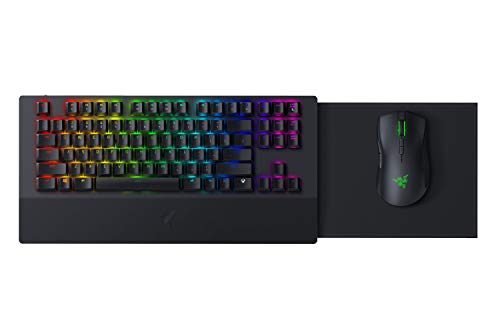
Description
Razer Turret Wireless Mechanical Gaming Keyboard & – Features & Prices in Saudi Arabia :
Razer Turret Wireless Mechanical Gaming Keyboard & Mouse Combo for PC, Xbox One, Xbox Series X & S: Chroma RGB/Dynamic Lighting – Retractable Magnetic Mouse Mat – 40hr Battery, Classic Black
Brand
Razer
Item model number
RZ84-02820200-B3U1
Hardware Platform
PC
Operating System
Windows 7
Item Weight
4.33 pounds
Product Dimensions
23.62 x 14.79 x 7.63 inches
Item Dimensions LxWxH
23.62 x 14.79 x 7.63 inches
Color
Classic Black
Power Source
Battery Powered
Batteries
1 Lithium Polymer batteries required. (included)
Manufacturer
Razer Inc.
ASIN
B07QXLC24V
Country of Origin
China
Is Discontinued By Manufacturer
No
Date First Available
June 19, 2019
Test video – Razer Turret Wireless Mechanical Gaming Keyboard & :
Product highlights :
Questions & Answers – Razer Turret Wireless Mechanical Gaming Keyboard & :
Technical specifications – Razer Turret Wireless Mechanical Gaming Keyboard & :
Brand
Razer
Color
Classic Black
Connectivity Technology
Wi Fi
Special Feature
Wireless
Compatible Devices
Xbox One
Purchase advice :
-
Warranty :
Check the duration of the warranty and also the faults and defects it covers. Is it complete or limited? and What is included in the warranty (parts, repairs or both)?
-
Shipping :
Is delivery offered? And how long does it take to get delivered (Delivery time)
-
Proof of purchase :
Does the shop give you an invoice ?
-
After-sales service :
Do they have an after-sales service to have information about the installation or operation (instructions for use). Also in case of problem, it is the seller who takes charge or you must contact the manufacturer or supplier yourself.
_____________________________

T. E (verified owner) –
Spectacularly built hardware, terrible dongle and software – The Razer Turret is very much designed for the couch gamer. It’s a pleasure to have on your lap and when it’s properly connected to the dongle it performs magnificently. The slide out magnetic mouse tray is great and everything has a very premium finish and feel.
D. R (verified owner) –
– Charged my mouse for a whole day, yet sitting at 1% charge. When I first got the thing it seemed fine, but every month the battery for the mouse seemed to last less and less. Now I know why no matter how long I charge it, it never gets to 100% anymore.
C. K (verified owner) –
– The anodized aluminum body is superb and classy. The weight and key-feel reeks of quality. I only use it as a desktop keyboard so it’s plugged in all the time- I can’t speak to battery life or couch use. This keyboard has been beyond frustrating as I’ve had disconnection issues during gameplay. I went through the troubleshooting with Razer support, have the latest windows updates installed with both beta and non-beat versions of Synapse tried, different USB ports and USB cables tried, all BIOS drivers etc up-to-date and during gameplay it’s like someone just unplugs the USB cable from the keyboard, disconnecting it from Windows. I’ve had it, tried everything and it’s now being RMA’d for a new one. If that one fails I’ll be getting my money back through amazon. What a bloody shame.
R. K (verified owner) –
Solid Construction, Works Out Of The Box – Was a bit worried, given the reviews mentioning random lag issues… However, once I got it all set up, it’s pretty solid. The box says for XBOX, but I bought it for my gaming PC. You want to install Synapse 3 and reboot, then drop the brightness to 10-15 to save on battery life. You plug it into the wall via outlet adapter until it’s all charged, then it’s off to the races. Everything works great, no lag, Windows 11 optimized for gaming. The mouse magnet works well keeping the mouse from sliding off the pad when you set the thing down. There’s a very slight pull if you try to lift the mouse off the pad, but not a big deal. I was also surprised that the small retractable pad has enough room to maneuver. No issues there at all, even though when I look down the mouse is slightly off of the pad. The keys have that clicky mechanical feel, which I’m not used to at all, and the unit is heavy and solid. Has a very durable feel. There are rubber adhesive pads along the bottom, and the mouse tray has a non-fabric adhesive pad as well for the surface. You press a little tab on the side of the mouse tray to pull it out and push it back in. The tray feels pretty solid when extended, but we’ll see how it holds up under the constant weight of my wrist. The mouse glides smoothly across the surface, but then again it’s brand new. Charging happens via USB-C, and so far I got a solid 5 hours of Fallout 76 on the initial charge. Initially, when I set it up it recommended I download Synapse 2, but the device never registered. It also had some weird stuttering and lag issues until I got everything going. Maybe that’s what people are complaining about? Overall, definitely a nice little addition to my gaming couch. Keep the lights turned down and the sleep/dim timers around 2-5 minutes to conserve battery.
C. T (verified owner) –
Wow, very impressed, my new favorite lapboard! – I do everything from my couch, health issues have forced me to, and over the years I have used no less than 5 different lapboard/keyboard/wireless mouse combinations, and this new Turret is now my favorite of them all.
C. T (verified owner) –
Wow, very impressed, my new favorite lapboard! – I do everything from my couch, health issues have forced me to, and over the years I have used no less than 5 different lapboard/keyboard/wireless mouse combinations, and this new Turret is now my favorite of them all.
T. E (verified owner) –
Spectacularly built hardware, terrible dongle and software – The Razer Turret is very much designed for the couch gamer. It’s a pleasure to have on your lap and when it’s properly connected to the dongle it performs magnificently. The slide out magnetic mouse tray is great and everything has a very premium finish and feel.
R. K (verified owner) –
Solid Construction, Works Out Of The Box – Was a bit worried, given the reviews mentioning random lag issues… However, once I got it all set up, it’s pretty solid. The box says for XBOX, but I bought it for my gaming PC. You want to install Synapse 3 and reboot, then drop the brightness to 10-15 to save on battery life. You plug it into the wall via outlet adapter until it’s all charged, then it’s off to the races. Everything works great, no lag, Windows 11 optimized for gaming. The mouse magnet works well keeping the mouse from sliding off the pad when you set the thing down. There’s a very slight pull if you try to lift the mouse off the pad, but not a big deal. I was also surprised that the small retractable pad has enough room to maneuver. No issues there at all, even though when I look down the mouse is slightly off of the pad. The keys have that clicky mechanical feel, which I’m not used to at all, and the unit is heavy and solid. Has a very durable feel. There are rubber adhesive pads along the bottom, and the mouse tray has a non-fabric adhesive pad as well for the surface. You press a little tab on the side of the mouse tray to pull it out and push it back in. The tray feels pretty solid when extended, but we’ll see how it holds up under the constant weight of my wrist. The mouse glides smoothly across the surface, but then again it’s brand new. Charging happens via USB-C, and so far I got a solid 5 hours of Fallout 76 on the initial charge. Initially, when I set it up it recommended I download Synapse 2, but the device never registered. It also had some weird stuttering and lag issues until I got everything going. Maybe that’s what people are complaining about? Overall, definitely a nice little addition to my gaming couch. Keep the lights turned down and the sleep/dim timers around 2-5 minutes to conserve battery.
C. K (verified owner) –
– The anodized aluminum body is superb and classy. The weight and key-feel reeks of quality. I only use it as a desktop keyboard so it’s plugged in all the time- I can’t speak to battery life or couch use. This keyboard has been beyond frustrating as I’ve had disconnection issues during gameplay. I went through the troubleshooting with Razer support, have the latest windows updates installed with both beta and non-beat versions of Synapse tried, different USB ports and USB cables tried, all BIOS drivers etc up-to-date and during gameplay it’s like someone just unplugs the USB cable from the keyboard, disconnecting it from Windows. I’ve had it, tried everything and it’s now being RMA’d for a new one. If that one fails I’ll be getting my money back through amazon. What a bloody shame.
D. R (verified owner) –
– Charged my mouse for a whole day, yet sitting at 1% charge. When I first got the thing it seemed fine, but every month the battery for the mouse seemed to last less and less. Now I know why no matter how long I charge it, it never gets to 100% anymore.