
Description
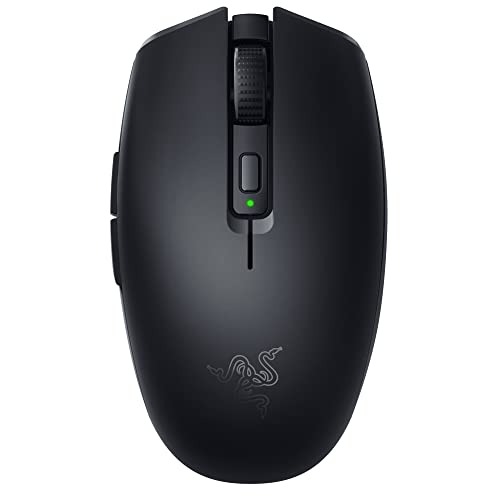
Razer Orochi V2 Mobile Wireless Gaming Mouse: – Features & Prices in Saudi Arabia :
Razer Orochi V2 Mobile Wireless Gaming Mouse: Ultra Lightweight – 2 Wireless Modes – Up to 950hrs Battery Life – Mechanical Mouse Switches – 5G Advanced 18K DPI Optical Sensor – Classic Black
Average Battery Life (in hours)
425 Hours
Series
Orochi V2
Item model number
RZ01-03730100-R3U1
Hardware Platform
PC
Item Weight
2.08 ounces
Product Dimensions
4.26 x 1.52 x 2.47 inches
Item Dimensions LxWxH
4.26 x 1.52 x 2.47 inches
Color
Classic Black
Power Source
Battery Powered
Batteries
1 AA batteries required. (included)
Manufacturer
Razer Inc.
ASIN
B0916N2LPZ
Country of Origin
China
Date First Available
September 9, 2022
Test video – Razer Orochi V2 Mobile Wireless Gaming Mouse: :
Product highlights :
Questions & Answers – Razer Orochi V2 Mobile Wireless Gaming Mouse: :
Technical specifications – Razer Orochi V2 Mobile Wireless Gaming Mouse: :
Brand
Razer
Color
Classic Black
Connectivity Technology
Bluetooth, USB
Special Feature
,
Movement Detection Technology
Optical
Purchase advice :
-
Warranty :
Check the duration of the warranty and also the faults and defects it covers. Is it complete or limited? and What is included in the warranty (parts, repairs or both)?
-
Shipping :
Is delivery offered? And how long does it take to get delivered (Delivery time)
-
Proof of purchase :
Does the shop give you an invoice ?
-
After-sales service :
Do they have an after-sales service to have information about the installation or operation (instructions for use). Also in case of problem, it is the seller who takes charge or you must contact the manufacturer or supplier yourself.
_____________________________

H. H (verified owner) –
Best mouse I have used. Faster response than some wired mice. Sticky side buttons – To start I would like to say that I have owned several wireless “gaming” mice as well as many wired “gaming” mice. This is my new favorite. Razer deathadder, several logitech and steelseries.
G. Z (verified owner) –
Ligero – La caja vino rota por una esquina (se puede ver en la imagen), cosa que no me agrada ya que comprar un producto nuevo, con ese tipo de daños cosméticos a la caja, me hace dudar de la integridad del producto, al momento el mouse se comportamiento muy bien, es rápido, muy ligero, tiene opción de Bluetooth, el sensor usb que trae y además permite usar baterías doble A y triple A, lo único es que cuando reinicio mi pc o la enciendo, tarda en conectarse (sin importar si lo conecto por Bluetooth o por sensor) y para mi es molesto esperar a que se conecte para empezar a usar mi pc (tengo un logitech que jamas me a dado ese problema),, eso si una vez conectado la conexión es muy estable, no eh tenido problemas en ese sentido, por lo demás un buen producto y aun así lo recomiendo (si no te molesta ese pequeño detalle en la conexión)
H. H (verified owner) –
Best mouse I have used. Faster response than some wired mice. Sticky side buttons – To start I would like to say that I have owned several wireless “gaming” mice as well as many wired “gaming” mice. This is my new favorite. Razer deathadder, several logitech and steelseries.
F. L (verified owner) –
I’m picky about my mouse and I use it a lot – For me anyway mice fall into two categories. Huge and normal. I would put this one in the normal category. At first it was acting weird on bluetooth. If you must use bluetooth I’d pass on this one. I switched to 2.4ghz receiver and it’s been flawless since. I like the size. I have average hands I’m 5’9″ if it matters. I’ve had a few other Razer mice I didn’t care for. This one is my favorite so far. I don’t game much with it. So keep that in mind.
A. K (verified owner) –
Razer Orochi V2: The Perfect Mobile Wireless Gaming Mouse – I absolutely love my Razer Orochi V2 Mobile Wireless Gaming Mouse! The sleek design and compact size make it perfect for on-the-go gaming, and the wireless connectivity ensures that I can game without any pesky cables getting in the way. The button placement is intuitive and comfortable, and the tracking is extremely precise, which is essential for fast-paced games. Overall, I highly recommend the Razer Orochi V2 Mobile Wireless Gaming Mouse to any gamer looking for a high-performance, portable mouse. It’s definitely worth the investment!
H. E (verified owner) –
G305 killer? – Bought this as a birthday present for the wife. I have a G305 which she likes so I figured it was on sale for the same price so I scooped a white one so we didn’t just have two G305’s. I have slightly larger than average hands and I think I prefer the ergs on the smaller razer. I do play claw/ some fingertip. It feels lighter than my g305 more nimble. I did however slap a AAA lithium in a AA adapter. Really enjoyed that I could completely tear the mouse down for customization (There is just something about having to peel off perfectly good mouse skates to get at some screws that would make me not even want to mod it till it was time to change out skates. That’s like a whole year for me.) so anyways thank you razer truly a great idea. Also clicks are nice I like them better than the g305. Used briefly haven’t noticed any skipping or lag. Thanks.
M. D (verified owner) –
Its ok – I needed a mouse that was small factor and worked well with my MacBook Air and this one at least works. I like that it has the toggle on the bottom for both bluetooth or connecting by usb dongle
I. K (verified owner) –
I never knew a “good mouse” existed until I got this one – Coming from the the $20 wired razer deathadder, the orochi v2 changed my life forever. When I built my PC I was using the previously mentioned mouse and I thought it was all I would ever need. I thought that wireless and lightweight mouses were pointless. It was until my scroll wheel broke on that mouse that I decided that I needed a new one. I figured I would invest in a mouse that was a bit more expensive, and perhaps even a wireless one if it was in my budget. It came down to the logitech g305 and this orochi v2. I ended up settling for the orochi v2 because it was smaller, and most reviewers compared it to some of the higher ends mouses on the market- if I recall correctly, the specs may also be a bit better than the g305.
H. E (verified owner) –
G305 killer? – Bought this as a birthday present for the wife. I have a G305 which she likes so I figured it was on sale for the same price so I scooped a white one so we didn’t just have two G305’s. I have slightly larger than average hands and I think I prefer the ergs on the smaller razer. I do play claw/ some fingertip. It feels lighter than my g305 more nimble. I did however slap a AAA lithium in a AA adapter. Really enjoyed that I could completely tear the mouse down for customization (There is just something about having to peel off perfectly good mouse skates to get at some screws that would make me not even want to mod it till it was time to change out skates. That’s like a whole year for me.) so anyways thank you razer truly a great idea. Also clicks are nice I like them better than the g305. Used briefly haven’t noticed any skipping or lag. Thanks.
M. D (verified owner) –
Its ok – I needed a mouse that was small factor and worked well with my MacBook Air and this one at least works. I like that it has the toggle on the bottom for both bluetooth or connecting by usb dongle
F. L (verified owner) –
I’m picky about my mouse and I use it a lot – For me anyway mice fall into two categories. Huge and normal. I would put this one in the normal category. At first it was acting weird on bluetooth. If you must use bluetooth I’d pass on this one. I switched to 2.4ghz receiver and it’s been flawless since. I like the size. I have average hands I’m 5’9″ if it matters. I’ve had a few other Razer mice I didn’t care for. This one is my favorite so far. I don’t game much with it. So keep that in mind.
G. Z (verified owner) –
Ligero – La caja vino rota por una esquina (se puede ver en la imagen), cosa que no me agrada ya que comprar un producto nuevo, con ese tipo de daños cosméticos a la caja, me hace dudar de la integridad del producto, al momento el mouse se comportamiento muy bien, es rápido, muy ligero, tiene opción de Bluetooth, el sensor usb que trae y además permite usar baterías doble A y triple A, lo único es que cuando reinicio mi pc o la enciendo, tarda en conectarse (sin importar si lo conecto por Bluetooth o por sensor) y para mi es molesto esperar a que se conecte para empezar a usar mi pc (tengo un logitech que jamas me a dado ese problema),, eso si una vez conectado la conexión es muy estable, no eh tenido problemas en ese sentido, por lo demás un buen producto y aun así lo recomiendo (si no te molesta ese pequeño detalle en la conexión)
I. K (verified owner) –
I never knew a “good mouse” existed until I got this one – Coming from the the $20 wired razer deathadder, the orochi v2 changed my life forever. When I built my PC I was using the previously mentioned mouse and I thought it was all I would ever need. I thought that wireless and lightweight mouses were pointless. It was until my scroll wheel broke on that mouse that I decided that I needed a new one. I figured I would invest in a mouse that was a bit more expensive, and perhaps even a wireless one if it was in my budget. It came down to the logitech g305 and this orochi v2. I ended up settling for the orochi v2 because it was smaller, and most reviewers compared it to some of the higher ends mouses on the market- if I recall correctly, the specs may also be a bit better than the g305.
A. K (verified owner) –
Razer Orochi V2: The Perfect Mobile Wireless Gaming Mouse – I absolutely love my Razer Orochi V2 Mobile Wireless Gaming Mouse! The sleek design and compact size make it perfect for on-the-go gaming, and the wireless connectivity ensures that I can game without any pesky cables getting in the way. The button placement is intuitive and comfortable, and the tracking is extremely precise, which is essential for fast-paced games. Overall, I highly recommend the Razer Orochi V2 Mobile Wireless Gaming Mouse to any gamer looking for a high-performance, portable mouse. It’s definitely worth the investment!