Mechanical Keyboard and Mouse, Wired Blue Backlit – Features & Prices in Saudi Arabia :
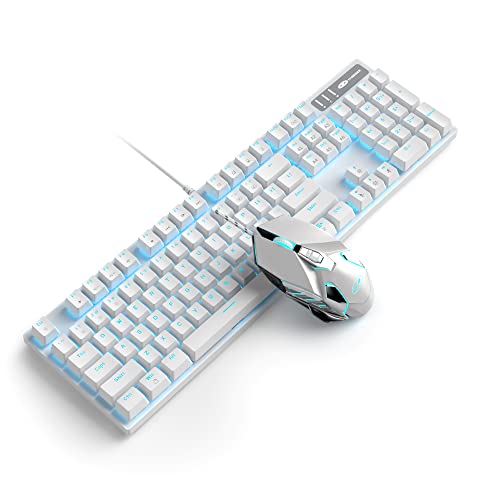
Mechanical Keyboard and Mouse, Wired Blue Backlit Mechanical Gaming Keyboard with Blue Switch, 104 Keys Anti-Ghosting Gaming Keyboard, 7-Color Breathing Backlit Gaming Mouse, White
Package Dimensions
17.56 x 8.66 x 1.93 inches
Item Weight
2.66 pounds
Manufacturer
MageGee
ASIN
B0B6C6X9T3
Country of Origin
China
Date First Available
May 6, 2020
Test video – Mechanical Keyboard and Mouse, Wired Blue Backlit :
Product highlights :
GORGEOUS BACKLIGHTING: The mechanical gaming keyboard supports blue backlit effect, 22 light modes (static & dynamic), 6 brightness levels and 6 speed levels. The gaming mouse has breathing LED lights in 7 colors: white, yellow, blue, purple, green, red and cyan, creating a strong gaming atmosphere. Double-Shot molded keycaps offer clear and even backlit without glare, reducing typing errors in the dark, great for office & gaming.
CLASSIC MECHANICAL SWITCH: Blue Switches are tactile, clicky switches with clearly noticeable and audible feedback. Since you can accurately feel that you have registered a key, you don’t have to keep pressing the key. They are undoubtedly the best choice for typists.
N-KEY ROLLOVER & METAL PANEL: 104 keys standard layout, 12 multimedia shortcut keys, 100% anti-ghosting and floating keys. Even if you press many keys on the keyboard, each keystroke is detected correctly. The keys are sensitive and quick to respond. High quality metal panel ensures long service life, resistant to wear, and not easily deformed.
ERGONOMIC GAMING MOUSE: 7 buttons and 6 DPI levels ( 600/800/1200/1600/2400/3200 ). You can easily adjust the mouse speed according to the needs of different game scenarios. Accurate positioning and stable transmission help you play smoothly in the game. The mouse fits perfectly in the palm, and the anti-slip design gives you complete control.
COMFORT AND WIDE COMPATIBILITY: Wired connection, illuminated letters, excellent hand feeling, simple and classic design. High and low keycaps are ergonomically designed, not easy to be fatigued by long-term use. Compatible with PC, laptop, desktop, computer, supports Windows 2000/Vista/XP/ME/Win7/Win8/Win10/MAC/Linux.
Questions & Answers – Mechanical Keyboard and Mouse, Wired Blue Backlit :
➕ What is the price of Mechanical Keyboard and Mouse, Wired Blue Backlit in Saudi Arabia ?
The price of Mechanical Keyboard and Mouse, Wired Blue Backlit in-store is 110 SAR VAT.
➕ When Mechanical Keyboard and Mouse, Wired Blue Backlit was released ?
The release date was May 6, 2020.
➕ What is the price of Mechanical Keyboard and Mouse, Wired Blue Backlit cheap used ?
The price of Mechanical Keyboard and Mouse, Wired Blue Backlit used is 70 SAR VAT.
➕ What are the main characteristics of Mechanical Keyboard and Mouse, Wired Blue Backlit ?
Special specifications :
GORGEOUS BACKLIGHTING: The mechanical gaming keyboard supports blue backlit effect, 22 light modes (static & dynamic), 6 brightness levels and 6 speed levels. The gaming mouse has breathing LED lights in 7 colors: white, yellow, blue, purple, green, red and cyan, creating a strong gaming atmosphere. Double-Shot molded keycaps offer clear and even backlit without glare, reducing typing errors in the dark, great for office & gaming.
➕ Is it interesting to buy this product ?
The best people who can answer you are customers who have already bought and tested this product (See Customer Reviews). This product is rated 4.6 / 5 on Amazon.
➕ Where to buy Mechanical Keyboard and Mouse, Wired Blue Backlit in Saudi Arabia ?
Technical specifications – Mechanical Keyboard and Mouse, Wired Blue Backlit :
Brand
MageGee
Color
White
Operating System
Linux, Windows 8, Windows 7, Windows 2000, Windows 10
Batteries Required?
No
Number of Keys
104
Purchase advice :
Warranty :
Check the duration of the warranty and also the faults and defects it covers. Is it complete or limited? and What is included in the warranty (parts, repairs or both)?
Shipping :
Is delivery offered? And how long does it take to get delivered (Delivery time)
Proof of purchase :
Does the shop give you an invoice ?
After-sales service :
Do they have an after-sales service to have information about the installation or operation (instructions for use). Also in case of problem, it is the seller who takes charge or you must contact the manufacturer or supplier yourself.
_____________________________
16 reviews for Mechanical Keyboard and Mouse, Wired Blue Backlit
Rated 4 out of 5
A. F (verified owner)–
Good quality for the price – (8/6/21) I bought this keyboard because I needed something to match my setup on a budget. I’m impressed with how good quality it is due to the low price. I’ve been using it for the past few days and I’m fairly happy with it so far. My biggest problem lies with the mouse, just really not a fan. I find that it’s not very responsive, I may have just gotten a defective one though. Not really worth the hassle of returning, I’ll be buying a different mouse so I knocked a star off for that. Otherwise, it works fairly well. Definitely not something I’ll be using forever, but it seems to work while you’re on a budget!
Rated 4 out of 5
F. C (verified owner)–
Cute, but noisy – It’s a really great keyboard, though the keys are obnoxiously clicky. There is only one color light (white), though there are several options to change the pattern. Overall, if you don’t really mind a lot of noise when you type or play, then this is a good buy for the cost.
Rated 5 out of 5
M. K (verified owner)–
A bit too clicky for my liking but for the price and color? It’s perfect. – Marshmallowpuddin made a great short review on how to change the lighting themes on the keyboard. To add on, there’s also a 6th theme with Fn + ScrLk. You can also change the brightness of the lights by pressing Fn with the up and down arrow. Some of the lighting themes can have their speeds changed which is done by pressing Fn + – and Fn =. Although there’s no RGB lighting, these customizations are quite fun.
Rated 5 out of 5
F. K (verified owner)–
How to change the colors on keyboard and mouse + Review – For the keyboard, there’s 6 designs for the light. Press the Fn button + the Ins (A1) for the 1st design and then the Home, PgUp, Del, End, and PgDn for the other 5 designs. To change the color of the mouse press the bottom Dpi button plus the forward side button until it starts to blink a certain color, mine started Red, press just the forward side button until it has reached the color you want and then press the Dpi + forward side button to lock the color.
Rated 4 out of 5
P. K (verified owner)–
Cheap cute pinky keyboard – The switch : quality is ok, it come with Blue switches, very good for typing and gaming is ok.
Rated 3 out of 5
D. B (verified owner)–
broke after a month – I really don’t use this keyboard often but all of a sudden it began disconnecting/reconnecting a ton, and a function/lock key got stuck and I’m unable to use this at all. It’s cute but I don’t recommend.
Rated 4 out of 5
M. J (verified owner)–
Does the Job – I’ll give it four stars. It’s a functioning keyboard, the light settings are super cool, and I love that the mouse changes colors, too. It’s a great, low cost alternative to those 80 dollar keyboards you see. It doesn’t have all the bells and whistles, sure, but it works.
Rated 5 out of 5
F. K (verified owner)–
How to change the colors on keyboard and mouse + Review – For the keyboard, there’s 6 designs for the light. Press the Fn button + the Ins (A1) for the 1st design and then the Home, PgUp, Del, End, and PgDn for the other 5 designs. To change the color of the mouse press the bottom Dpi button plus the forward side button until it starts to blink a certain color, mine started Red, press just the forward side button until it has reached the color you want and then press the Dpi + forward side button to lock the color.
Rated 5 out of 5
O. F (verified owner)–
It works good with my job desktop computer – Not used for Gaming
Rated 4 out of 5
M. J (verified owner)–
Does the Job – I’ll give it four stars. It’s a functioning keyboard, the light settings are super cool, and I love that the mouse changes colors, too. It’s a great, low cost alternative to those 80 dollar keyboards you see. It doesn’t have all the bells and whistles, sure, but it works.
Rated 4 out of 5
A. F (verified owner)–
Good quality for the price – (8/6/21) I bought this keyboard because I needed something to match my setup on a budget. I’m impressed with how good quality it is due to the low price. I’ve been using it for the past few days and I’m fairly happy with it so far. My biggest problem lies with the mouse, just really not a fan. I find that it’s not very responsive, I may have just gotten a defective one though. Not really worth the hassle of returning, I’ll be buying a different mouse so I knocked a star off for that. Otherwise, it works fairly well. Definitely not something I’ll be using forever, but it seems to work while you’re on a budget!
Rated 5 out of 5
M. K (verified owner)–
A bit too clicky for my liking but for the price and color? It’s perfect. – Marshmallowpuddin made a great short review on how to change the lighting themes on the keyboard. To add on, there’s also a 6th theme with Fn + ScrLk. You can also change the brightness of the lights by pressing Fn with the up and down arrow. Some of the lighting themes can have their speeds changed which is done by pressing Fn + – and Fn =. Although there’s no RGB lighting, these customizations are quite fun.
Rated 4 out of 5
F. C (verified owner)–
Cute, but noisy – It’s a really great keyboard, though the keys are obnoxiously clicky. There is only one color light (white), though there are several options to change the pattern. Overall, if you don’t really mind a lot of noise when you type or play, then this is a good buy for the cost.
Rated 5 out of 5
O. F (verified owner)–
It works good with my job desktop computer – Not used for Gaming
Rated 3 out of 5
D. B (verified owner)–
broke after a month – I really don’t use this keyboard often but all of a sudden it began disconnecting/reconnecting a ton, and a function/lock key got stuck and I’m unable to use this at all. It’s cute but I don’t recommend.
Rated 4 out of 5
P. K (verified owner)–
Cheap cute pinky keyboard – The switch : quality is ok, it come with Blue switches, very good for typing and gaming is ok.


A. F (verified owner) –
Good quality for the price – (8/6/21) I bought this keyboard because I needed something to match my setup on a budget. I’m impressed with how good quality it is due to the low price. I’ve been using it for the past few days and I’m fairly happy with it so far. My biggest problem lies with the mouse, just really not a fan. I find that it’s not very responsive, I may have just gotten a defective one though. Not really worth the hassle of returning, I’ll be buying a different mouse so I knocked a star off for that. Otherwise, it works fairly well. Definitely not something I’ll be using forever, but it seems to work while you’re on a budget!
F. C (verified owner) –
Cute, but noisy – It’s a really great keyboard, though the keys are obnoxiously clicky. There is only one color light (white), though there are several options to change the pattern. Overall, if you don’t really mind a lot of noise when you type or play, then this is a good buy for the cost.
M. K (verified owner) –
A bit too clicky for my liking but for the price and color? It’s perfect. – Marshmallowpuddin made a great short review on how to change the lighting themes on the keyboard. To add on, there’s also a 6th theme with Fn + ScrLk. You can also change the brightness of the lights by pressing Fn with the up and down arrow. Some of the lighting themes can have their speeds changed which is done by pressing Fn + – and Fn =. Although there’s no RGB lighting, these customizations are quite fun.
F. K (verified owner) –
How to change the colors on keyboard and mouse + Review – For the keyboard, there’s 6 designs for the light. Press the Fn button + the Ins (A1) for the 1st design and then the Home, PgUp, Del, End, and PgDn for the other 5 designs. To change the color of the mouse press the bottom Dpi button plus the forward side button until it starts to blink a certain color, mine started Red, press just the forward side button until it has reached the color you want and then press the Dpi + forward side button to lock the color.
P. K (verified owner) –
Cheap cute pinky keyboard – The switch : quality is ok, it come with Blue switches, very good for typing and gaming is ok.
D. B (verified owner) –
broke after a month – I really don’t use this keyboard often but all of a sudden it began disconnecting/reconnecting a ton, and a function/lock key got stuck and I’m unable to use this at all. It’s cute but I don’t recommend.
M. J (verified owner) –
Does the Job – I’ll give it four stars. It’s a functioning keyboard, the light settings are super cool, and I love that the mouse changes colors, too. It’s a great, low cost alternative to those 80 dollar keyboards you see. It doesn’t have all the bells and whistles, sure, but it works.
F. K (verified owner) –
How to change the colors on keyboard and mouse + Review – For the keyboard, there’s 6 designs for the light. Press the Fn button + the Ins (A1) for the 1st design and then the Home, PgUp, Del, End, and PgDn for the other 5 designs. To change the color of the mouse press the bottom Dpi button plus the forward side button until it starts to blink a certain color, mine started Red, press just the forward side button until it has reached the color you want and then press the Dpi + forward side button to lock the color.
O. F (verified owner) –
It works good with my job desktop computer – Not used for Gaming
M. J (verified owner) –
Does the Job – I’ll give it four stars. It’s a functioning keyboard, the light settings are super cool, and I love that the mouse changes colors, too. It’s a great, low cost alternative to those 80 dollar keyboards you see. It doesn’t have all the bells and whistles, sure, but it works.
A. F (verified owner) –
Good quality for the price – (8/6/21) I bought this keyboard because I needed something to match my setup on a budget. I’m impressed with how good quality it is due to the low price. I’ve been using it for the past few days and I’m fairly happy with it so far. My biggest problem lies with the mouse, just really not a fan. I find that it’s not very responsive, I may have just gotten a defective one though. Not really worth the hassle of returning, I’ll be buying a different mouse so I knocked a star off for that. Otherwise, it works fairly well. Definitely not something I’ll be using forever, but it seems to work while you’re on a budget!
M. K (verified owner) –
A bit too clicky for my liking but for the price and color? It’s perfect. – Marshmallowpuddin made a great short review on how to change the lighting themes on the keyboard. To add on, there’s also a 6th theme with Fn + ScrLk. You can also change the brightness of the lights by pressing Fn with the up and down arrow. Some of the lighting themes can have their speeds changed which is done by pressing Fn + – and Fn =. Although there’s no RGB lighting, these customizations are quite fun.
F. C (verified owner) –
Cute, but noisy – It’s a really great keyboard, though the keys are obnoxiously clicky. There is only one color light (white), though there are several options to change the pattern. Overall, if you don’t really mind a lot of noise when you type or play, then this is a good buy for the cost.
O. F (verified owner) –
It works good with my job desktop computer – Not used for Gaming
D. B (verified owner) –
broke after a month – I really don’t use this keyboard often but all of a sudden it began disconnecting/reconnecting a ton, and a function/lock key got stuck and I’m unable to use this at all. It’s cute but I don’t recommend.
P. K (verified owner) –
Cheap cute pinky keyboard – The switch : quality is ok, it come with Blue switches, very good for typing and gaming is ok.