Test video – Logitech G502 Hero High Performance Gaming Mouse :
https://www.youtube.com/www.youtube.com/wat
Product highlights :
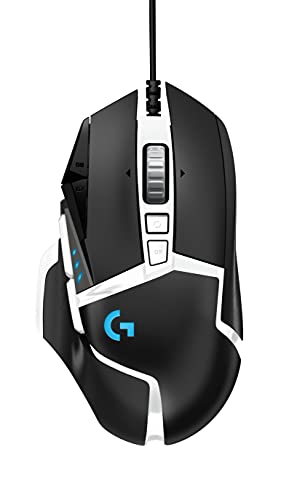
HERO Gaming Sensor: Next generation HERO mouse sensor delivers precision tracking up to 25600 DPI with zero smoothing, filtering or acceleration
11 programmable buttons and dual mode hyper-fast scroll wheel: The Logitech wired gaming mouse gives you fully customisable control over your gameplay
Adjustable weights: Match your playing style. Arrange up to five 3.6 g weights for a personalised weight and balance configuration
LIGHTSYNC technology: Logitech G LIGHTSYNC technology provides fully customisable RGB lighting that can also synchronise with your gaming
Mechanical Switch Button Tensioning: A metal spring tensioning system and metal pivot hinges are built into left and right computer gaming mouse buttons for a crisp, clean click feel with rapid click feedback.Next gen sensor: Capable of detecting movements at the sub-micron level, can track movement less than one millionth of a meter with pinpoint accuracy.World’s NO.1 Best Selling Gaming Gear Brand – Based on independent aggregated sales data (FEB ‘19 – FEB’20) of Gaming Keyboard, Mice, and PC Headset in units
➕ What is the price of Logitech G502 Hero High Performance Gaming Mouse in Saudi Arabia ?
The price of Logitech G502 Hero High Performance Gaming Mouse in-store is 180 SAR VAT.
➕ When Logitech G502 Hero High Performance Gaming Mouse was released ?
The release date was October 7, 2019.
➕ What is the price of Logitech G502 Hero High Performance Gaming Mouse cheap used ?
The price of Logitech G502 Hero High Performance Gaming Mouse used is 120 SAR VAT.
➕ What are the main characteristics of Logitech G502 Hero High Performance Gaming Mouse ?
Special specifications :
HERO Gaming Sensor: Next generation HERO mouse sensor delivers precision tracking up to 25600 DPI with zero smoothing, filtering or acceleration
➕ Is it interesting to buy this product ?
The best people who can answer you are customers who have already bought and tested this product (See Customer Reviews). This product is rated 4.6 / 5 on Amazon.
➕ Where to buy Logitech G502 Hero High Performance Gaming Mouse in Saudi Arabia ?
Check the duration of the warranty and also the faults and defects it covers. Is it complete or limited? and What is included in the warranty (parts, repairs or both)?
Shipping :
Is delivery offered? And how long does it take to get delivered (Delivery time)
Proof of purchase :
Does the shop give you an invoice ?
After-sales service :
Do they have an after-sales service to have information about the installation or operation (instructions for use). Also in case of problem, it is the seller who takes charge or you must contact the manufacturer or supplier yourself.
_____________________________
16 reviews for Logitech G502 Hero High Performance Gaming Mouse
Rated 4 out of 5
P. G (verified owner)–
Only direct USB plug not for Type-C – I was trying to get it to work on my Mac, but if you can’t directly connect it to the USB (NOT A HUB!) you won’t be able to program the mouse. So, if you don’t have a USB connector on your PC/Laptop that connects directly to the motherboard it won’t work. It just says: “Please power on or wake up the device.” However, it’s very comfortable. Just wish it worked with my laptop.
Rated 4 out of 5
R. R (verified owner)–
Bueno en general – Es muy bueno, solo tengo una queja, a veces no me detecta el click izquierdo o el derecho, es un fallo un poco molesto pero quiero creer que es problema del software que quiere combatir el doble clip, tal vez sea por eso.
Rated 5 out of 5
S. B (verified owner)–
Awesome for gaming –
Rated 4 out of 5
R. A (verified owner)–
Plastic scrollwheel, colors a bit different than pictured, otherwise a solid mouse – I am purchasing to replace my Corsair M65 Pro mouse. I like the M65, but the mouse started double-clicking and I had issues with middle click not working at one point in time. The M65 has a wider frame, while this G502 is much thinner. Generally, I prefer the wider frame.
Rated 5 out of 5
G. L (verified owner)–
Great for gaming. – The Logitech software is very buggy and it is slow to start so u will need to wait a few minutes before you can use your mouse when the PC starts. That’s pretty annoying. Also the buttons to change DPI don’t want to work a lot of the times. Using the official software and drivers from the Logitech website. I’m hoping an update eventually fixes these problems because when it wants to work this thing is amazing.
Rated 4 out of 5
R. R (verified owner)–
Bueno en general – Es muy bueno, solo tengo una queja, a veces no me detecta el click izquierdo o el derecho, es un fallo un poco molesto pero quiero creer que es problema del software que quiere combatir el doble clip, tal vez sea por eso.
Rated 5 out of 5
S. B (verified owner)–
Awesome for gaming –
Rated 4 out of 5
P. G (verified owner)–
Only direct USB plug not for Type-C – I was trying to get it to work on my Mac, but if you can’t directly connect it to the USB (NOT A HUB!) you won’t be able to program the mouse. So, if you don’t have a USB connector on your PC/Laptop that connects directly to the motherboard it won’t work. It just says: “Please power on or wake up the device.” However, it’s very comfortable. Just wish it worked with my laptop.
Rated 5 out of 5
D. L (verified owner)–
Not the wireless edition! – I am uncertain as to why is it listed as wireless, but I knew it wasn’t due to the price and reviews. It is an amazing mouse, feels light in comparison to my old thermaltake lvl 10 mouse but it has adjustable weights in case one needs to add more, it is pretty good looking although it feels a bit “plastic” , not a bad plastic but it is a shame that there is no metal in it.
Rated 5 out of 5
S. L (verified owner)–
Cant go wrong with the 502 – Absolutely wonderful mouse never stop making these Logitech. please?
Rated 4 out of 5
B. S (verified owner)–
Worked great but began breaking after one year of use – Great mouse, but it became glitchy and stopped hold-clicking after just one year of use. Otherwise it performed well.
Rated 4 out of 5
B. S (verified owner)–
Worked great but began breaking after one year of use – Great mouse, but it became glitchy and stopped hold-clicking after just one year of use. Otherwise it performed well.
Rated 5 out of 5
D. L (verified owner)–
Not the wireless edition! – I am uncertain as to why is it listed as wireless, but I knew it wasn’t due to the price and reviews. It is an amazing mouse, feels light in comparison to my old thermaltake lvl 10 mouse but it has adjustable weights in case one needs to add more, it is pretty good looking although it feels a bit “plastic” , not a bad plastic but it is a shame that there is no metal in it.
Rated 5 out of 5
G. L (verified owner)–
Great for gaming. – The Logitech software is very buggy and it is slow to start so u will need to wait a few minutes before you can use your mouse when the PC starts. That’s pretty annoying. Also the buttons to change DPI don’t want to work a lot of the times. Using the official software and drivers from the Logitech website. I’m hoping an update eventually fixes these problems because when it wants to work this thing is amazing.
Rated 5 out of 5
S. L (verified owner)–
Cant go wrong with the 502 – Absolutely wonderful mouse never stop making these Logitech. please?
Rated 4 out of 5
R. A (verified owner)–
Plastic scrollwheel, colors a bit different than pictured, otherwise a solid mouse – I am purchasing to replace my Corsair M65 Pro mouse. I like the M65, but the mouse started double-clicking and I had issues with middle click not working at one point in time. The M65 has a wider frame, while this G502 is much thinner. Generally, I prefer the wider frame.


P. G (verified owner) –
Only direct USB plug not for Type-C – I was trying to get it to work on my Mac, but if you can’t directly connect it to the USB (NOT A HUB!) you won’t be able to program the mouse. So, if you don’t have a USB connector on your PC/Laptop that connects directly to the motherboard it won’t work. It just says: “Please power on or wake up the device.” However, it’s very comfortable. Just wish it worked with my laptop.
R. R (verified owner) –
Bueno en general – Es muy bueno, solo tengo una queja, a veces no me detecta el click izquierdo o el derecho, es un fallo un poco molesto pero quiero creer que es problema del software que quiere combatir el doble clip, tal vez sea por eso.
S. B (verified owner) –
Awesome for gaming –
R. A (verified owner) –
Plastic scrollwheel, colors a bit different than pictured, otherwise a solid mouse – I am purchasing to replace my Corsair M65 Pro mouse. I like the M65, but the mouse started double-clicking and I had issues with middle click not working at one point in time. The M65 has a wider frame, while this G502 is much thinner. Generally, I prefer the wider frame.
G. L (verified owner) –
Great for gaming. – The Logitech software is very buggy and it is slow to start so u will need to wait a few minutes before you can use your mouse when the PC starts. That’s pretty annoying. Also the buttons to change DPI don’t want to work a lot of the times. Using the official software and drivers from the Logitech website. I’m hoping an update eventually fixes these problems because when it wants to work this thing is amazing.
R. R (verified owner) –
Bueno en general – Es muy bueno, solo tengo una queja, a veces no me detecta el click izquierdo o el derecho, es un fallo un poco molesto pero quiero creer que es problema del software que quiere combatir el doble clip, tal vez sea por eso.
S. B (verified owner) –
Awesome for gaming –
P. G (verified owner) –
Only direct USB plug not for Type-C – I was trying to get it to work on my Mac, but if you can’t directly connect it to the USB (NOT A HUB!) you won’t be able to program the mouse. So, if you don’t have a USB connector on your PC/Laptop that connects directly to the motherboard it won’t work. It just says: “Please power on or wake up the device.” However, it’s very comfortable. Just wish it worked with my laptop.
D. L (verified owner) –
Not the wireless edition! – I am uncertain as to why is it listed as wireless, but I knew it wasn’t due to the price and reviews. It is an amazing mouse, feels light in comparison to my old thermaltake lvl 10 mouse but it has adjustable weights in case one needs to add more, it is pretty good looking although it feels a bit “plastic” , not a bad plastic but it is a shame that there is no metal in it.
S. L (verified owner) –
Cant go wrong with the 502 – Absolutely wonderful mouse never stop making these Logitech. please?
B. S (verified owner) –
Worked great but began breaking after one year of use – Great mouse, but it became glitchy and stopped hold-clicking after just one year of use. Otherwise it performed well.
B. S (verified owner) –
Worked great but began breaking after one year of use – Great mouse, but it became glitchy and stopped hold-clicking after just one year of use. Otherwise it performed well.
D. L (verified owner) –
Not the wireless edition! – I am uncertain as to why is it listed as wireless, but I knew it wasn’t due to the price and reviews. It is an amazing mouse, feels light in comparison to my old thermaltake lvl 10 mouse but it has adjustable weights in case one needs to add more, it is pretty good looking although it feels a bit “plastic” , not a bad plastic but it is a shame that there is no metal in it.
G. L (verified owner) –
Great for gaming. – The Logitech software is very buggy and it is slow to start so u will need to wait a few minutes before you can use your mouse when the PC starts. That’s pretty annoying. Also the buttons to change DPI don’t want to work a lot of the times. Using the official software and drivers from the Logitech website. I’m hoping an update eventually fixes these problems because when it wants to work this thing is amazing.
S. L (verified owner) –
Cant go wrong with the 502 – Absolutely wonderful mouse never stop making these Logitech. please?
R. A (verified owner) –
Plastic scrollwheel, colors a bit different than pictured, otherwise a solid mouse – I am purchasing to replace my Corsair M65 Pro mouse. I like the M65, but the mouse started double-clicking and I had issues with middle click not working at one point in time. The M65 has a wider frame, while this G502 is much thinner. Generally, I prefer the wider frame.