
Description
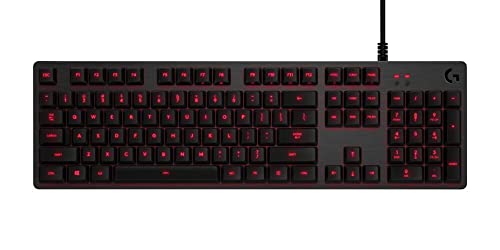
Logitech G413 Backlit Mechanical Gaming Keyboard with – Features & Prices in Saudi Arabia :
Logitech G413 Backlit Mechanical Gaming Keyboard with USB Passthrough – Carbon
Brand
Logitech
Series
920-008300
Item model number
920-008300
Hardware Platform
PC
Operating System
Windows 8.1, Windows 8, Windows 7, Windows 10
Item Weight
2.43 pounds
Product Dimensions
1.4 x 17.5 x 5.1 inches
Item Dimensions LxWxH
1.4 x 17.5 x 5.1 inches
Color
G413 Carbon
Batteries
2 AA batteries required.
Department
Keyboard
Manufacturer
Logitech
ASIN
B06XR5MWGM
Country of Origin
China
Is Discontinued By Manufacturer
No
Date First Available
April 6, 2017
Test video – Logitech G413 Backlit Mechanical Gaming Keyboard with :
Product highlights :
Questions & Answers – Logitech G413 Backlit Mechanical Gaming Keyboard with :
Technical specifications – Logitech G413 Backlit Mechanical Gaming Keyboard with :
Brand
Logitech
Compatible Devices
Gaming Console
Connectivity Technology
,
Keyboard Description
Gaming
Recommended Uses For Product
Gaming
Special Feature
Backlit
Color
G413 Carbon
Operating System
Windows 8.1, Windows 8, Windows 7, Windows 10
Number of Keys
84
Keyboard backlighting color support
Single Color
Purchase advice :
-
Warranty :
Check the duration of the warranty and also the faults and defects it covers. Is it complete or limited? and What is included in the warranty (parts, repairs or both)?
-
Shipping :
Is delivery offered? And how long does it take to get delivered (Delivery time)
-
Proof of purchase :
Does the shop give you an invoice ?
-
After-sales service :
Do they have an after-sales service to have information about the installation or operation (instructions for use). Also in case of problem, it is the seller who takes charge or you must contact the manufacturer or supplier yourself.
_____________________________
O. N (verified owner) –
Great keyboard – Great keyboard for everyday use, bright white (silver front) backlights are well done can be turned down or off. Tactile (subtle) but not noisey clicking. Only negative is no numlock light, but msoffice 2007 can be set to show that status. Not sure of gaming ability / based on demonstrated quality probably would be very good. Has ability to turn off some keys in gaming mode so inadvertently striking doesn’t register.
A. F (verified owner) –
Love the clicky feeling – Very good mechanical keyboard, satisfying clicky sound and feel, good button customization
E. O (verified owner) –
Great gaming keyboard that isn’t too loud, and types well. – Working from home right now, and was using a Razer Black Widow Tournament Edition with their proprietary green switches (much like Cherry MX blues).
A. F (verified owner) –
Love the clicky feeling – Very good mechanical keyboard, satisfying clicky sound and feel, good button customization
E. O (verified owner) –
Great gaming keyboard that isn’t too loud, and types well. – Working from home right now, and was using a Razer Black Widow Tournament Edition with their proprietary green switches (much like Cherry MX blues).
J. M (verified owner) –
The Perfect Work Keyboard – I am a work-at-home software developer and I can attest to the quality of this keyboard. In fact, I have this keyboard on all of my computers, and even have one as a backup that I leave in the box. While technically this is a “gaming” keyboard, it’s also one hell of a work keyboard. It also pairs well with the M720 “Triathlon” mouse and I use the USB passthrough for the mouse’s Unity dongle. I have found that using the USB passthrough for the Unity dongle keeps everything super responsive which is critical for my work. It’s as if the G413 keyboard and the M720 mouse were made for each other.
K. L (verified owner) –
A good keyboard with minor caveats – I am not a gamer. I wanted a good quality backlit keyboard with reasonably quiet mechanical switches and no need for software. I got what I was looking for in the G413 Silver, at a reasonable price.
O. N (verified owner) –
Great keyboard – Great keyboard for everyday use, bright white (silver front) backlights are well done can be turned down or off. Tactile (subtle) but not noisey clicking. Only negative is no numlock light, but msoffice 2007 can be set to show that status. Not sure of gaming ability / based on demonstrated quality probably would be very good. Has ability to turn off some keys in gaming mode so inadvertently striking doesn’t register.
Z. S (verified owner) –
has it been two years now? – it’s been over two years i think… i’m not sure. sometimes this unit has hiccups with my alienware r11 desktop tower and the keys will not respond when pressed. i then have to disconnect the usb cable from the port and reconnect and then it’s fine. i think the issue stopped happening when i just moved the keyboard usb cable to a totally different usb port. there are several usb ports on the back panel of my desktop.
C. L (verified owner) –
This keyboard served me well for the past 4 years. – Works as you would expect, the lights are only red, can change how bright or have it “breathe” on and off. There’s a USB port that works pretty good as well. I would complain that the clicking of the keys are a bit too quiet for my preference but again works just fine. Be extra careful removing the keys for cleaning as I broke off the left control key and that left it with an ugly look from then on. Lately it’s been acting up double typing some letters and triple spaces, also not registering some letters as well, tried to clean it up but that didn’t work so it’s getting replaced. I got 4 years and honestly I could have cleaned it more often might still be working.
K. L (verified owner) –
A good keyboard with minor caveats – I am not a gamer. I wanted a good quality backlit keyboard with reasonably quiet mechanical switches and no need for software. I got what I was looking for in the G413 Silver, at a reasonable price.
F. G (verified owner) –
Doesn’t work well when paired with Coffee. – First purchased years ago and worked flawlessly then total failure 2 days after soaking it in coffee. ;>)
Z. S (verified owner) –
has it been two years now? – it’s been over two years i think… i’m not sure. sometimes this unit has hiccups with my alienware r11 desktop tower and the keys will not respond when pressed. i then have to disconnect the usb cable from the port and reconnect and then it’s fine. i think the issue stopped happening when i just moved the keyboard usb cable to a totally different usb port. there are several usb ports on the back panel of my desktop.
J. M (verified owner) –
The Perfect Work Keyboard – I am a work-at-home software developer and I can attest to the quality of this keyboard. In fact, I have this keyboard on all of my computers, and even have one as a backup that I leave in the box. While technically this is a “gaming” keyboard, it’s also one hell of a work keyboard. It also pairs well with the M720 “Triathlon” mouse and I use the USB passthrough for the mouse’s Unity dongle. I have found that using the USB passthrough for the Unity dongle keeps everything super responsive which is critical for my work. It’s as if the G413 keyboard and the M720 mouse were made for each other.
F. G (verified owner) –
Doesn’t work well when paired with Coffee. – First purchased years ago and worked flawlessly then total failure 2 days after soaking it in coffee. ;>)
C. L (verified owner) –
This keyboard served me well for the past 4 years. – Works as you would expect, the lights are only red, can change how bright or have it “breathe” on and off. There’s a USB port that works pretty good as well. I would complain that the clicking of the keys are a bit too quiet for my preference but again works just fine. Be extra careful removing the keys for cleaning as I broke off the left control key and that left it with an ugly look from then on. Lately it’s been acting up double typing some letters and triple spaces, also not registering some letters as well, tried to clean it up but that didn’t work so it’s getting replaced. I got 4 years and honestly I could have cleaned it more often might still be working.