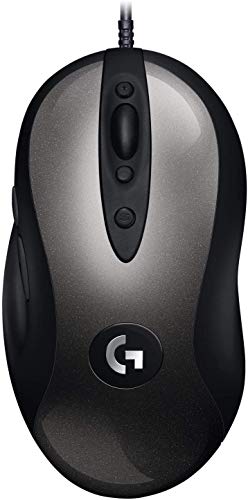
Test video – Logitech G MX518 Gaming Mouse Hero 25K :
Product highlights :
HERO sensor: The reborn MX518 features our exclusive HERO 25K sensor. It’s our most accurate gaming sensor ever, with a capture rate of up to 17,000 frames per second, achieving 400+ IPS across the entire 100 – 25,600 DPI range with zero smoothing, filtering or acceleration.
32-Bit arm Processor: With on-board memory and 1 ms report rate, it feels like the original MX518 while performing to today’s advanced standards
On-board memory: Save up to five profiles to the on-board memory, using Logitech G Hub, and take them with you, your saved settings will work on any PC without additional software or any login required
On-the-fly DPI: cycle up and down through as many as five DPI settings, you can customise them with lgs or G hub, or use the default settings (400, 800, 1600, 3200 and 6400) Out of the box
8 programmable buttons: Use G HUB to program your favourite commands and macros to each of the eight buttons. Build, crouch, melee, heal … put your power moves at your fingertips.
World’s NO.1 Best Selling Gaming Gear Brand – Based on independent aggregated sales data (FEB ‘19 – FEB’20) of Gaming Keyboard, Mice, and PC Headset in units
➕ What is the price of Logitech G MX518 Gaming Mouse Hero 25K in Saudi Arabia ?
The price of Logitech G MX518 Gaming Mouse Hero 25K in-store is 110 SAR VAT.
➕ When Logitech G MX518 Gaming Mouse Hero 25K was released ?
The release date was October 11, 2019.
➕ What is the price of Logitech G MX518 Gaming Mouse Hero 25K cheap used ?
The price of Logitech G MX518 Gaming Mouse Hero 25K used is 70 SAR VAT.
➕ What are the main characteristics of Logitech G MX518 Gaming Mouse Hero 25K ?
Special specifications :
HERO sensor: The reborn MX518 features our exclusive HERO 25K sensor. It’s our most accurate gaming sensor ever, with a capture rate of up to 17,000 frames per second, achieving 400+ IPS across the entire 100 – 25,600 DPI range with zero smoothing, filtering or acceleration.
➕ Is it interesting to buy this product ?
The best people who can answer you are customers who have already bought and tested this product (See Customer Reviews). This product is rated 4.4 / 5 on Amazon.
➕ Where to buy Logitech G MX518 Gaming Mouse Hero 25K in Saudi Arabia ?
Check the duration of the warranty and also the faults and defects it covers. Is it complete or limited? and What is included in the warranty (parts, repairs or both)?
Shipping :
Is delivery offered? And how long does it take to get delivered (Delivery time)
Proof of purchase :
Does the shop give you an invoice ?
After-sales service :
Do they have an after-sales service to have information about the installation or operation (instructions for use). Also in case of problem, it is the seller who takes charge or you must contact the manufacturer or supplier yourself.
_____________________________
16 reviews for Logitech G MX518 Gaming Mouse Hero 25K
Rated 3 out of 5
R. H (verified owner)–
Not as good as the original – I use this primarily on my work Mac which I use to do software development. I’ve had the old generation model for over 10 years and it’s been great. I liked that the auxiliary button below the sensitivity selector buttons could be used as a shortcut on the Mac to go into the window switcher mode. In the latest generation, they’ve changed that button to reset the sensitivity to default and it no longer works as “Mouse Button 6” in the keyboard shortcuts selection menu. I tried changing the settings in Logitech’s GHub software but couldn’t figure out if it was possible and after 10 minutes gave up after failing to discover if it was possible to customize a profile with button remappings to make this mouse equivalent to the old generation.
Rated 4 out of 5
K. N (verified owner)–
almost returned it – Using this on a Mac Pro with Big Sur. Previously using an MX 310 that is no longer supported by Logitech. I almost returned this cuz I couldn’t get any of the drivers/software to work and give me options to assign buttons. When I went to the Logitech support site and selected software for the MX510, it said that there were no software downloads for this device and Big Sur. Ended up going a couple rounds with Logitech tech support before they finally tipped me off that I needed to download G Hub to set the buttons and control the speed. Why their website said that there were no downloads is beyond me, but at least it’s working now. Tracking speed on this always seems to reset to WAY BEYOND FAST whenever I restart no matter what I put the G Hub setting to. I would have to launch G Hub and have to just click on the speed that I wanted. I finally just went to the Mouse preferences in the System Preferences and turned down the tracking speed there so I don’t have to launch G Hub every time I start up or restart the computer. Hope this helps someone out there.
Rated 4 out of 5
R. R (verified owner)–
very very good grip and easy to use – i bought it because the dog of my friend made a vase fall on my original MX 518 . i bought a G Pro but i liked my original MX 518 better ( better grip and overall use).So that is why i bought this remake.It is a very good mouse but i like the original MX518 more.This remake feels different( read for me less good).
Rated 5 out of 5
L. B (verified owner)–
What a mouse! – I tried many gaming and regular mice, but very few allowed me to….
Rated 4 out of 5
D. C (verified owner)–
Second verse, different than the first – I have been using an MX518 for several years. My previous one served me well for a very long time, but had finally started to wear out. Happy with it’s performance, I ordered what looked to be an identical model.
Rated 4 out of 5
R. R (verified owner)–
very very good grip and easy to use – i bought it because the dog of my friend made a vase fall on my original MX 518 . i bought a G Pro but i liked my original MX 518 better ( better grip and overall use).So that is why i bought this remake.It is a very good mouse but i like the original MX518 more.This remake feels different( read for me less good).
Rated 3 out of 5
R. H (verified owner)–
Not as good as the original – I use this primarily on my work Mac which I use to do software development. I’ve had the old generation model for over 10 years and it’s been great. I liked that the auxiliary button below the sensitivity selector buttons could be used as a shortcut on the Mac to go into the window switcher mode. In the latest generation, they’ve changed that button to reset the sensitivity to default and it no longer works as “Mouse Button 6” in the keyboard shortcuts selection menu. I tried changing the settings in Logitech’s GHub software but couldn’t figure out if it was possible and after 10 minutes gave up after failing to discover if it was possible to customize a profile with button remappings to make this mouse equivalent to the old generation.
Rated 5 out of 5
I. L (verified owner)–
NO DOUBLE CLICKING – I have bought 2 of these, i use one at work, one at home. Home consists of gaming primarily, and at work i use several spreadsheets throughout the day, the buttons to control mouse speed are very handy as well as using the thumb buttons to go back or forward on websites is very handy.
Rated 5 out of 5
B. I (verified owner)–
Greatest mouse of all time – I’ve been gaming since 2000 and been using this mouse exclusively since like 2005. Mainly FPS games like CSGO / Valorant / PUBG. By far the best mouse in my opinion. I haven’t had any of these MX518’s break in the past or had any issues. Very reliable, glad Logitech brought it back.
Rated 5 out of 5
I. L (verified owner)–
NO DOUBLE CLICKING – I have bought 2 of these, i use one at work, one at home. Home consists of gaming primarily, and at work i use several spreadsheets throughout the day, the buttons to control mouse speed are very handy as well as using the thumb buttons to go back or forward on websites is very handy.
Rated 5 out of 5
B. I (verified owner)–
Greatest mouse of all time – I’ve been gaming since 2000 and been using this mouse exclusively since like 2005. Mainly FPS games like CSGO / Valorant / PUBG. By far the best mouse in my opinion. I haven’t had any of these MX518’s break in the past or had any issues. Very reliable, glad Logitech brought it back.
Rated 4 out of 5
K. N (verified owner)–
almost returned it – Using this on a Mac Pro with Big Sur. Previously using an MX 310 that is no longer supported by Logitech. I almost returned this cuz I couldn’t get any of the drivers/software to work and give me options to assign buttons. When I went to the Logitech support site and selected software for the MX510, it said that there were no software downloads for this device and Big Sur. Ended up going a couple rounds with Logitech tech support before they finally tipped me off that I needed to download G Hub to set the buttons and control the speed. Why their website said that there were no downloads is beyond me, but at least it’s working now. Tracking speed on this always seems to reset to WAY BEYOND FAST whenever I restart no matter what I put the G Hub setting to. I would have to launch G Hub and have to just click on the speed that I wanted. I finally just went to the Mouse preferences in the System Preferences and turned down the tracking speed there so I don’t have to launch G Hub every time I start up or restart the computer. Hope this helps someone out there.
Rated 5 out of 5
G. H (verified owner)–
Good mouse – The mouse feels comfortable in your hands. I like the ability to easily assign the extra buttons. Would definitely recommend!!
Rated 4 out of 5
D. C (verified owner)–
Second verse, different than the first – I have been using an MX518 for several years. My previous one served me well for a very long time, but had finally started to wear out. Happy with it’s performance, I ordered what looked to be an identical model.
Rated 5 out of 5
L. B (verified owner)–
What a mouse! – I tried many gaming and regular mice, but very few allowed me to….
Rated 5 out of 5
G. H (verified owner)–
Good mouse – The mouse feels comfortable in your hands. I like the ability to easily assign the extra buttons. Would definitely recommend!!


R. H (verified owner) –
Not as good as the original – I use this primarily on my work Mac which I use to do software development. I’ve had the old generation model for over 10 years and it’s been great. I liked that the auxiliary button below the sensitivity selector buttons could be used as a shortcut on the Mac to go into the window switcher mode. In the latest generation, they’ve changed that button to reset the sensitivity to default and it no longer works as “Mouse Button 6” in the keyboard shortcuts selection menu. I tried changing the settings in Logitech’s GHub software but couldn’t figure out if it was possible and after 10 minutes gave up after failing to discover if it was possible to customize a profile with button remappings to make this mouse equivalent to the old generation.
K. N (verified owner) –
almost returned it – Using this on a Mac Pro with Big Sur. Previously using an MX 310 that is no longer supported by Logitech. I almost returned this cuz I couldn’t get any of the drivers/software to work and give me options to assign buttons. When I went to the Logitech support site and selected software for the MX510, it said that there were no software downloads for this device and Big Sur. Ended up going a couple rounds with Logitech tech support before they finally tipped me off that I needed to download G Hub to set the buttons and control the speed. Why their website said that there were no downloads is beyond me, but at least it’s working now. Tracking speed on this always seems to reset to WAY BEYOND FAST whenever I restart no matter what I put the G Hub setting to. I would have to launch G Hub and have to just click on the speed that I wanted. I finally just went to the Mouse preferences in the System Preferences and turned down the tracking speed there so I don’t have to launch G Hub every time I start up or restart the computer. Hope this helps someone out there.
R. R (verified owner) –
very very good grip and easy to use – i bought it because the dog of my friend made a vase fall on my original MX 518 . i bought a G Pro but i liked my original MX 518 better ( better grip and overall use).So that is why i bought this remake.It is a very good mouse but i like the original MX518 more.This remake feels different( read for me less good).
L. B (verified owner) –
What a mouse! – I tried many gaming and regular mice, but very few allowed me to….
D. C (verified owner) –
Second verse, different than the first – I have been using an MX518 for several years. My previous one served me well for a very long time, but had finally started to wear out. Happy with it’s performance, I ordered what looked to be an identical model.
R. R (verified owner) –
very very good grip and easy to use – i bought it because the dog of my friend made a vase fall on my original MX 518 . i bought a G Pro but i liked my original MX 518 better ( better grip and overall use).So that is why i bought this remake.It is a very good mouse but i like the original MX518 more.This remake feels different( read for me less good).
R. H (verified owner) –
Not as good as the original – I use this primarily on my work Mac which I use to do software development. I’ve had the old generation model for over 10 years and it’s been great. I liked that the auxiliary button below the sensitivity selector buttons could be used as a shortcut on the Mac to go into the window switcher mode. In the latest generation, they’ve changed that button to reset the sensitivity to default and it no longer works as “Mouse Button 6” in the keyboard shortcuts selection menu. I tried changing the settings in Logitech’s GHub software but couldn’t figure out if it was possible and after 10 minutes gave up after failing to discover if it was possible to customize a profile with button remappings to make this mouse equivalent to the old generation.
I. L (verified owner) –
NO DOUBLE CLICKING – I have bought 2 of these, i use one at work, one at home. Home consists of gaming primarily, and at work i use several spreadsheets throughout the day, the buttons to control mouse speed are very handy as well as using the thumb buttons to go back or forward on websites is very handy.
B. I (verified owner) –
Greatest mouse of all time – I’ve been gaming since 2000 and been using this mouse exclusively since like 2005. Mainly FPS games like CSGO / Valorant / PUBG. By far the best mouse in my opinion. I haven’t had any of these MX518’s break in the past or had any issues. Very reliable, glad Logitech brought it back.
I. L (verified owner) –
NO DOUBLE CLICKING – I have bought 2 of these, i use one at work, one at home. Home consists of gaming primarily, and at work i use several spreadsheets throughout the day, the buttons to control mouse speed are very handy as well as using the thumb buttons to go back or forward on websites is very handy.
B. I (verified owner) –
Greatest mouse of all time – I’ve been gaming since 2000 and been using this mouse exclusively since like 2005. Mainly FPS games like CSGO / Valorant / PUBG. By far the best mouse in my opinion. I haven’t had any of these MX518’s break in the past or had any issues. Very reliable, glad Logitech brought it back.
K. N (verified owner) –
almost returned it – Using this on a Mac Pro with Big Sur. Previously using an MX 310 that is no longer supported by Logitech. I almost returned this cuz I couldn’t get any of the drivers/software to work and give me options to assign buttons. When I went to the Logitech support site and selected software for the MX510, it said that there were no software downloads for this device and Big Sur. Ended up going a couple rounds with Logitech tech support before they finally tipped me off that I needed to download G Hub to set the buttons and control the speed. Why their website said that there were no downloads is beyond me, but at least it’s working now. Tracking speed on this always seems to reset to WAY BEYOND FAST whenever I restart no matter what I put the G Hub setting to. I would have to launch G Hub and have to just click on the speed that I wanted. I finally just went to the Mouse preferences in the System Preferences and turned down the tracking speed there so I don’t have to launch G Hub every time I start up or restart the computer. Hope this helps someone out there.
G. H (verified owner) –
Good mouse – The mouse feels comfortable in your hands. I like the ability to easily assign the extra buttons. Would definitely recommend!!
D. C (verified owner) –
Second verse, different than the first – I have been using an MX518 for several years. My previous one served me well for a very long time, but had finally started to wear out. Happy with it’s performance, I ordered what looked to be an identical model.
L. B (verified owner) –
What a mouse! – I tried many gaming and regular mice, but very few allowed me to….
G. H (verified owner) –
Good mouse – The mouse feels comfortable in your hands. I like the ability to easily assign the extra buttons. Would definitely recommend!!