EKSA Gaming Mouse, Wired Ergonomic Gaming Mice – Features & Prices in Saudi Arabia :
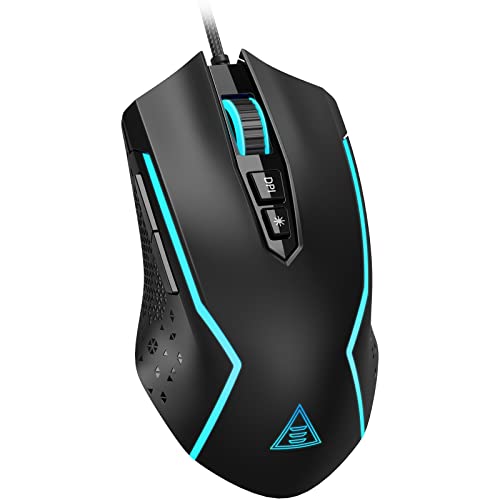
EKSA Gaming Mouse, Wired Ergonomic Gaming Mice with 7 Programmable Buttons, Chroma RGB 6 Backlit& Adjustable 8000DPI for Windows PC Gamers (EM100)
Product Dimensions
2.75 x 1.57 x 4.96 inches
Item Weight
6.7 ounces
ASIN
B09HJX7B9F
Item model number
em100
Date First Available
October 25, 2021
Manufacturer
EKSA
Country of Origin
China
Test video – EKSA Gaming Mouse, Wired Ergonomic Gaming Mice :
Product highlights :
Cool RGB Backlights: This computer gaming mouse is fitted with 6 backlight modes that come in a whopping 16 million colors. Chroma RGB backlit can be adjusted to suit your needs and greatly match your style. “”Breathing and Streamer””, and Rainbow RGB LED that radiates ambient light to create a unique gaming atmosphere for enhanced enjoyment of the game. You can also turn the lights off when needed. “
Gaming Grade Optical Sensor: The gamer mouse features a 6-level DPI of 800/1600/2400/3200/4800/8000, allowing it to function at various speeds, accuracy, and responsiveness. Higher pinpoint precision and faster tracking than any other computer mice are at your fingertips, perfect for Battle Royale, FPS, MOBA, MMO, and other fast-paced games.
High-End PC Gaming Mouse: This RGB gaming mouse has 7 programmable buttons – Left, Right, Scroll, DPI, Forward, Backward, and RGB Light buttons. EKSA RGB mouse will empower you to make quicker decisions with a wide array of buttons at your fingertips and meet your different game demands. Plus, the included 5inch flexible braided cable causes little or no drag for unhindered swipes.
Ergonomic Shape for Esports and Competitive Play: EKSA wired gaming mouse fits perfectly into any hand size. Designed for long-lasting comfort and fast movement, it provides responsive input and a comfortable gaming experience with less fatigue after hours of gameplay. The sides also provide friction, eradicating the possibility of the mouse slipping from your hands and aiding quick and precise movement that is essential in games.
Wide Compatibility: EKSA wired mouse is compatible with Windows 2000/XP/Vista/7/8/10/11 for programmable using and macOS for normal using, and supports Notebooks, PCs, Laptops, Computers and MacBooks. (Note: This programmable feature does not available on macOS, and you can download the driver from our official website if needed. Check the manual.)
➕ What is the price of EKSA Gaming Mouse, Wired Ergonomic Gaming Mice in Saudi Arabia ?
The price of EKSA Gaming Mouse, Wired Ergonomic Gaming Mice in-store is 50 SAR VAT.
➕ When EKSA Gaming Mouse, Wired Ergonomic Gaming Mice was released ?
The release date was October 25, 2021.
➕ What is the price of EKSA Gaming Mouse, Wired Ergonomic Gaming Mice cheap used ?
The price of EKSA Gaming Mouse, Wired Ergonomic Gaming Mice used is 30 SAR VAT.
➕ What are the main characteristics of EKSA Gaming Mouse, Wired Ergonomic Gaming Mice ?
Special specifications :
Cool RGB Backlights: This computer gaming mouse is fitted with 6 backlight modes that come in a whopping 16 million colors. Chroma RGB backlit can be adjusted to suit your needs and greatly match your style. “”Breathing and Streamer””, and Rainbow RGB LED that radiates ambient light to create a unique gaming atmosphere for enhanced enjoyment of the game. You can also turn the lights off when needed. “
➕ Is it interesting to buy this product ?
The best people who can answer you are customers who have already bought and tested this product (See Customer Reviews). This product is rated 4.5 / 5 on Amazon.
➕ Where to buy EKSA Gaming Mouse, Wired Ergonomic Gaming Mice in Saudi Arabia ?
Check the duration of the warranty and also the faults and defects it covers. Is it complete or limited? and What is included in the warranty (parts, repairs or both)?
Shipping :
Is delivery offered? And how long does it take to get delivered (Delivery time)
Proof of purchase :
Does the shop give you an invoice ?
After-sales service :
Do they have an after-sales service to have information about the installation or operation (instructions for use). Also in case of problem, it is the seller who takes charge or you must contact the manufacturer or supplier yourself.
_____________________________
16 reviews for EKSA Gaming Mouse, Wired Ergonomic Gaming Mice
Rated 5 out of 5
I. S (verified owner)–
Very good mouse – You can change the color sequence, have specific colors, actually change DPI which is just a fancy way if saying it speeds up the mouse either with a game or simply wanting to quick drag on web pages. It works great for the price, has a nice weight to it and overall just feels really premium for its lower price range. If you dont want to overspend on a simple pointing device you get durability and quality with this mouse for sure.
Rated 4 out of 5
D. K (verified owner)–
Middle button is too hard to push. – Price is great but an ergonomic and buttons not so. Middle (top) button requires some effort to click and the design not so “curvy” for the hand.
Rated 5 out of 5
G. K (verified owner)–
Looks cool – and works well – Not a game player – Just replacement of my generic mouse that is showing age.
Rated 4 out of 5
A. E (verified owner)–
Bought to use with chromebook – Not gaming
Rated 4 out of 5
A. Z (verified owner)–
My rating on the mouse – I really like this mouse and it really fits on my hand it feels very smooth and conformable and I really like using it for gaming but there are 2 problems. 1 problem is that at some point while using the mouse the dpi button will glitch, for example, let’s say I want to change the dpi of the mouse but the buttons do not seem to work, and then the dpi button is also being used for the brightness button as well and it’s annoying because when I want to chang the dpi I have to use the brightness button as well and when that happens I can’t change the buttons because the dpi is the one using it. The second reason is that at some point my mouse started to blink red and I really don’t know how to fix it and this is the only mouse I have so I’m pretty much stuck with a broken mouse.
Rated 5 out of 5
I. S (verified owner)–
Very good mouse – You can change the color sequence, have specific colors, actually change DPI which is just a fancy way if saying it speeds up the mouse either with a game or simply wanting to quick drag on web pages. It works great for the price, has a nice weight to it and overall just feels really premium for its lower price range. If you dont want to overspend on a simple pointing device you get durability and quality with this mouse for sure.
Rated 4 out of 5
I. E (verified owner)–
Its sensitive – you can’t rest your hands on the button it’s way too sensitive
Rated 5 out of 5
H. F (verified owner)–
A Gaming Mouse that doesn’t break the bank!!!! – I have a confession to make: I don’t use gaming mice to play games. I started buying gaming mice because I wanted something more durable than the wireless mice that I’d been using. I also wanted one that wouldn’t cost me “an arm & a leg”. I compared prices from various sources and decided upon the EKSA Gaming Mouse.When I opened the box and connected it to my desktop, it was instantaneous and easy to use. I even consider the color cycling to be a little extra “icing on the cake”, so to speak. I’ve found this mouse to be faster and more responsive than any other computer mouse I’ve ever used before. Even though I use a graphic pen and stylus in image-editing programs, I’ve found that some functions do work better with a mouse. When I’d used the EKSA gaming mouse, I’ve found that it was faster and more responsive, with less strain on my fingers and wrist. I’ve found I could do more work on an image in less time. Now that I’ve experienced the joys of using a gaming mouse, there’s no way I could ever go back to using a regular computer mouse. I can see myself purchasing another one just to have a backup.
Rated 4 out of 5
I. E (verified owner)–
Its sensitive – you can’t rest your hands on the button it’s way too sensitive
Rated 4 out of 5
E. R (verified owner)–
It’s great but get a wrist rest – The mouse is big and fits my big hand nicely. It is slightly bigger than average size mouse I am used to. The shape gives my hand a posture that makes it bend the wrist down onto the desk. It has a low profile, not flat yet makes my hand not glide above the desk compared to other mice.
Rated 5 out of 5
H. F (verified owner)–
A Gaming Mouse that doesn’t break the bank!!!! – I have a confession to make: I don’t use gaming mice to play games. I started buying gaming mice because I wanted something more durable than the wireless mice that I’d been using. I also wanted one that wouldn’t cost me “an arm & a leg”. I compared prices from various sources and decided upon the EKSA Gaming Mouse.When I opened the box and connected it to my desktop, it was instantaneous and easy to use. I even consider the color cycling to be a little extra “icing on the cake”, so to speak. I’ve found this mouse to be faster and more responsive than any other computer mouse I’ve ever used before. Even though I use a graphic pen and stylus in image-editing programs, I’ve found that some functions do work better with a mouse. When I’d used the EKSA gaming mouse, I’ve found that it was faster and more responsive, with less strain on my fingers and wrist. I’ve found I could do more work on an image in less time. Now that I’ve experienced the joys of using a gaming mouse, there’s no way I could ever go back to using a regular computer mouse. I can see myself purchasing another one just to have a backup.
Rated 4 out of 5
E. R (verified owner)–
It’s great but get a wrist rest – The mouse is big and fits my big hand nicely. It is slightly bigger than average size mouse I am used to. The shape gives my hand a posture that makes it bend the wrist down onto the desk. It has a low profile, not flat yet makes my hand not glide above the desk compared to other mice.
Rated 4 out of 5
A. Z (verified owner)–
My rating on the mouse – I really like this mouse and it really fits on my hand it feels very smooth and conformable and I really like using it for gaming but there are 2 problems. 1 problem is that at some point while using the mouse the dpi button will glitch, for example, let’s say I want to change the dpi of the mouse but the buttons do not seem to work, and then the dpi button is also being used for the brightness button as well and it’s annoying because when I want to chang the dpi I have to use the brightness button as well and when that happens I can’t change the buttons because the dpi is the one using it. The second reason is that at some point my mouse started to blink red and I really don’t know how to fix it and this is the only mouse I have so I’m pretty much stuck with a broken mouse.
Rated 4 out of 5
D. K (verified owner)–
Middle button is too hard to push. – Price is great but an ergonomic and buttons not so. Middle (top) button requires some effort to click and the design not so “curvy” for the hand.
Rated 5 out of 5
G. K (verified owner)–
Looks cool – and works well – Not a game player – Just replacement of my generic mouse that is showing age.


I. S (verified owner) –
Very good mouse – You can change the color sequence, have specific colors, actually change DPI which is just a fancy way if saying it speeds up the mouse either with a game or simply wanting to quick drag on web pages. It works great for the price, has a nice weight to it and overall just feels really premium for its lower price range. If you dont want to overspend on a simple pointing device you get durability and quality with this mouse for sure.
D. K (verified owner) –
Middle button is too hard to push. – Price is great but an ergonomic and buttons not so. Middle (top) button requires some effort to click and the design not so “curvy” for the hand.
G. K (verified owner) –
Looks cool – and works well – Not a game player – Just replacement of my generic mouse that is showing age.
A. E (verified owner) –
Bought to use with chromebook – Not gaming
A. Z (verified owner) –
My rating on the mouse – I really like this mouse and it really fits on my hand it feels very smooth and conformable and I really like using it for gaming but there are 2 problems. 1 problem is that at some point while using the mouse the dpi button will glitch, for example, let’s say I want to change the dpi of the mouse but the buttons do not seem to work, and then the dpi button is also being used for the brightness button as well and it’s annoying because when I want to chang the dpi I have to use the brightness button as well and when that happens I can’t change the buttons because the dpi is the one using it. The second reason is that at some point my mouse started to blink red and I really don’t know how to fix it and this is the only mouse I have so I’m pretty much stuck with a broken mouse.
I. S (verified owner) –
Very good mouse – You can change the color sequence, have specific colors, actually change DPI which is just a fancy way if saying it speeds up the mouse either with a game or simply wanting to quick drag on web pages. It works great for the price, has a nice weight to it and overall just feels really premium for its lower price range. If you dont want to overspend on a simple pointing device you get durability and quality with this mouse for sure.
I. E (verified owner) –
Its sensitive – you can’t rest your hands on the button it’s way too sensitive
H. F (verified owner) –
A Gaming Mouse that doesn’t break the bank!!!! – I have a confession to make: I don’t use gaming mice to play games. I started buying gaming mice because I wanted something more durable than the wireless mice that I’d been using. I also wanted one that wouldn’t cost me “an arm & a leg”. I compared prices from various sources and decided upon the EKSA Gaming Mouse.When I opened the box and connected it to my desktop, it was instantaneous and easy to use. I even consider the color cycling to be a little extra “icing on the cake”, so to speak. I’ve found this mouse to be faster and more responsive than any other computer mouse I’ve ever used before. Even though I use a graphic pen and stylus in image-editing programs, I’ve found that some functions do work better with a mouse. When I’d used the EKSA gaming mouse, I’ve found that it was faster and more responsive, with less strain on my fingers and wrist. I’ve found I could do more work on an image in less time. Now that I’ve experienced the joys of using a gaming mouse, there’s no way I could ever go back to using a regular computer mouse. I can see myself purchasing another one just to have a backup.
I. E (verified owner) –
Its sensitive – you can’t rest your hands on the button it’s way too sensitive
E. R (verified owner) –
It’s great but get a wrist rest – The mouse is big and fits my big hand nicely. It is slightly bigger than average size mouse I am used to. The shape gives my hand a posture that makes it bend the wrist down onto the desk. It has a low profile, not flat yet makes my hand not glide above the desk compared to other mice.
H. F (verified owner) –
A Gaming Mouse that doesn’t break the bank!!!! – I have a confession to make: I don’t use gaming mice to play games. I started buying gaming mice because I wanted something more durable than the wireless mice that I’d been using. I also wanted one that wouldn’t cost me “an arm & a leg”. I compared prices from various sources and decided upon the EKSA Gaming Mouse.When I opened the box and connected it to my desktop, it was instantaneous and easy to use. I even consider the color cycling to be a little extra “icing on the cake”, so to speak. I’ve found this mouse to be faster and more responsive than any other computer mouse I’ve ever used before. Even though I use a graphic pen and stylus in image-editing programs, I’ve found that some functions do work better with a mouse. When I’d used the EKSA gaming mouse, I’ve found that it was faster and more responsive, with less strain on my fingers and wrist. I’ve found I could do more work on an image in less time. Now that I’ve experienced the joys of using a gaming mouse, there’s no way I could ever go back to using a regular computer mouse. I can see myself purchasing another one just to have a backup.
E. R (verified owner) –
It’s great but get a wrist rest – The mouse is big and fits my big hand nicely. It is slightly bigger than average size mouse I am used to. The shape gives my hand a posture that makes it bend the wrist down onto the desk. It has a low profile, not flat yet makes my hand not glide above the desk compared to other mice.
A. Z (verified owner) –
My rating on the mouse – I really like this mouse and it really fits on my hand it feels very smooth and conformable and I really like using it for gaming but there are 2 problems. 1 problem is that at some point while using the mouse the dpi button will glitch, for example, let’s say I want to change the dpi of the mouse but the buttons do not seem to work, and then the dpi button is also being used for the brightness button as well and it’s annoying because when I want to chang the dpi I have to use the brightness button as well and when that happens I can’t change the buttons because the dpi is the one using it. The second reason is that at some point my mouse started to blink red and I really don’t know how to fix it and this is the only mouse I have so I’m pretty much stuck with a broken mouse.
D. K (verified owner) –
Middle button is too hard to push. – Price is great but an ergonomic and buttons not so. Middle (top) button requires some effort to click and the design not so “curvy” for the hand.
G. K (verified owner) –
Looks cool – and works well – Not a game player – Just replacement of my generic mouse that is showing age.
A. E (verified owner) –
Bought to use with chromebook – Not gaming