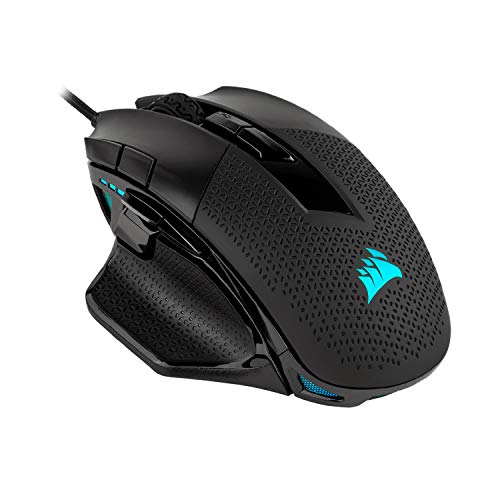
Corsair Nightsword RGB – Comfort Performance Tunable is available in Saudi Arabia.
Find out all you need to know about Corsair Nightsword RGB – Comfort Performance Tunable before buying : Price, Test video, Datasheet, Similar products.
Corsair Nightsword RGB – Comfort Performance Tunable – Features & Prices in Saudi Arabia :
Corsair Nightsword RGB – Comfort Performance Tunable FPS/MOBA Optical Ergonomic Gaming Mouse with Backlit RGB LED, 18000 DPI, Black
Brand
Corsair
Item model number
CH-9306011-NA
Hardware Platform
PC
Item Weight
4.2 ounces
Product Dimensions
5.08 x 3.38 x 1.71 inches
Item Dimensions LxWxH
5.08 x 3.38 x 1.71 inches
Color
Black
Power Source
Corded Electric
Batteries
1 Lithium Ion batteries required.
Manufacturer
Corsair
ASIN
B07QX9C9WH
Country of Origin
China
Date First Available
June 13, 2019
Test video – Corsair Nightsword RGB – Comfort Performance Tunable :
Product highlights :
Corsair exclusive software automatically detects the center of gravity in real time, allowing you to adjust weight between 119g and 141g and fine tune balance to perfectly fit your grip
A custom PixArt PMW3391 native 18, 000 DPI optical sensor, adjustable in 1 DPI resolution steps, gives you total sensitivity customization and ultra accurate tracking
Built with a comfortable contoured shape that naturally fits your hand, with high-performance rubber grips inspired by Pro sports equipment
Ten fully programmable buttons let you customize your gaming, with the in game advantage of powerful macros and key Remaps
Includes two sets of weights with six mounting locations, Offering 120 different weight and balance configurations for a precisely calibrated gaming experience
➕ What is the price of Corsair Nightsword RGB - Comfort Performance Tunable in Saudi Arabia ?
The price of Corsair Nightsword RGB – Comfort Performance Tunable in-store is 250 SAR VAT.
➕ When Corsair Nightsword RGB - Comfort Performance Tunable was released ?
The release date was June 13, 2019.
➕ What is the price of Corsair Nightsword RGB - Comfort Performance Tunable cheap used ?
The price of Corsair Nightsword RGB – Comfort Performance Tunable used is 170 SAR VAT.
➕ What are the main characteristics of Corsair Nightsword RGB - Comfort Performance Tunable ?
Special specifications :
Corsair exclusive software automatically detects the center of gravity in real time, allowing you to adjust weight between 119g and 141g and fine tune balance to perfectly fit your grip
➕ Is it interesting to buy this product ?
The best people who can answer you are customers who have already bought and tested this product (See Customer Reviews). This product is rated 4.6 / 5 on Amazon.
➕ Where to buy Corsair Nightsword RGB - Comfort Performance Tunable in Saudi Arabia ?
Check the duration of the warranty and also the faults and defects it covers. Is it complete or limited? and What is included in the warranty (parts, repairs or both)?
Shipping :
Is delivery offered? And how long does it take to get delivered (Delivery time)
Proof of purchase :
Does the shop give you an invoice ?
After-sales service :
Do they have an after-sales service to have information about the installation or operation (instructions for use). Also in case of problem, it is the seller who takes charge or you must contact the manufacturer or supplier yourself.
_____________________________
10 reviews for Corsair Nightsword RGB – Comfort Performance Tunable
Rated 5 out of 5
H. C (verified owner)–
Corsair of course – I use the mouse for MMOs and other games, it’s a little bigger than my old mouse, but way more comfortable and ergonomic, with the buttons all in the right places. I have large hands so it kinda makes sense that this is perfect for me.
Rated 5 out of 5
R. D (verified owner)–
This mouse is simply fantastic – I’ve been using this mouse for about a year and a half now. It is SUPER comfortable, really responsive, and has the perfect size and weight options for my hand. I am a huge Corsair fan simply because of this mouse alone. It is a large mouse, but that’s also a good thing – it allows your hand to rest more comfortably on it without fatigue or strain. Great product, certainly worth the investment over budget options. I’ve used a few Steel Series and Razers over the years, this is by far my favorite gaming mouse.
Rated 4 out of 5
H. K (verified owner)–
This mouse feels like it was made for my hand – Impressions after 1 week. May update if something goes wrong later, otherwise see you in a few years.
Rated 5 out of 5
R. D (verified owner)–
This mouse is simply fantastic – I’ve been using this mouse for about a year and a half now. It is SUPER comfortable, really responsive, and has the perfect size and weight options for my hand. I am a huge Corsair fan simply because of this mouse alone. It is a large mouse, but that’s also a good thing – it allows your hand to rest more comfortably on it without fatigue or strain. Great product, certainly worth the investment over budget options. I’ve used a few Steel Series and Razers over the years, this is by far my favorite gaming mouse.
R. F (verified owner)–
– The first mouse had a defective right click where the switch would randomly “click”.
R. F (verified owner)–
– The first mouse had a defective right click where the switch would randomly “click”.
Rated 5 out of 5
H. C (verified owner)–
Corsair of course – I use the mouse for MMOs and other games, it’s a little bigger than my old mouse, but way more comfortable and ergonomic, with the buttons all in the right places. I have large hands so it kinda makes sense that this is perfect for me.
Rated 4 out of 5
L. Z (verified owner)–
Great for FPS gaming in combo with WASP interface but lousy for scrolling web pages! – I have had this mouse for about 2-3 weeks. So I can give a pretty good review on it. For gaming it works! fits my wide hand perfectly! It has a good response and switches(aside from the profile/dpi) work like a charm. that is where the star falls. When you browse on the web or do typing or blogs you are going to be scrolling an aweful lot! When you do your scroll wheel so too close to the profile “switch” button. often times I find my mouse switching to a lower DPI profile and at basline speed (lowest setting DPI) when you switch profile it goes to the lowest DPI setting after switch! this is not good when browsing as you often fatfinger the scrollwheel/profile switch button and wonder why your mouse suddenly crawls to a snail’s pace. dangerous in some cases if you want to avoid pop up banner click bait. at the very least annoying. and NO it is not a malware! you not someone else has switched your profile(more than likely) by fat fingering the scrollwheel/profile switch. the button and the wheel are too close together! Also Corsair could make it where your new profile switch stays on the same DPI level as your old. for instance if you are on level two it needs to stay on level two when you switch from Proflie A to Profile B and C and so on. Would partially fix the problem. another thing: the switch and wheel should have a larger gap for people with larger fingers. not all of us are piano players you know… Some people complain about the scrollwheel being cheap plastic(at least on the other Scimitar) this one is also. I cannot judge as I have not had it long enough to know when/if it could(or not) break. It feels okay, just okay, not too flimsy not sturdy though either. same with the Scimitar which I also have. This Nightsword WASP FPS mouse feels less cheap and more sturdy than the Scimitar. why? Probably because the weights in it give it that illusion but it also feels less mushy in clicking L/R the hand grip rubber is better quality and it has flanks on the side for stablity. I find it works for both FPS and RPG games and I don’t play too many stratigy games anyway. If you use it I recommend programming iCUE on another PC to hardware settings(LTD as they are) and then safely utilizing the mouse on a computer without iCue loaded(unless you have a lightening fast machine or play offline as I often do) If you program settings you can reprogram it later as many times as you want as you change or play different games. Also browsing and Icue is dangerous these days! Icue reputedly opens up backdoors to your firewall. I’d just use it for programming hardware and leave it off or use another computer to play games on without iCue loaded.
Rated 4 out of 5
L. Z (verified owner)–
Great for FPS gaming in combo with WASP interface but lousy for scrolling web pages! – I have had this mouse for about 2-3 weeks. So I can give a pretty good review on it. For gaming it works! fits my wide hand perfectly! It has a good response and switches(aside from the profile/dpi) work like a charm. that is where the star falls. When you browse on the web or do typing or blogs you are going to be scrolling an aweful lot! When you do your scroll wheel so too close to the profile “switch” button. often times I find my mouse switching to a lower DPI profile and at basline speed (lowest setting DPI) when you switch profile it goes to the lowest DPI setting after switch! this is not good when browsing as you often fatfinger the scrollwheel/profile switch button and wonder why your mouse suddenly crawls to a snail’s pace. dangerous in some cases if you want to avoid pop up banner click bait. at the very least annoying. and NO it is not a malware! you not someone else has switched your profile(more than likely) by fat fingering the scrollwheel/profile switch. the button and the wheel are too close together! Also Corsair could make it where your new profile switch stays on the same DPI level as your old. for instance if you are on level two it needs to stay on level two when you switch from Proflie A to Profile B and C and so on. Would partially fix the problem. another thing: the switch and wheel should have a larger gap for people with larger fingers. not all of us are piano players you know… Some people complain about the scrollwheel being cheap plastic(at least on the other Scimitar) this one is also. I cannot judge as I have not had it long enough to know when/if it could(or not) break. It feels okay, just okay, not too flimsy not sturdy though either. same with the Scimitar which I also have. This Nightsword WASP FPS mouse feels less cheap and more sturdy than the Scimitar. why? Probably because the weights in it give it that illusion but it also feels less mushy in clicking L/R the hand grip rubber is better quality and it has flanks on the side for stablity. I find it works for both FPS and RPG games and I don’t play too many stratigy games anyway. If you use it I recommend programming iCUE on another PC to hardware settings(LTD as they are) and then safely utilizing the mouse on a computer without iCue loaded(unless you have a lightening fast machine or play offline as I often do) If you program settings you can reprogram it later as many times as you want as you change or play different games. Also browsing and Icue is dangerous these days! Icue reputedly opens up backdoors to your firewall. I’d just use it for programming hardware and leave it off or use another computer to play games on without iCue loaded.
Rated 4 out of 5
H. K (verified owner)–
This mouse feels like it was made for my hand – Impressions after 1 week. May update if something goes wrong later, otherwise see you in a few years.
H. C (verified owner) –
Corsair of course – I use the mouse for MMOs and other games, it’s a little bigger than my old mouse, but way more comfortable and ergonomic, with the buttons all in the right places. I have large hands so it kinda makes sense that this is perfect for me.
R. D (verified owner) –
This mouse is simply fantastic – I’ve been using this mouse for about a year and a half now. It is SUPER comfortable, really responsive, and has the perfect size and weight options for my hand. I am a huge Corsair fan simply because of this mouse alone. It is a large mouse, but that’s also a good thing – it allows your hand to rest more comfortably on it without fatigue or strain. Great product, certainly worth the investment over budget options. I’ve used a few Steel Series and Razers over the years, this is by far my favorite gaming mouse.
H. K (verified owner) –
This mouse feels like it was made for my hand – Impressions after 1 week. May update if something goes wrong later, otherwise see you in a few years.
R. D (verified owner) –
This mouse is simply fantastic – I’ve been using this mouse for about a year and a half now. It is SUPER comfortable, really responsive, and has the perfect size and weight options for my hand. I am a huge Corsair fan simply because of this mouse alone. It is a large mouse, but that’s also a good thing – it allows your hand to rest more comfortably on it without fatigue or strain. Great product, certainly worth the investment over budget options. I’ve used a few Steel Series and Razers over the years, this is by far my favorite gaming mouse.
R. F (verified owner) –
– The first mouse had a defective right click where the switch would randomly “click”.
R. F (verified owner) –
– The first mouse had a defective right click where the switch would randomly “click”.
H. C (verified owner) –
Corsair of course – I use the mouse for MMOs and other games, it’s a little bigger than my old mouse, but way more comfortable and ergonomic, with the buttons all in the right places. I have large hands so it kinda makes sense that this is perfect for me.
L. Z (verified owner) –
Great for FPS gaming in combo with WASP interface but lousy for scrolling web pages! – I have had this mouse for about 2-3 weeks. So I can give a pretty good review on it. For gaming it works! fits my wide hand perfectly! It has a good response and switches(aside from the profile/dpi) work like a charm. that is where the star falls. When you browse on the web or do typing or blogs you are going to be scrolling an aweful lot! When you do your scroll wheel so too close to the profile “switch” button. often times I find my mouse switching to a lower DPI profile and at basline speed (lowest setting DPI) when you switch profile it goes to the lowest DPI setting after switch! this is not good when browsing as you often fatfinger the scrollwheel/profile switch button and wonder why your mouse suddenly crawls to a snail’s pace. dangerous in some cases if you want to avoid pop up banner click bait. at the very least annoying. and NO it is not a malware! you not someone else has switched your profile(more than likely) by fat fingering the scrollwheel/profile switch. the button and the wheel are too close together! Also Corsair could make it where your new profile switch stays on the same DPI level as your old. for instance if you are on level two it needs to stay on level two when you switch from Proflie A to Profile B and C and so on. Would partially fix the problem. another thing: the switch and wheel should have a larger gap for people with larger fingers. not all of us are piano players you know… Some people complain about the scrollwheel being cheap plastic(at least on the other Scimitar) this one is also. I cannot judge as I have not had it long enough to know when/if it could(or not) break. It feels okay, just okay, not too flimsy not sturdy though either. same with the Scimitar which I also have. This Nightsword WASP FPS mouse feels less cheap and more sturdy than the Scimitar. why? Probably because the weights in it give it that illusion but it also feels less mushy in clicking L/R the hand grip rubber is better quality and it has flanks on the side for stablity. I find it works for both FPS and RPG games and I don’t play too many stratigy games anyway. If you use it I recommend programming iCUE on another PC to hardware settings(LTD as they are) and then safely utilizing the mouse on a computer without iCue loaded(unless you have a lightening fast machine or play offline as I often do) If you program settings you can reprogram it later as many times as you want as you change or play different games. Also browsing and Icue is dangerous these days! Icue reputedly opens up backdoors to your firewall. I’d just use it for programming hardware and leave it off or use another computer to play games on without iCue loaded.
L. Z (verified owner) –
Great for FPS gaming in combo with WASP interface but lousy for scrolling web pages! – I have had this mouse for about 2-3 weeks. So I can give a pretty good review on it. For gaming it works! fits my wide hand perfectly! It has a good response and switches(aside from the profile/dpi) work like a charm. that is where the star falls. When you browse on the web or do typing or blogs you are going to be scrolling an aweful lot! When you do your scroll wheel so too close to the profile “switch” button. often times I find my mouse switching to a lower DPI profile and at basline speed (lowest setting DPI) when you switch profile it goes to the lowest DPI setting after switch! this is not good when browsing as you often fatfinger the scrollwheel/profile switch button and wonder why your mouse suddenly crawls to a snail’s pace. dangerous in some cases if you want to avoid pop up banner click bait. at the very least annoying. and NO it is not a malware! you not someone else has switched your profile(more than likely) by fat fingering the scrollwheel/profile switch. the button and the wheel are too close together! Also Corsair could make it where your new profile switch stays on the same DPI level as your old. for instance if you are on level two it needs to stay on level two when you switch from Proflie A to Profile B and C and so on. Would partially fix the problem. another thing: the switch and wheel should have a larger gap for people with larger fingers. not all of us are piano players you know… Some people complain about the scrollwheel being cheap plastic(at least on the other Scimitar) this one is also. I cannot judge as I have not had it long enough to know when/if it could(or not) break. It feels okay, just okay, not too flimsy not sturdy though either. same with the Scimitar which I also have. This Nightsword WASP FPS mouse feels less cheap and more sturdy than the Scimitar. why? Probably because the weights in it give it that illusion but it also feels less mushy in clicking L/R the hand grip rubber is better quality and it has flanks on the side for stablity. I find it works for both FPS and RPG games and I don’t play too many stratigy games anyway. If you use it I recommend programming iCUE on another PC to hardware settings(LTD as they are) and then safely utilizing the mouse on a computer without iCue loaded(unless you have a lightening fast machine or play offline as I often do) If you program settings you can reprogram it later as many times as you want as you change or play different games. Also browsing and Icue is dangerous these days! Icue reputedly opens up backdoors to your firewall. I’d just use it for programming hardware and leave it off or use another computer to play games on without iCue loaded.
H. K (verified owner) –
This mouse feels like it was made for my hand – Impressions after 1 week. May update if something goes wrong later, otherwise see you in a few years.